


What’s New in Google SecOps for the interval July 6 through July 13, 2026
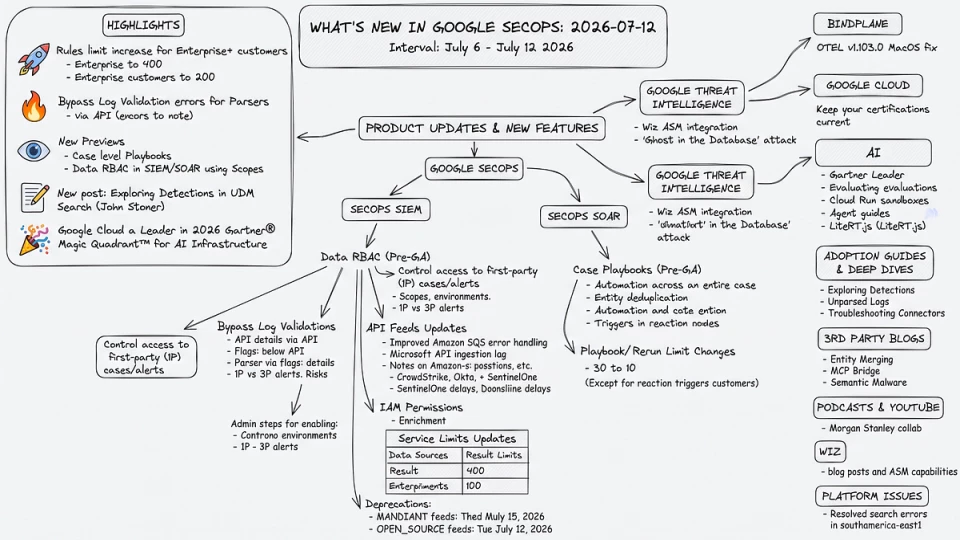
What’s New in Google SecOps, July 12th 2026
Highlights
🚀 If you’re an E+ customer, the multi-event rules limit is increasing to 200 for Enterprise customers and 400 for Enterprise+ customers
🔥 After many years of waiting, there is now a way to submit Parsers in SecOps and bypass Log Validation errors
👀 New preview features in Google SecOps, including Case level Playbooks and Data RBAC in SIEM and SOAR using Scopes
✍️ John Stoner with a new post on Exploring Detections in UDM Search
🚀 A new Wiz ASM and Google TI integration is available
️️📖 ️I wrote an in-depth post on how Entity Merging in Google SecOps works, and released an MCP Bridge for Google-Hosted MCP Servers,
🎉 Last but not least, Google Cloud was named a Leader in the 2026 Gartner® Magic Quadrant™ for AI Infrastructure
Product Updates & New Features
Google SecOps
🔥🚀 Release Notes from Google Cloud Documentation
- Google Cloud Chronicle has released Data RBAC for first-party cases and alerts in public preview, available in specific global regions. [Read More]
- Multiple event rule limits have been increased to 200 for Enterprise customers and 400 for Enterprise+ customers. [Read More]
- note, this appears back dated and only showed up in my feed this week
📑 New Docs: Administration > Data RBAC Impact Cases from Google Cloud Documentation
This document describes a new Data Role-Based Access Control (RBAC) feature in Google SecOps, currently in Pre-GA, which allows administrators to control access to first-party (1P) cases and alerts.
Key Information:
- Purpose: To restrict user visibility to 1P cases and alerts based on their authorized data access scopes, thereby enforcing data governance, enhancing security, and reducing data exposure.
- Target Audience: Google SecOps administrators and security analysts.
- Core Mechanism: SIEM-side data access scopes are mapped to SOAR environments. Users can only view cases and alerts if they have access to both the assigned SOAR environment and all associated data access scopes.
First-Party (1P) vs. Third-Party (3P) Alerts:
- 1P Alerts: Generated by the Google SecOps SIEM detection engine. Their underlying data scopes propagate to the SOAR component and are subject to this RBAC.
- 3P Alerts: Ingested directly into SOAR from external tools; they bypass SIEM and are not subject to SIEM data access scopes.
Prerequisites:
- A unified Google SecOps instance (SIEM and SOAR enabled).
- The Chronicle Connector connecting SIEM to SOAR must be upgraded to the modern Chronicle API.
- For multi-instance SIEM, scope enforcement only applies to the Primary SIEM instance.
Enabling Data RBAC (Admin Steps):
- Ensure SIEM data access scopes are correctly configured.
- Assign data scopes to users in Google Cloud IAM.
- In Google SecOps SIEM Settings, enable Data Access for SOAR (either by extending existing SIEM enforcement or by enforcing it for both SIEM and SOAR simultaneously).
- Map SIEM data access scopes to SOAR environments (a scope maps to one environment; an environment can have multiple scopes).
- Alerts that are unscoped or whose scopes are not mapped are routed to a “fallback environment.”
Access Evaluation Logic:
- An alert carries the scope assigned by the SIEM detection engine.
- A case inherits the union of all scopes from its associated alerts.
- Users must have access to all scopes assigned to a case/alert, in addition to environment access.Global users bypass scope filtering and can see all cases.
- Case grouping is restricted to alerts routing to the same SOAR environment.
Impact of Changes:
- Moving a scope mapping affects new alerts/cases, while existing ones remain in their original environment.
- Removing a scope mapping routes new alerts/cases to the fallback environment; existing ones remain but are only visible to global users.
- Deleting a SIEM scope unmaps it from SOAR, making historical items associated with it visible only to global users.
- Visibility: Assigned data access scopes are displayed in the Case header and in the List cases table (where they can be filtered).
- Performance: Changes to scope-to-environment mappings can take up to 30 seconds to propagate.
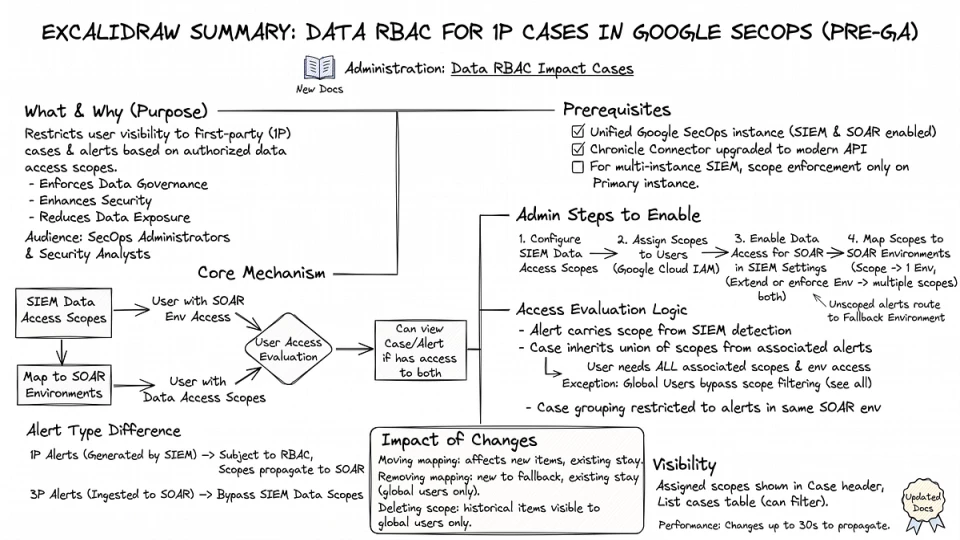
New Docs: Data RBAC Impact Cases
☠️ Deprecations > MANDIANT_ACTIVE_BREACH_IOC, MANDIANT_FUSION_IOC, and OPEN_SOURCE_INTEL_IOC from Google Cloud Documentation
MANDIANT_ACTIVE_BREACH_IOC, MANDIANT_FUSION_IOC, and OPEN_SOURCE_INTEL_IOC feeds.
- Deprecated Date: March 18, 2026
- Shutdown Date: March 18, 2027
- Details: Users are required to migrate IOC content from these feeds to the GTI_IOC feed. The existing feeds will be frozen from the deprecated date and removed from the product by the shutdown date.
SecOps SIEM
🔥📑 New Docs: Event Processing > Bypass Log Validations from Google Cloud Documentation
- This document describes a new API-based feature in Google SecOps SIEM that allows users to bypass mandatory log validation for parser extensions and custom parsers.
Purpose: Normally, parser validation checks against 30 days of sample logs. This bypass is designed for situations where validation fails due to:
- No logs being ingested in the last 30 days.
- Current logs not yet reflecting a new format the parser is intended for.
Mechanism:
- Users enable a validation_skipped: true (Boolean flag) when creating a parser extension or custom parser.
- This flag is used in the CreateParserExtension API call (for extensions) or the CreateParser API call (for custom parsers).
- It allows the parser to be made active even if no logs have been ingested for the customer and logtype.
Status: When validation is skipped, the parser’s status will eventually reflect VALIDATION_SKIPPED (after an initial NEW state due to asynchronous processing).
Deployment: Once created with the validation_skipped flag, these parsers can be deployed using the ActivateParserExtension or ActivateParser methods.
Limitations and Risks:
- Does not bypass all checks: It will still reject parsers with syntax-related failures. The bypass is only for issues related to parsing logic or the absence of logs.
- Potential Deactivation: Google internal engineering teams may deactivate the validation_skipped flag if it causes system issues or performance regressions.
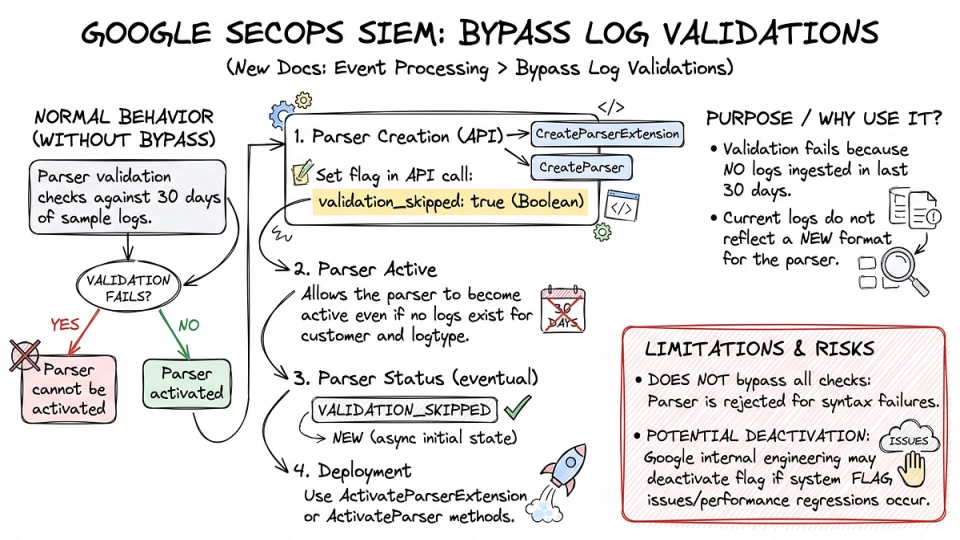
New Docs: Bypass Log Validations
📑 New Docs: Reference > Chronicle API Feeds from Google Cloud Documentation
The key changes in this document focus on enhancing the clarity and guidance around data ingestion, particularly concerning potential delays and error handling for various API connectors.
Enhanced Amazon SQS V2 Error Handling and Data Loss Prevention Guidance:
- A comprehensive new section has been added detailing “Message acknowledgement behavior and error handling” for AMAZON_SQS_V2 feeds.
- It explains that Google SecOps acknowledges (deletes) messages from the SQS queue even on “terminal failure” (e.g., permission denied, object not found, invalid SQS message format) to prevent “poison pill” messages, explicitly noting the risk of data loss in such scenarios.
- Extensive recommendations to prevent data loss and ensure feed health are provided, including:
- Verifying IAM permissions (s3:GetObject, s3:ListBucket).
- Enabling AWS CloudTrail and S3 server access logs for auditing.
- Monitoring feed status through the Google SecOps UI and programmatic API calls.
- Setting up Amazon CloudWatch alarms.
- The required IAM permissions for Amazon SQS feeds were updated to explicitly include sqs:ReceiveMessage, s3:GetObject, and optionally s3:ListBucket.
Clarification on Microsoft API Ingestion Lag:
- A new note explains that Microsoft APIs can experience data latency and polling window limitations. For all log types ingested using the Microsoft fetcher, a mandatory 5-minute ingestion lag is now explicitly stated as being applied within the fetcher to account for these typical source-side delays from the Microsoft Graph API.
New Notes on Potential Ingestion Delays for Specific Log Types:
- CrowdStrike Alerts (CS_ALERTS): A note was added about initial ingestion lag due to historical data backfilling from the CrowdStrike API.
- Okta System Log (OKTA): A note was added regarding potential ingestion delays stemming from Okta service processing times or API availability.
- SentinelOne Alert (SENTINELONE_ALERT): A note was added explaining potential ingestion delays because events might be detected by SentinelOne earlier than they are published to its API endpoint, clarifying this delay originates from the source system.
📑 New Docs: Event Processing > Data Enrichment from Google Cloud Documentation
The key change in this document is the addition of a new “Note” regarding Identity and Access Management (IAM) permissions required for the Enrichment feature.
- The Enrichment feature requires the chronicle.events.fetchEnrichedEvent IAM permission.
- If using custom IAM roles, one of the following permissions must be added to custom policies: chronicle.googleapis.com/limitedViewer, chronicle.googleapis.com/restrictedDataAccessViewer, or chronicle.googleapis.com/viewer.
📝 Updated Docs: Reference > Service Limits from Google Cloud Documentation
Removal of General Search Limits:
- The previous version had a general section on “Search limits” which stated:
- A maximum of 1 million events for search results, with only 1 million shown if results exceed this.
- A default display limit of 30,000 events, adjustable up to 1 million.
- A console display limit of 10,000 results, which didn’t alter the total number of returned events.
Introduction of Specific “Result limits for data sources”:
- This general section has been replaced with a detailed table outlining maximum result limits for specific data sources and search types. The new limits are:
- 1,000,000 for UDM, ECG, Data table, UDM to UDM join, UDM to ECG join, UDM to Data table join, and Cases and case history.
- 100,000 for Stats and Detections.
- The new section also explicitly states that these limits apply consistently whether using the platform or the API, and refers to “Asynchronous Search APIs” for more information on API limits.
SecOps SOAR
🔥📑 New Docs: Soar: Respond: Working With Playbooks: Case Playbooks from Google Cloud Documentation
This document introduces Case playbooks in Google SecOps SOAR, a new Pre-GA feature (meaning it has limited support, may change, and isn’t available to all customers).
Purpose: Unlike alert playbooks that focus on individual alerts, case playbooks allow automation workflows to run across an entire case (which often groups multiple similar alerts).
Core Advantages:
- Case-specific context: Automate operational tasks directly related to the case container.
- Consolidated execution: Perform a single action on the case or its combined entities, reducing redundant work (e.g., enriching the same IP multiple times) and saving third-party API credits.
- Case-level reaction triggers: Automate actions based on changes to the case’s lifecycle during an investigation.
How it works:
- Scope: When creating a playbook, select “Case” as the scope.
- Data Processing: Only processes and extracts data from alerts that are in an “Open” status within the case.
Triggers:
- Ingestion Triggers (upon case creation): Attach playbook to “All” new cases, or based on “Custom trigger” fields or specific “Case tags.
- Reaction Triggers (during investigation): Trigger automation when the case’s assignee, priority, stage, tags, or custom fields change.
Entity Deduplication: Automatically aggregates all entities from the case’s alerts into a single list.
- “Deduplicate entities” toggle (default: Enabled): Actions process only unique entities, saving API credits, and apply results to all matching duplicates across the case.
- “Deduplicate loop entities” toggle (default: Enabled): Loops iterate only on distinct case entities.
Playbook Blocks: Are scope-agnostic and can be used in both alert and case playbooks. They also include a default deduplication toggle.
Common Use Cases:
- Upon case creation: Automate creation of tracking tickets in external ITSM systems.
- Manual attachment: Run a single enrichment block on all entities collected from various alerts in the case, rather than looping through each alert.
- Reaction triggers: Send Slack notifications or assign tasks automatically when case attributes (like assignee) change.
Limitations & Considerations:
- Playbook names must be unique across the platform (a case playbook and an alert playbook cannot share the same name).
- Requires updating integrations to minimum specified versions for full functionality (e.g., Jira 58, ServiceNow 67, GoogleChronicle 84).
- Custom actions/scripts must be designed to loop through arrays of alerts to ensure all entity details are processed at the case level.
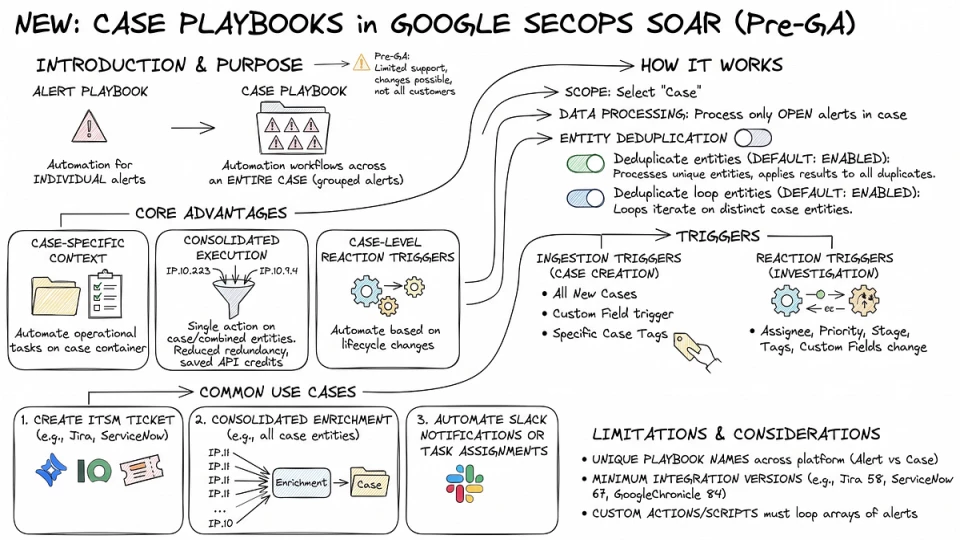
New Docs: Case Playbooks in SecOps SOAR
📝 Updated Docs: Soar > Respond > Working With Playbooks > Attach Playbooks To Alerts Cases from Google Cloud Documentation
Alert Scope Limits (Total Attachments):
- The total number of playbooks that can be attached to a single alert has been reduced from 30 to 10.
- Consequently, the number of playbooks that can be manually attached has changed from 29 to 9.
- New Exception: Customers who have the “Reaction Triggers” feature or the “Cases playbook” feature enabled can still attach a total of 30 playbooks to an alert.
Case Scope Limits (Automatic Attachment Availability):
- A new clarification states that the feature allowing one automatic playbook attachment per case upon ingestion is not available to all customers in all regions.
Rerun Limits:
- The maximum number of times a unique playbook can be rerun within a single case or alert has been reduced from 30 to 10.
- New Exception: Customers who have the “Reaction Triggers” feature or the “Cases playbook” feature enabled can still rerun playbooks up to 30 times.
Google Threat Intelligence
✍️ Drive proactive security, prioritize risks with Google Threat Intelligence and Wiz ASM from Google Cloud Blog
- This article details how organizations can enhance proactive security and prioritize risks by leveraging Google Threat Intelligence and Wiz ASM, addressing the accelerated pace of vulnerability discovery and exploitation driven by AI. [Read More]
✍️ The ‘Ghost’ in the Database: Recovering Active ADFS Signing Keys via Machine DPAPI from Google Cloud Blog
- The article details a method, dubbed ‘Ghost in the Database,’ for recovering active ADFS signing keys using Machine DPAPI, a technique linked to the ‘Golden SAML’ attack for forging authentication. [Read More]
BindPlane
⚙️ OTEL v1.103.0 from GitHub
- This release, v1.103.0, for the observIQ BindPlane OTel Collector includes a fix for the MacOS unified logging receiver. [Read More]
Google Cloud
✍️ New ways to keep Google Cloud certifications current and boost your career from Google Cloud Blog
- This article introduces new methods for Google Cloud certified professionals to keep their credentials current, highlighting the significant career benefits such as increased recruiter interest, faster promotions, and higher salaries. [Read More]
AI
🔥✍️ Google Cloud named Leader in the 2026 Gartner® Magic Quadrant™ for AI Infrastructure from Google Cloud Blog
- Google Cloud has been recognized as a Leader in the 2026 Gartner Magic Quadrant for AI Infrastructure, highlighting its optimized computing infrastructure for the evolving agentic era of AI. [Read More]
✍️ Frontier and Center: Who evaluates the evaluations? from Google Cloud Blog
- The article explores the critical challenge of evaluating AI agent performance and how to provide context to these emerging AI systems, a question being asked by information theoreticians. [Read More]
✍️ Safely run AI-generated code in Cloud Run sandboxes from Google Cloud Blog
- Google Cloud introduces Cloud Run sandboxes, now in public preview, to safely execute AI-generated or untrusted code and mitigate risks to host applications and data. [Read More]
✍ ️20 questions for the Agentic Enterprise (and how Agent Platform can help) from Google Cloud Blog
- The article explores the challenges IT leaders face in building and deploying AI agents within an enterprise, offering 20 questions and highlighting how an Agent Platform can help manage complexity and prevent data leaks. [Read More]
✍️ A developer’s guide to publishing agents in Gemini Enterprise and Google Cloud Marketplace from Google Cloud Blog
- This guide helps developers publish their AI agents in Gemini Enterprise and Google Cloud Marketplace, reflecting the evolution from Software-as-a-service to Agents-as-a-service. [Read More]
✍️ LiteRT.js, Google’s high performance Web AI Inference from Google Developer Blog
- Google has introduced LiteRT.js, a new high-performance solution for running machine learning models directly in web browsers, leveraging WebGPU, WebNN, and WebAssembly. [Read More]
✍️ Bridging the Domain Gap: AI Race Coach built with Antigravity and Gemini from Google Developer Blog
- The article introduces an AI Race Coach developed by Google Developer Experts using Antigravity and Gemini, showcased following Google I/O [Read More]
Adoption Guides & Deep Dives
✍️ 🔥 New to Google SecOps: Exploring Detections from Google Cloud Security Community
- This article introduces users to Google SecOps, detailing how to use its search functionality to find and utilize detections and alerts within a security workflow. [Read More]
✍️ Tuesday’s Tip of the Week — Finding and Fixing Unparsed Logs from Google Cloud Security Community
- The article discusses the hidden risks of unparsed logs in SIEM deployments, highlighting how they create security blind spots by preventing data from being used in detection rules. [Read More]
✍️ Adoption Guide: Troubleshooting Connectors from Google Cloud Security Community
- This adoption guide provides crucial steps for troubleshooting SOAR Connectors in Google SecOps, emphasizing their role in data ingestion and alert creation, and the significant impact of their failure on SOC operations. [Read More]
3rd Party Blogs
🔥✍️ Entity Merging in Google SecOps from Chris Martin (@thatsiemguy)
- This article discusses the concept and implementation of entity merging within the Google SecOps platform. [Read More]
✍️ An MCP Bridge for Google-Hosted MCP Servers from Chris Martin (@thatsiemguy)
- The article discusses or introduces an MCP bridge specifically designed for Google-hosted MCP servers. [Read More]
✍️ Detection Engineering in the Era of Semantic Malware from Koifsec
- The article explores the evolving field of detection engineering as it confronts the new challenges posed by ‘semantic malware’. [Read More]
Podcasts & YouTube
📹 Google Cloud x Morgan Stanley: Redefining Threat Defense in the AI Era from YouTube
- Google Cloud and Morgan Stanley are collaborating to redefine threat defense strategies, leveraging AI advancements in the cybersecurity landscape. [Read More]
Wiz
✍️ How ProdSec uses Wiz from Wiz Blog
- The article details how Product Security (ProdSec) teams utilize the Wiz platform to enhance automation, resilience, and overall security posture. [Read More]
✍️ Wiz in the Verizon DBIR: How AI Acceleration and Cloud Sprawl Impact Modern Defense from Wiz Blog
- Wiz’s analysis of Verizon’s DBIR reveals how AI acceleration and cloud sprawl intensify attacker exploitation of vulnerabilities and trust relationships in modern cloud defense environments. [Read More]
✍️ GhostApproval: A Trust Boundary Gap in AI Coding Assistants from Wiz Blog
- This article details “GhostApproval,” a trust boundary gap and category-level blind spot found in AI coding assistants, which undermines the human-in-the-loop safety model. [Read More]
✍️ Wiz ASM for any environment, any risk, everywhere from Wiz Blog
- Wiz ASM introduces new auto-reconnaissance capabilities and a Red Agent to enhance protection of modern attack surfaces and identify risks in any environment. [Read More]
Platform Issues
✅ RESOLVED: Google SecOps customers may experience errors when querying Search stats in the southamerica-east1 region from Google Cloud Status
- Google SecOps customers are encountering errors when querying Search statistics in the southamerica-east1 region, with engineering teams actively investigating the incident. [Read More]
