




This weeks update is brought to you by Chris Martin, Google Security Specialist.
Discover the latest updates in Google SecOps for the week of June 8 through June 14, 2026.
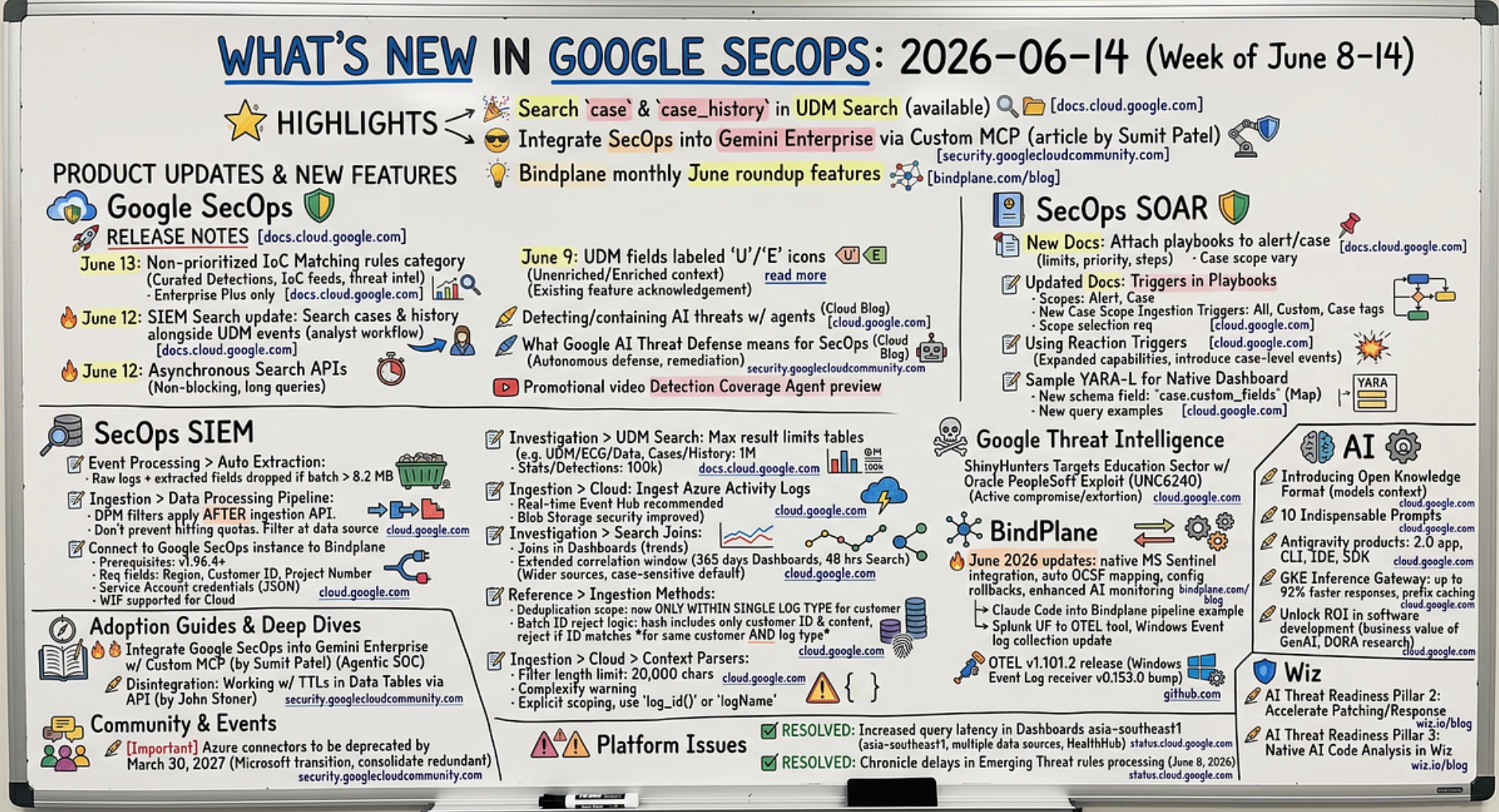
Highlights
🎉 Search case and case_history in UDM Search is now available
😎 A great article from Sumit Patel on Integrating Google SecOps into Gemini Enterprise using Custom MCP
💡 Explore several interesting features in the Bindplane monthly June roundup
Product Updates & New Features
Google SecOps
🚀 Release Notes from Google Cloud Documentation
- June 13, 2026: Google SecOps has introduced a new detection category, ‘Non-prioritized IoC Matching rules,’ within its Curated Detections feature, leveraging IoC feeds and threat intelligence to identify malicious activities. [Read More]
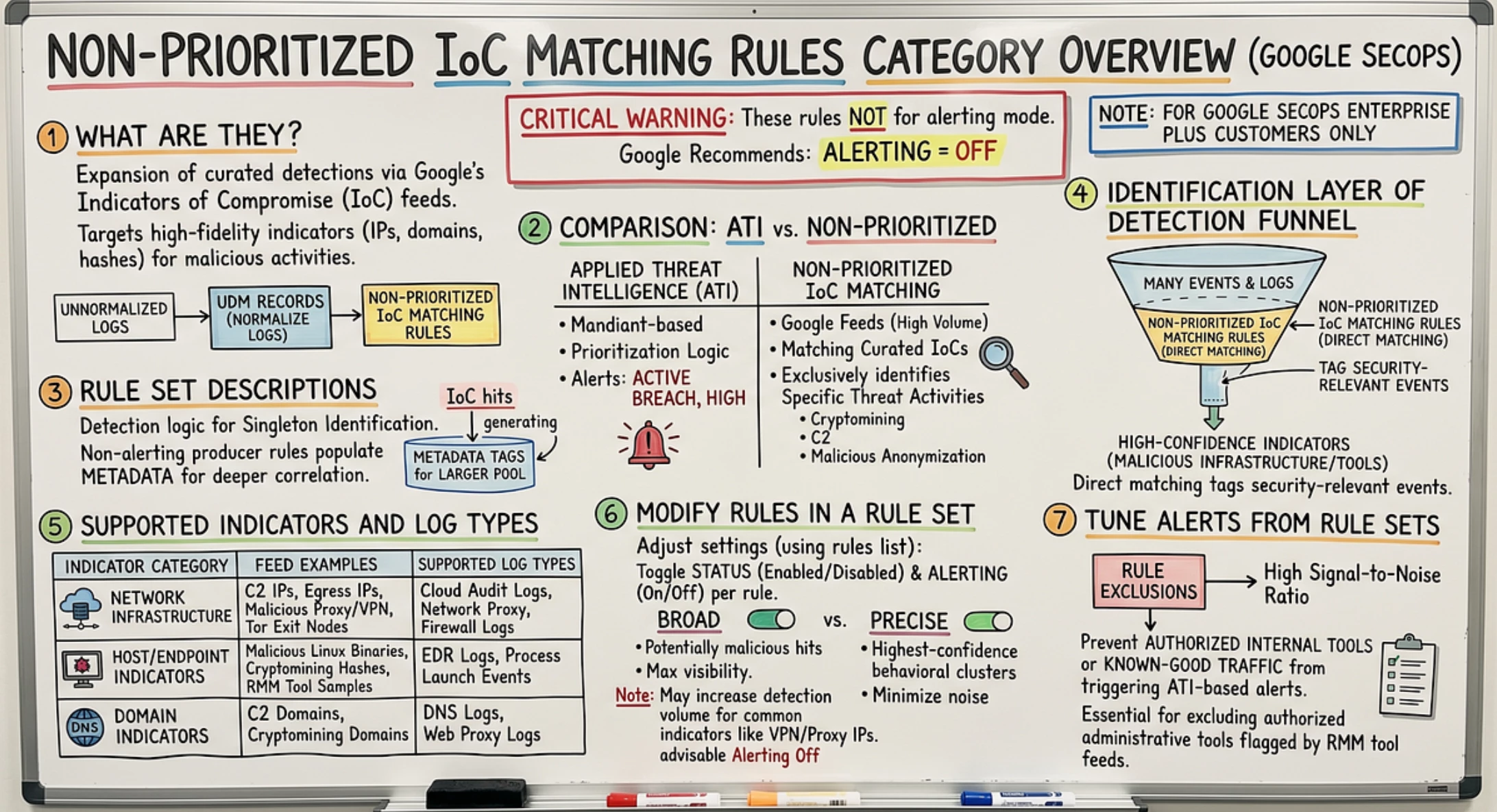
Non-prioritized IoC Matching rules category overview | Google Security Operations | Google Cloud…
Note, this is a Google SecOps Enterprise Plus only feature.
- 🔥 June 12, 2026: Google SecOps SIEM Search has been updated with new capabilities that allow security analysts to search for cases and their history alongside UDM events, aiming to streamline incident response workflows. [Read More]
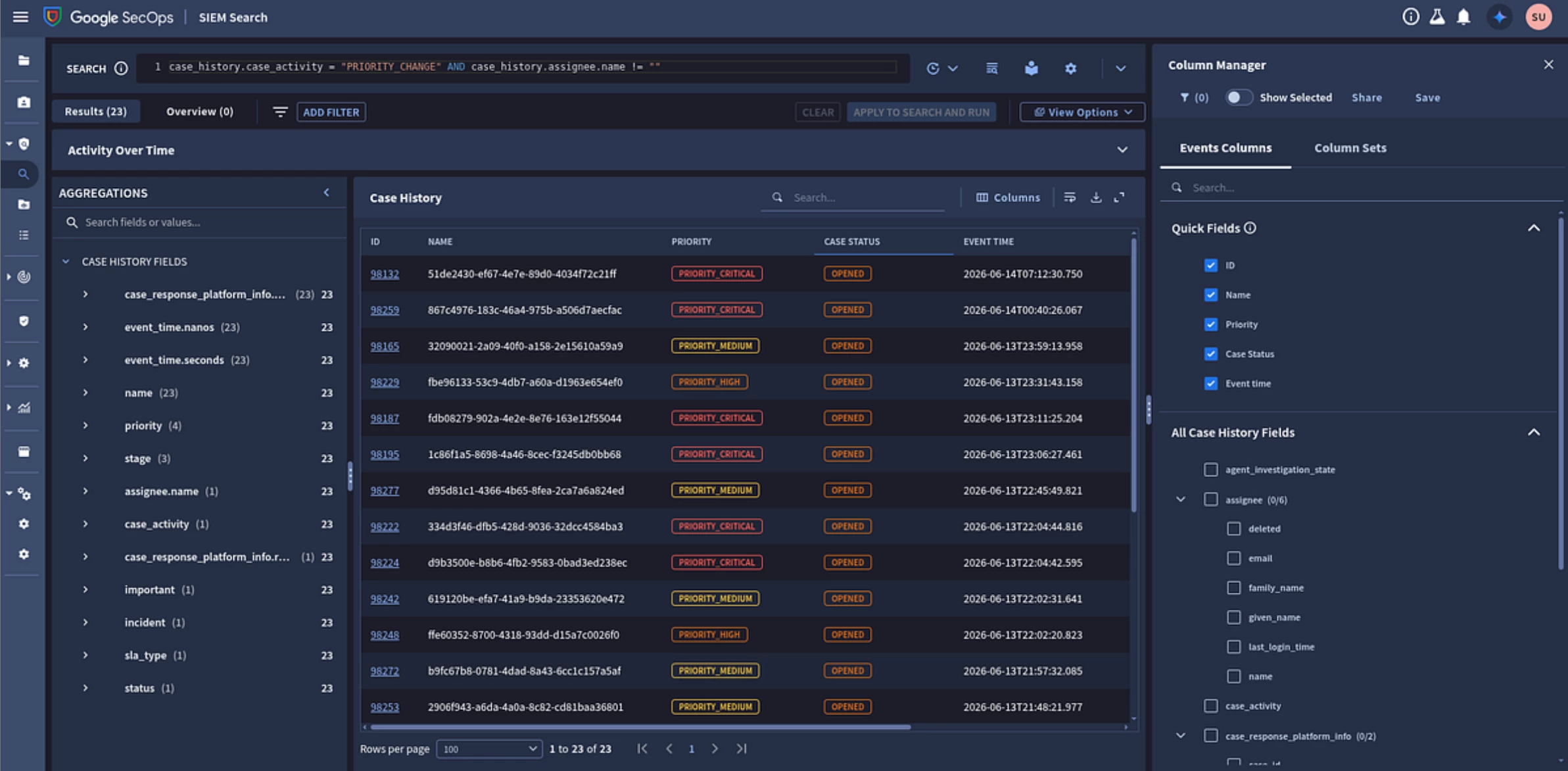
Search cases and case history | Google Security Operations | Google Cloud Documentation
- 🔥 June 12, 2026: Google SecOps has launched asynchronous Search APIs, enabling non-blocking, long-running queries for large datasets without hindering application responsiveness. [Read More]
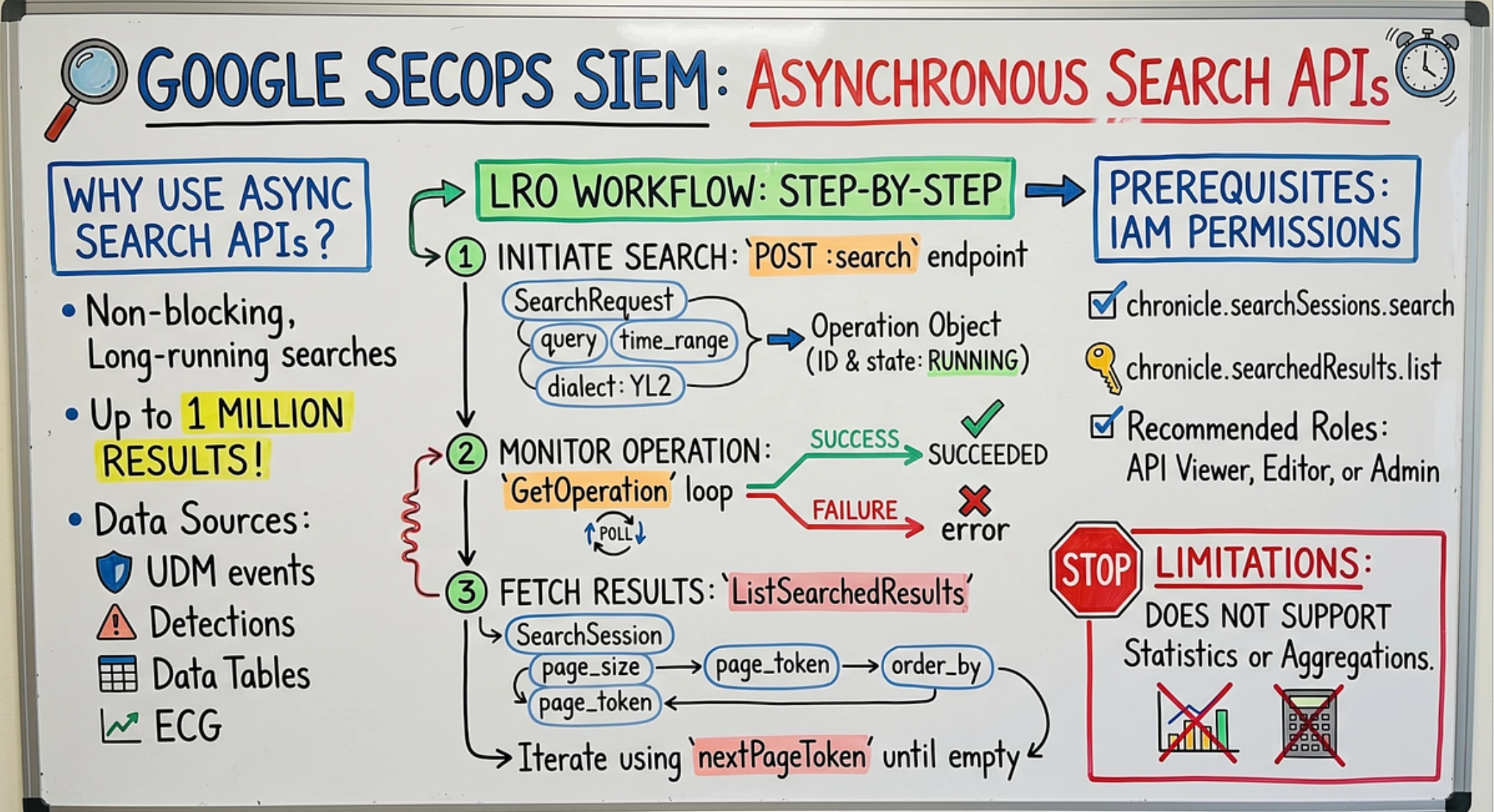
Asynchronous Search APIs | Google Security Operations | Google Cloud Documentation
- June 9, 2026: Google SecOps has introduced a new feature that labels UDM fields with icons (‘U’ for unenriched, ‘E’ for enriched) to indicate whether the data has been enriched with additional context by Google SecOps. [Read More]
Note, this has been in product for a while now, and this appears to be an acknowledgement the feature exists.
✍️ Detecting and containing AI-powered threats with Google Security Operations agents from Google Cloud Blog
- The article discusses how Google Security Operations agents help organizations detect and contain AI-powered threats, building upon the previously introduced Google AI Threat Defense system for automated security. [Read More]
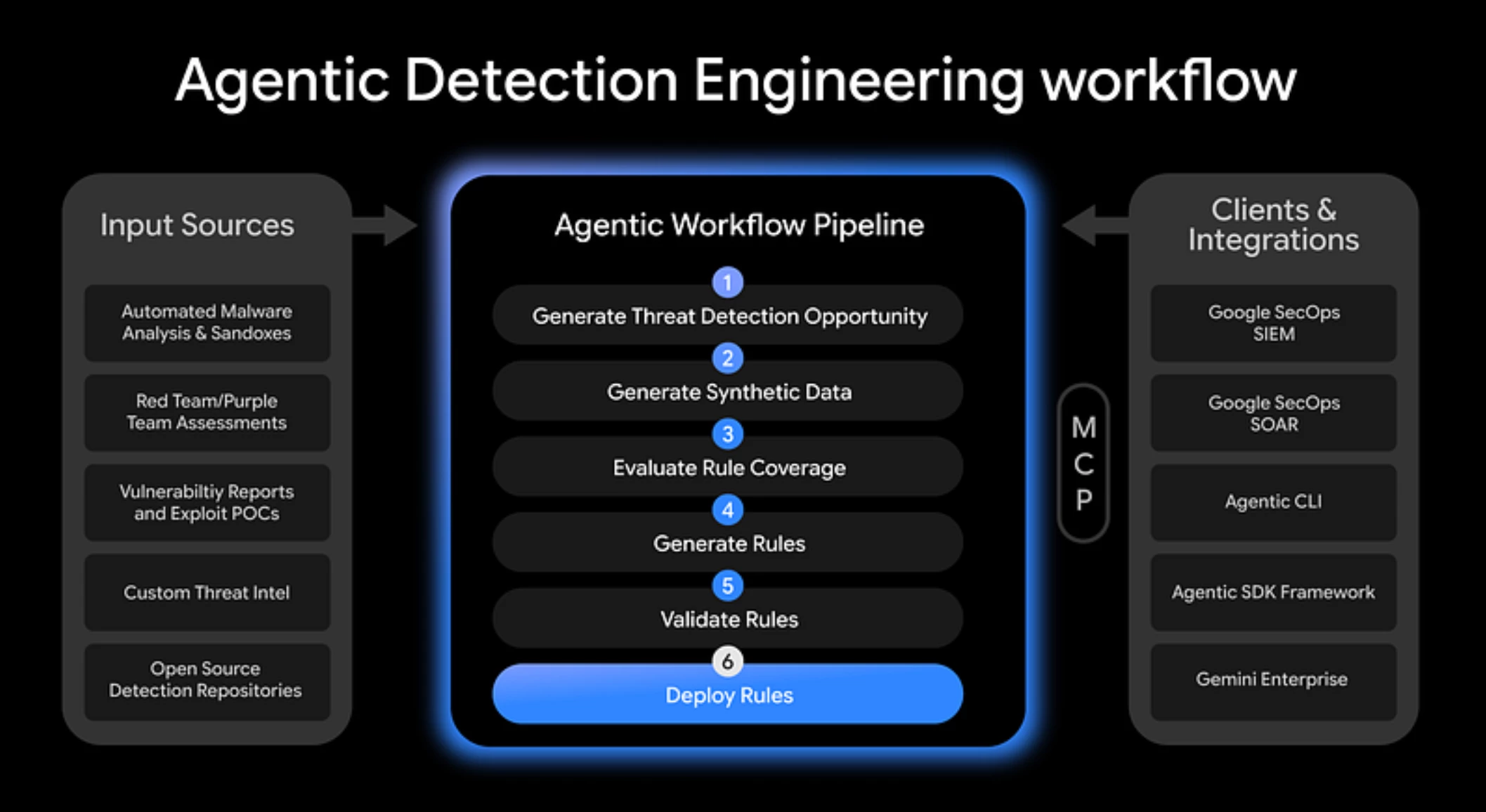
✍️ What the Google AI Threat Defense announcement means for SecOps from Google Cloud Blog
- Google has announced AI Threat Defense, a new platform designed to help SecOps move from a reactive posture to a continuous, autonomous defense by leveraging AI to prioritize critical risks and automate remediation against machine-speed attacks. [Read More]
SecOps SIEM
📝 Doc Update: Event Processing > Auto Extraction from Google Cloud Docs
- Previously, if a batch UDM event exceeded 8.2 MB, only the extracted fields were dropped. The updated text specifies that now, the raw logs and all the extracted fields are dropped in this scenario. [Read More]
📝 Doc Update: Ingestion > Data Processing Pipeline from Google Cloud Docs
- Clarification on Data Processing Manager (DPM) Filters and API Quotas:
- A new explanation has been added to the “API support” section clarifying that filters configured in the Data Processing Manager (DPM) are applied after data has been received by the Chronicle Ingestion API.
- Consequently, these DPM filters do not prevent customers from hitting Ingestion API quotas and limits (e.g., importPushLog API limits), as these limits are evaluated before DPM filtering occurs.
- The document now advises customers to implement filtering at the data source itself to effectively manage and stay within Ingestion API limits, rather than relying solely on DPM filters. [Read More] - Detailed Instructions for Connecting a Google SecOps Instance in Bindplane:
- An entirely new, comprehensive section titled “Connect to a Google SecOps instance” has been added.
- This section provides step-by-step guidance on how to connect a Google SecOps destination instance using the Bindplane Server console.
- New Prerequisites: It now states that Bindplane version 1.96.4 or later is required for this feature.
- Configuration Details: It outlines the specific fields required for connection (Region, Customer ID, Google Cloud project number) and where to find them in the Google SecOps console.
- It details how to obtain Service Account credentials (JSON value), specifying that the Service Account must be in the same Google Cloud project and requires either the Chronicle API Admin role or a custom role with required permissions.
- It also introduces support for Workload Identity Federation (WIF) for authentication in Bindplane Cloud deployments, noting it’s not supported in self-hosted Bindplane. [Read More]
📝 Updated Docs: Investigation > UDM Search from Google Cloud Docs
- Extensive tables have been added to specify maximum result limits for various search types and data sources. These limits include:
UDM search: 1,000,000
ECG search: 1,000,000
Data table search: 1,000,000
UDM to UDM, ECG, and Data table joins: 1,000,000 each
Cases and case history: 1,000,000
Stats and Detections: 100,000 [Read More]
📝 Updated Docs: Ingestion > Cloud: Ingest Azure Activity Logs from Google Cloud Docs
- The document has been significantly updated to introduce two primary methods for collecting Microsoft Azure Activity and Entra ID logs into Google Security Operations (SecOps). The document has evolved from describing a single (Blob Storage) log collection method to offering a more robust and flexible approach, introducing a real-time, recommended Event Hub method, and enhancing the security options for the existing Blob Storage method. [Read More]
📝Updated Docs: Investigation > Search Joins from Google Cloud Docs
- Joins in Dashboards: The most prominent change is the introduction of join operations within dashboards, allowing users to “visualize trends” with correlated data.
- Extended Correlation Time Window for Dashboards:
- The correlation (match) time window for search remains up to 48 hours.
- For dashboards, this window has been significantly extended to up to 365 days for most data sources - New Supported Data Sources for Dashboards: Dashboards now support joining data from a wider array of sources, including case, case_history, detection, ingestion, ioc, playbook, ruleset/rules, graph, and events.
- Dashboard-Specific Syntax and Behavior:
- The document clarifies that dashboard joins are case-sensitive by default, with a nocase modifier available for case-insensitive operations.
- New examples are provided for dashboard joins, including correlating case and case_history data, and an advanced use case demonstrating how to calculate metrics like Mean Time To Close (MTTC) using multistage queries. - Updated Limitations: The limitations section has been revised to specify which limitations apply “in search” (e.g., maximum UDM/ECG events) and to differentiate the maximum match time window between search (48 hours) and dashboards (365 days). [Read More]
📝 Updated Docs: Reference > Ingestion Methods from Google Cloud Docs
- Deduplication Scope:
- Archived: Stated that deduplication occurred “across feeds when the Customer ID, raw log payload, and UDM data are identical for a customer,” and explicitly mentioned “The Log Type is not included in the deduplication hash.” This implied that if the content was the same, it would be deduplicated regardless of the feed or log type.
- Current: Now explicitly states that “Google SecOps performs deduplication only within the context of a single log type for a specific customer.” It further clarifies that “Google SecOps does not consider batches with identical content but different log types as duplicates and ingests them.” - Batch ID Generation and Rejection Logic:
- Archived: Mentioned a batch ID was assigned, and if it matched an existing ID, the new batch was not forwarded. The batch ID was “identical if the batches contain the same logs.”
- Current: Provides a more detailed explanation. It states that the batch ID is generated by hashing the customer ID and the content of log entries (raw data and UDM fields), and confirms that “The batch ID hash does not include the log type or other metadata fields.” However, the critical change in the rejection logic is that a new batch is rejected as a duplicate only if its batch ID matches an existing one “for the same customer ID and log type.”
📝 Updated Docs: Ingestion > Cloud > Context Parsers from Google Cloud Docs
- Filter Length Limit: Export filters are now subject to a maximum length of 20,000 characters.
- Filter Complexity Warning: Users are cautioned that overly complex filters (especially those with deeply nested AND or OR conditions) might be rejected even if they are within the character limit, and are advised to simplify their filters.
- Explicit Scoping: All elements within a filter must be explicitly scoped to supported log types.
- Required Reference Methods: When referencing log types, users must use either log_id() or logName. [Read More]
SecOps SOAR
📑 New Docs: SOAR > Attach playbooks to an alert or case from Cloud Google Documentation
- This document outlines the attachment limits and priority settings for playbooks associated with an alert or case in Google Security Operations, followed by the steps necessary to manually add a playbook or playbook block to an active investigation. [Read More]
Attach playbooks to an alert or case | Google Security Operations | Google Cloud Documentation
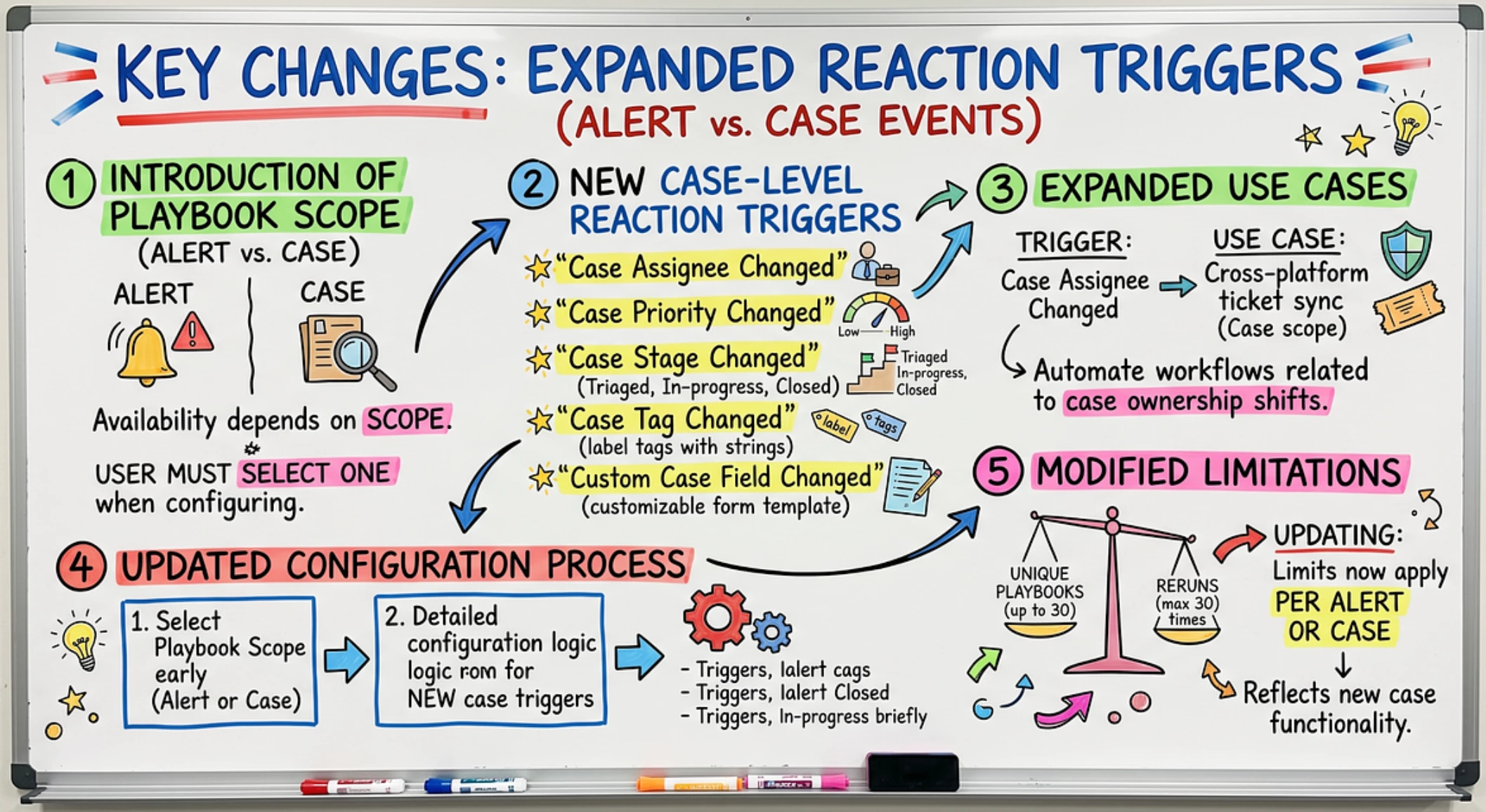
📝 Updated Docs: SOAR > Respond > Working With Playbooks > Using Triggers In Playbooks from Google Cloud Docs
- Introduction of Playbook Scopes: Triggers are now categorized based on the playbook’s chosen scope: “Alert scope” or “Case scope.” This fundamentally alters how triggers are configured and what options are available
- New Case Scope Ingestion Triggers: A new set of ingestion triggers has been added specifically for “Case scope” playbooks, including:
- All: Attaches the playbook to every newly created case.
- Custom trigger: Attaches based on specific filtering rules for cases.
- Case tags: Attaches only when a case contains specific tags. - Updated Playbook Creation Process: When creating a new playbook, users must now explicitly select its Scope (Alert or Case), which then determines the available trigger options.
- Clarification of Reaction Triggers: Reaction triggers are now explicitly described as “event-based and lifecycle triggers that fire during an active investigation,” providing a clearer distinction from ingestion triggers rather than just being another tab option in the initial description.
📝 Updated Doc: Soar > Respond > Working With Playbooks > Using Reaction Triggers In Playbooks from Google Cloud Docs
- The key changes in this document significantly expand the capabilities of reaction triggers by introducing case-level events in addition to the existing alert-level events. [Read More]
📝 Updated Doc: Reference > Sample YARA-L For Native Dashboard from Google Cloud Docs
- New Schema Field: A new field, case.custom_fields (Map data type), has been added to the "Cases and Alerts" schema. This field is designed to store user-defined custom data and requires specifying the data type when accessed (e.g., case.custom_fields["field_name"].string_seq.string_vals).
- New Query Examples for Custom Fields: Several new query examples have been added to demonstrate how to leverage these custom fields effectively. [Read More]
Google Threat Intelligence
✍️ ShinyHunters Targets Education Sector with Oracle PeopleSoft Exploit from Google Cloud Blog
- Mandiant and Google Threat Intelligence Group have identified an active compromise and extortion campaign by UNC6240 (ShinyHunters) targeting Oracle PeopleSoft infrastructure in the education sector. [Read More]
BindPlane
🔥 ✍️ Monitor our own AI with Bindplane, Sentinel goes native, and configs get rollbacks from Bindplane
- Bindplane’s June 2026 updates focus on de-risking telemetry pipelines with features like native Microsoft Sentinel integration, automatic OCSF mapping for security data, configuration rollbacks, and enhanced AI monitoring capabilities. [Read More]
⚙️ OTEL v1.101.2 from GitHub
- This article announces the v1.101.2 release, which includes bumping the Windows Event Log receiver to v0.153.0 and other module updates. [Read More]
AI
✍️ Introducing the Open Knowledge Format from Google Cloud Blog
- Google is introducing the Open Knowledge Format to provide relevant context to foundation models and agentic systems, aiming to improve data sharing and overcome current limitations in model performance due to a lack of information. [Read More]
✍️ 10 Indispensable Prompts Our Team Refuses to Build Without from Google Cloud Blog
- The article highlights ten indispensable AI prompts utilized by a team to consistently produce high-quality work, covering various tasks from debugging to generating boilerplate code. [Read More]
✍️ Choosing your surface: Antigravity 2.0, Antigravity CLI, Antigravity IDE, or Antigravity SDK from Google Cloud Blog
- The article introduces and differentiates various ‘Antigravity’ products, including a desktop app (Antigravity 2.0), a command-line interface (Antigravity CLI), an IDE, and an SDK, detailing their intended use cases for orchestrating autonomous agents and managing projects. [Read More]
✍️ Report: GKE Inference Gateway delivers up to 92% faster AI responses from Google Cloud Blog
- Google’s GKE Inference Gateway significantly accelerates AI inference, delivering up to 92% faster responses for generative AI workloads in production environments. [Read More]
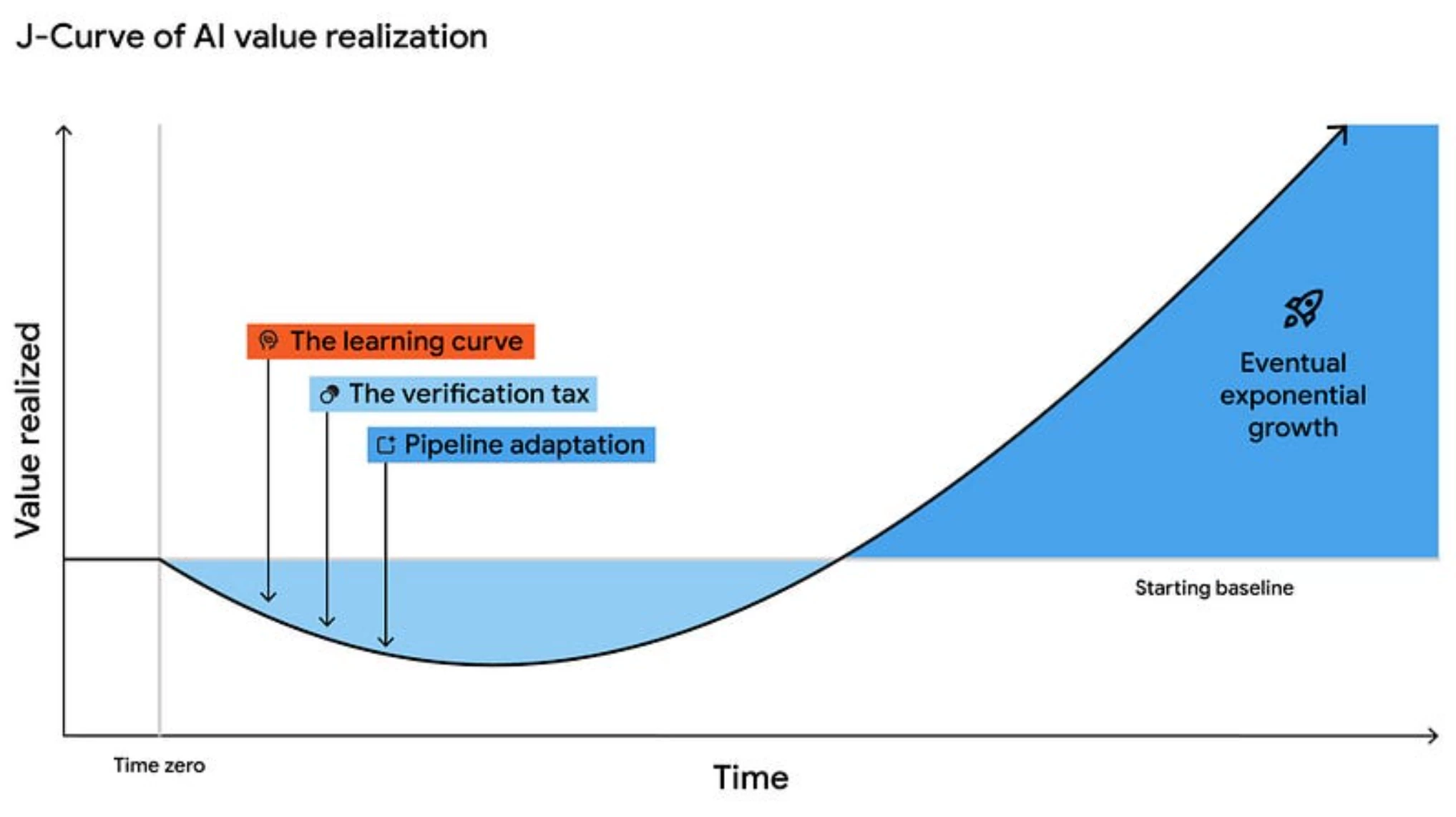
✍️ How to unlock true ROI in software development — a deep dive into the latest DORA research from Google Cloud Blog
- The article discusses how technology and finance leaders can prove the business value and secure funding for generative AI projects by focusing on ROI and building supportive organizational systems and culture. [Read More]
Adoption Guides & Deep Dives
🔥 ✍️ Integrating Google SecOps into Gemini Enterprise using Custom MCP from Google Cloud Security Community
- The article from Sumit Patel details how integrating Google SecOps with Gemini Enterprise creates an “Agentic SOC,” using AI to enhance security operations and address talent shortages and data overload. [Read More]
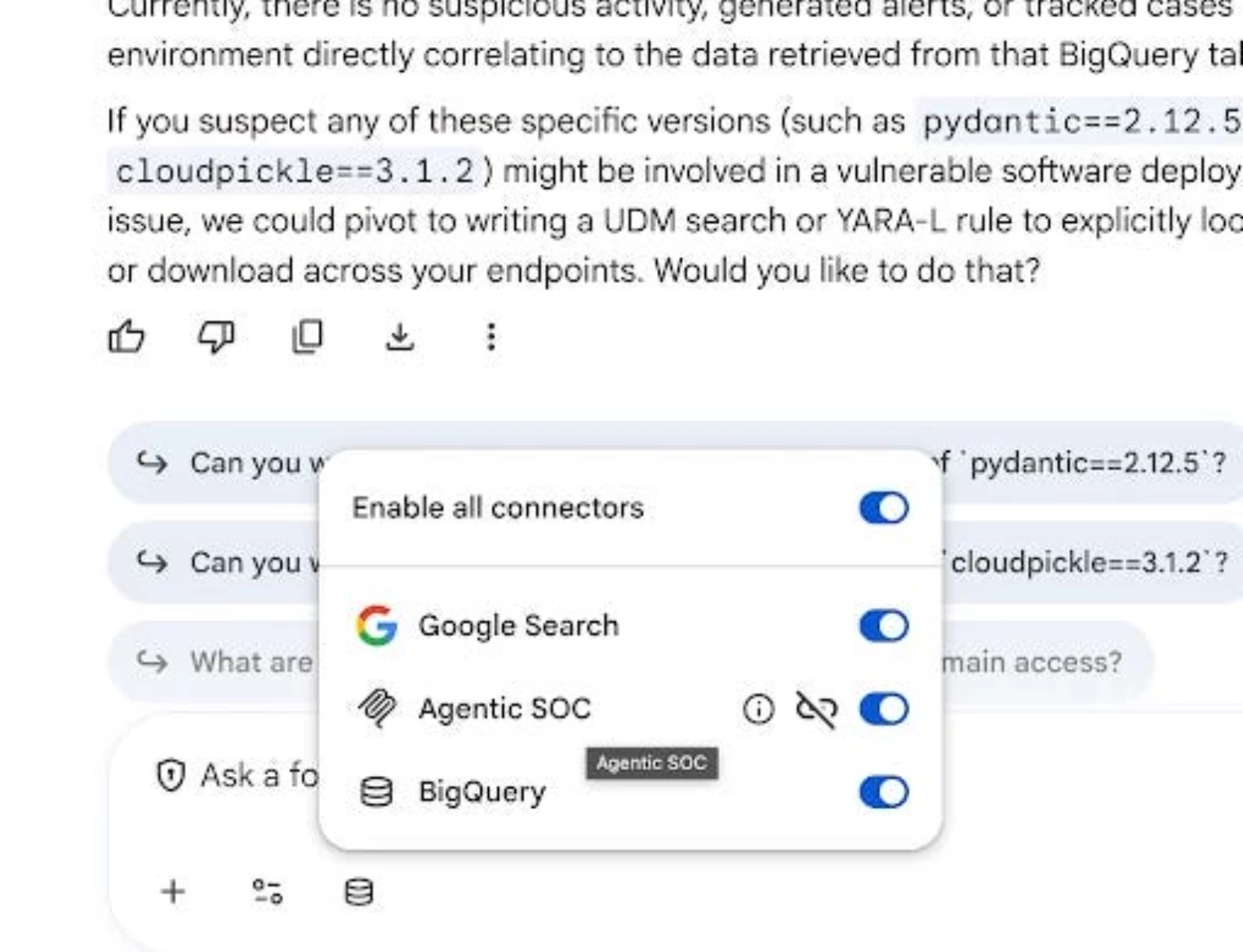
Using Google SecOps MCP with Gemini Enterprise
- Using Google SecOps MCP with Gemini Enterprise
Wiz
✍️ AI Threat Readiness Pillar 2: Accelerate Patching and Response from Wiz Blog
- This article is a guide on improving an organization’s readiness against AI threats by accelerating patching, remediation, and response strategies using the Wiz platform. [Read More]
✍️ AI Threat Readiness Pillar 3: Perform AI Code Analysis Natively in Wiz from Wiz Blog
- The article details Wiz’s native AI code analysis feature, positioned as the third pillar of AI threat readiness, to help organizations manage AI-driven development and combat adversaries. [Read More]
Platform Issues
✅ RESOLVED: Google SecOps customers are experiencing increased query latency in Dashboards in asia-southeast1 from Google Cloud Status
- Google SecOps customers in asia-southeast1 are experiencing increased query latency in Dashboards, impacting several data sources and HealthHub performance. [Read More]
✅ RESOLVED: Chronicle Security Operations customers are experiencing delay in processing a subset of Emerging Threat rules from Google Cloud Status
- Chronicle Security Operations customers are experiencing delays in processing a subset of Emerging Threat rules, which began at 2026–06–08 08:11 US/Pacific. [Read More]
