



This is Part 3 of a four-part series on running many tenants on one Google SecOps instance. Part 1 built the mental model: this kind of multi-tenancy is really three independent isolation challenges, and a single-slug naming convention can help overcome all of them! Part 2 got each tenant's telemetry in, correctly tagged, without trusting the partner's machines or leaking the ingestion key. This part takes the tagged data and answers the last two questions: can each analyst see only their own tenant's data, and does each alert land in the right queue? The final Part 4 closes the series with detection and response content that respects the boundary.
By now the data is in the Google SecOps instance and every event carries its tenant slug as a namespace label. That was the hard, physical part. It happens on the wire, once, and the stamp lives on the event forever (or until it ages out past the data-retention period, 12 months by default). What remains is entirely a control-plane exercise that splits cleanly along the two planes we have not yet wired up: data access on the SIEM side, and alert routing on the SOAR side.
The good news is that both consume the exact same slug we have carried since Part 1. The trap — and there is a real one, which I will get to — is that these two planes are independent of each other. An alert can route perfectly and still leave a scoped analyst unable to fully work the case it lands in. Let us take them one at a time, then look at where they meet.
Note: Data RBAC for first-party cases and alerts (Public Preview, July 2026)
A very new feature may narrow the independence described above. Google recently previewed an opt-in setting that carries a SIEM detection's data-access scope onto the SOAR case built from it. "First-party" here is a tooling distinction about the platform's own SIEM-engine detections that are routed through the Chronicle connector. It is not a statement about organizations or tenants. Where an administrator enables it, the two planes stop being fully independent for those Google SecOps SIEM specific cases: an analyst who lacks a case's scope no longer sees a partially-readable case, they do not see the case at all. The feature is only days old as this is written, is not yet broadly available, and I have not tested it, so treat it as a direction of travel rather than settled behavior. The model in this part — independent planes, with the routing-versus-visibility trap I reach below — holds by default and for every third-party tool alert.
Role-based Access Control to data in Google SecOps SIEM
On the SIEM side, "who sees what" is governed by Data RBAC, and its central object is the scope. A scope is a label-based access profile: it determines which data a user is allowed (or denied) to see based on conditions using "labels" or tags. A scope can match any label applied at ingestion (e.g. the log_type, namespace, or Custom key-value Ingestion Labels), and it can also carry a Custom Label, which is a UDM Search query that runs in the background to compute which data the scope covers. In the platform's own words: "you can use both default and custom labels to define your scopes and the data access level that the scopes will define."
For tenant isolation you generally use the simplest form of that general primitive: a scope whose single condition is a namespace allow-list. You name the scope after the tenant slug and list the namespace label matching the slug as well. To be fair, naming the scope after the slug is not strictly mandatory, but it keeps things clean and organized. One caution travels with every scope, though: once a scope exists it cannot be renamed, and even after you delete one you cannot reuse its name.
For more clarity, here is exactly what you typically do when designing scopes: First, you list the allowed namespace values for the tenant, each of which MUST take the slug form used throughout this series. You can add further conditions when you need them. If your framework also ingests a Custom Ingestion Label such as class (a Data Classification label carrying values like internal, confidential, and restricted) you can narrow a scope not only by tenant but by sensitivity within that tenant, and it is worth adapting the naming to match: a broad <slug> scope alongside finer <slug>-<class> scopes.
Tip
This is particularly useful when you need to logically separate teams within a tenant. However, be careful with it because it can quickly become a Matryoshka doll.
Finally, to make the scope effective, you bind an IAM user or group to the Google SecOps SIEM scope in Google Cloud IAM. That user now sees events carrying the scope's allowed labels and nothing else.
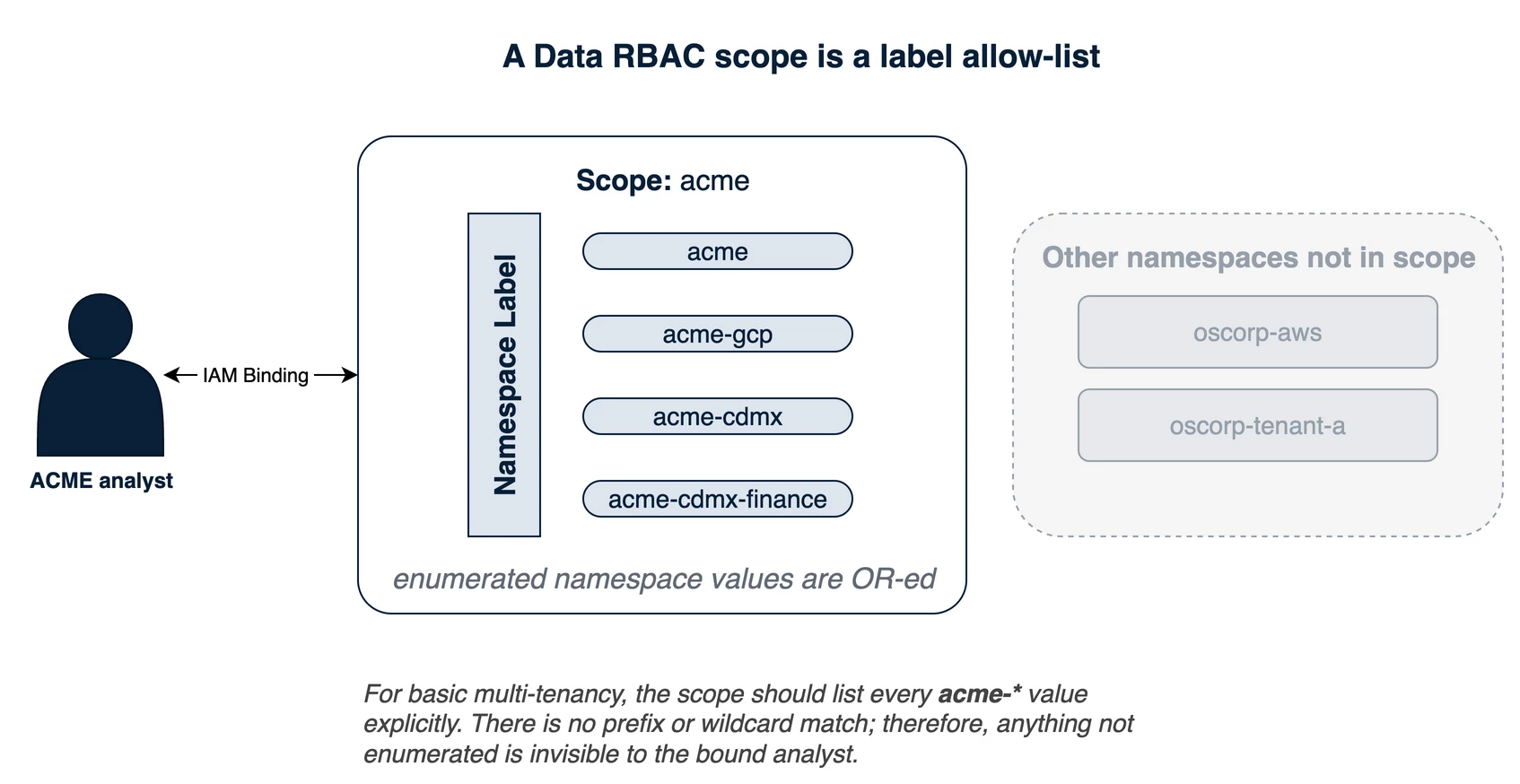
Figure 1 — A Data RBAC scope is a namespace allow-list. The acme scope enumerates every acme-* namespace the grant should cover; a bound analyst sees exactly those and nothing else.
Here is a concrete example of designing a scope around a use case. Suppose ACME Mexico City's telemetry arrives with a Custom Ingestion Label asset_type whose values are os, network, and application. You can run a broad acme-cdmx scope that sees all of the tenant's data alongside three narrower ones, one per team: acme-cdmx-it for the IT team, scoped to asset_type = network; acme-cdmx-dev for the software team, scoped to asset_type = application; and acme-cdmx-sys for the systems team, scoped to asset_type = os. Each team sees only the telemetry its role needs, and the slug-plus-suffix naming carries the team split exactly as it carried the tenant split. This intra-tenant use of scopes is the everyday one — it has nothing to do with multi-tenancy — and it composes cleanly with the tenant boundary. (Why one asset_type per team, rather than one team spanning two? A scope-editor limitation, covered under the combination rules below.)
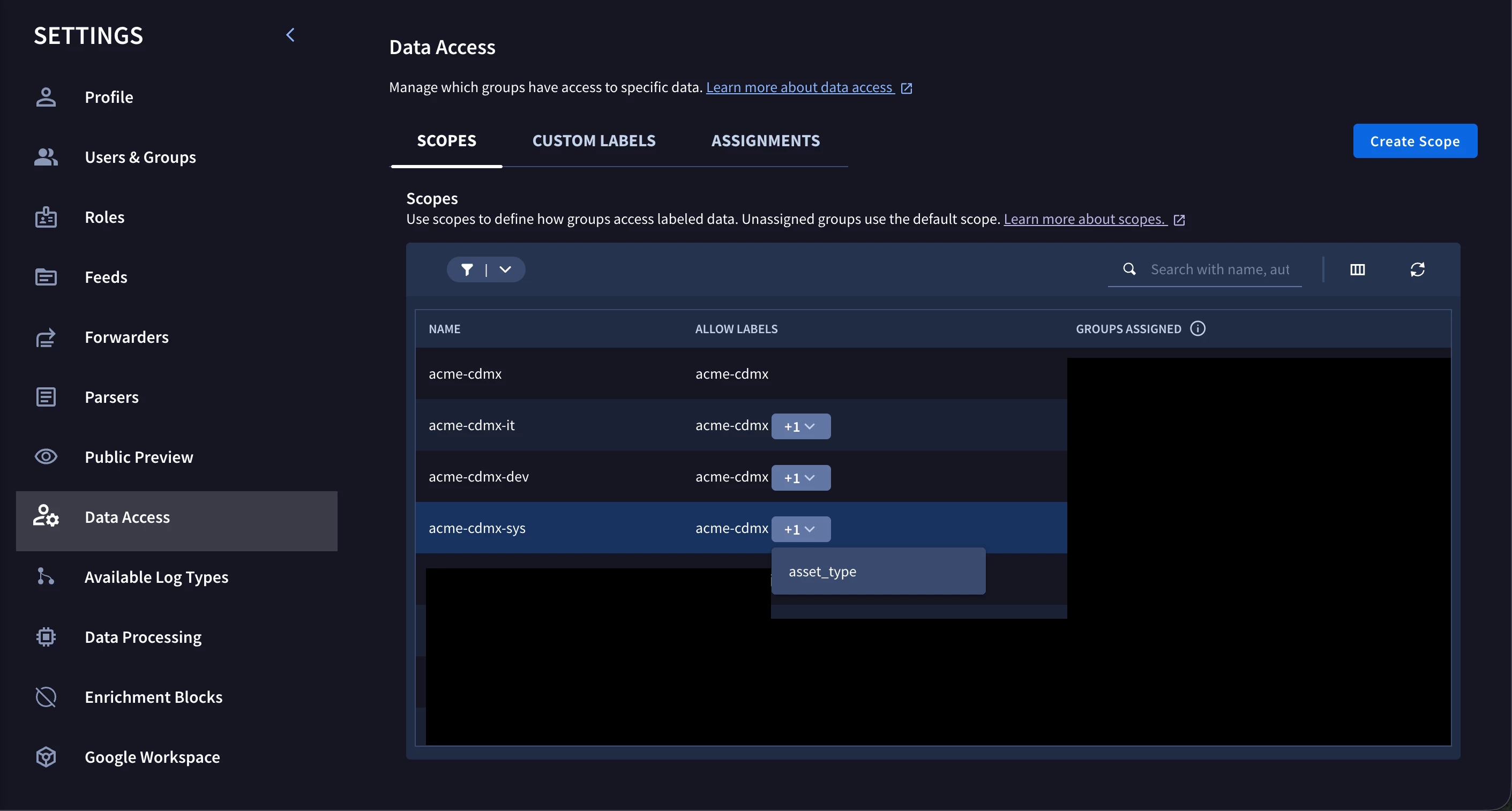
Figure 2 — The intra-tenant team split, on the instance. A broad acme-cdmx scope sits alongside acme-cdmx-it, acme-cdmx-dev, and acme-cdmx-sys, each combining the acme-cdmx namespace with a single asset_type value (the assigned groups are redacted). Screenshot from the operator's own instance.
Enumeration, not prefixes
In Part 1 I promised we would make this concrete, because it shapes how you design the whole hierarchy. Here it is: a Data RBAC scope enumerates exact label values. There is no prefix, wildcard, or regular-expression match.
You might reasonably expect to write "this analyst sees acme-*" and have the platform match the whole subtree. It does not. To grant "all of ACME" (where ACME is a third-party organization having multiple tenants) you have to list every ACME namespace in the scope (e.g. acme, acme-gcp, acme-cdmx, acme-cdmx-finance, acme-gdl, and so on), and when ACME grows a new unit next quarter, you edit the scope to add the new slug.
Two combination rules finish the picture, and they matter the moment a scope references more than one label:
- Within a single label type, values combine with OR (for the Namespace condition). A namespace allow-list of
acme-cdmxORacme-gdlmatches events carrying either — but see the warning below: Ingestion Metadata keys do not OR the same way. - Across different label types, they combine with AND. If you add a second label condition (say a custom
sensitivitylabel) to the same scope, an event must satisfy the namespace list AND the sensitivity list to be visible.
Warning: You cannot OR two values of the same ingestion-metadata key
The OR above is native to the Namespace condition, where you list several namespace values freely. It does not extend to Ingestion Metadata Key/Value conditions: on a tested instance, adding two rows that repeat a key (
asset_type = osORasset_type = network) fails to save with "Failed to save changes for scope", and the editor accepts the second row only once its key differs. Each ingestion-metadata key must be unique within a scope, so a single scope cannot enumerate two values of one key — which is why the team example above splits into one scope perasset_typevalue rather than one scope spanning two. If you genuinely need one grant to cover several values of the same key, a Custom Label expressing the OR in UDM Search is the path.
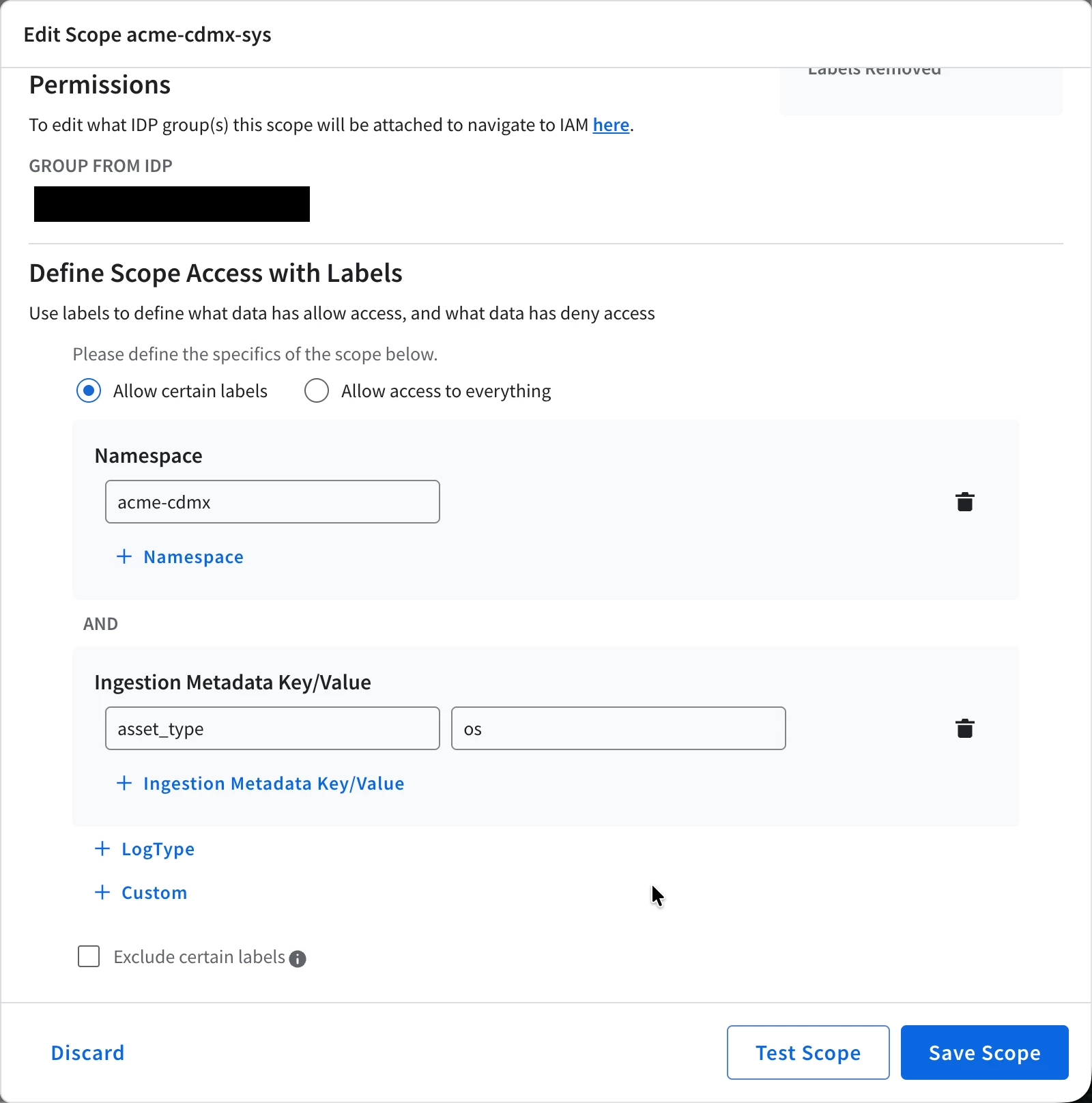
Figure 3 — The AND rule, made literal in the scope editor. This is acme-cdmx-sys from Figure 2, opened up: the acme-cdmx namespace block is joined to an Ingestion Metadata condition (asset_type = os) with AND, so an event must carry both to be visible to the systems team. Screenshot from the operator's own instance (assigned group redacted).
For straightforward tenant isolation you stay in the single-label case: one namespace allow-list per tenant scope. The AND-across-labels behavior is the tool you reach for only when you want to slice within a tenant.
Note: Why naming discipline pays off
The enumeration model is what rewards it. Because the scope name, the namespace value, and everything else are the same slug, building a tenant's scope is mechanical; you just list the slugs under the level you are granting. Whenever the strings diverge, you are hand-maintaining a translation table inside every scope which can become a nightmare very quickly.
Binding a scope to a tenant: the two roles
A scope defines which data can be seen; but it is not enforced over any principal by default. To put it to work you have to bind it to a principal, and in practice that principal is a group. This is worth stating plainly, because tenant is an overloaded word. In the access layer, a "tenant" refers simply to an IAM group that holds every one of a third party's users and carries that third party's scope. You create one group per third party, attach the scope binding to the group, and add users to the group. In IAM terms that group is the tenant. (The "multi-tenancy" in this series is, in the same spirit, just a name for the assembly of conventions that produces the isolation, not a platform feature you switch on.)
Note: The MSSP Partner Program
The native path exists, and it is a different tool. Google does offer first-class multi-tenancy here: a license applied at the Google Cloud organization or domain level, one separate SIEM instance per customer, provisioned and managed centrally through the Customer Management API. That model gives each customer full instance-level isolation and suits a provider running many distinct customers at scale. This series deliberately covers the other model — consolidating many tenants onto a single instance under one slug convention — which fits internal business units, engagements that sit below an MSSP license, or cases where cross-tenant correlation on one platform matters more than hard instance isolation. Single-instance multi-tenancy is a design choice with real trade-offs (the 200-value ceilings below, the routing-versus-visibility trap ahead), not a workaround for a missing feature. Pick the model that matches the engagement.
The binding itself is two roles:
- A marker role,
roles/chronicle.restrictedDataAccess, carrying an IAM condition that names the scope (resource.name.endsWith("/acme")). It grants no actions on its own; it declares which scope confines the principal. You attach it to the tenant's group, so one binding covers everyone in it, which is exactly why grouping is better than binding each user individually. - A scoped capability role that supplies the actual feature surface — reading, and depending on the role, writing. There is an important caveat here worth explaining in more detail.
First, regardless of whether you are in a multi-tenant environment, you are often expected to configure a working minimum-access feature set for proper defense-in-depth and just-enough-access security paradigms. This means that in some security-heavy scenarios you DO NOT want to use Google SecOps predefined roles, like Chronicle API Admin or Chronicle API Editor, and instead create your own roles. Second, there is an important difference between what we call global access and scoped access roles. In Google's documentation:
Global access overrides scoped access. If a user is assigned both a global role and a scoped role, they have access to all data, regardless of any restrictions imposed by the scoped role.
The topic is well documented on the Data RBAC overview page, but in short: to make a scoped-access role you typically clone a global-access role (say Chronicle API Editor) and remove the chronicle.globalDataAccessScopes.permit permission, producing a "scoped editor" that keeps its features. Google SecOps also hands some predefined scoped roles (i.e. out-of-the-box roles that do not have the globalDataAccessScopes permission by default), such as Chronicle API Limited Viewer.
I highly recommend reading Google's documentation on Data RBAC, because there are many things I am deliberately omitting here since it is an extensive topic. Before moving on, though, it is worth highlighting a few extra recommendations and tricks:
- There is a predefined role, Chronicle API Global Data Access, whose only purpose is to hold the Chronicle API Global Data Access permission. You can use it to flip a principal from scoped to global by adding or removing this one binding, instead of modifying the role's permissions every time you need to hand temporary global access to a particular principal.
- Enabling Data RBAC affects many features in the instance for scoped users. For example, scoped users cannot see curated rules or use raw search. If you think about it, it makes a lot of sense. Google SecOps has no way to tell whether you are allowed to see raw telemetry; the raw telemetry does not have a label to determine if you are allowed to read that log. This topic is covered in Data RBAC impact on features overview
- When creating custom roles, whether scoped or not, it is good to keep the Google Security Operations roles and permissions and Configure feature access documentation pages open.
Note
None of this requires the third party's users to live in your Cloud organization. If the third party brings its own identity provider (Okta, Microsoft Entra ID, AD FS), you connect it through Workforce Identity Federation as a workforce pool, then bind the Data RBAC marker to a workforce-pool principal instead of a Google account. The identifier takes the form
principal://iam.googleapis.com/locations/global/workforcePools/POOL_ID/subject/USER_EMAIL(or.../group/GROUP_NAMEfor a group). However, I must highlight that this is what the documentation describes. It is not something I have exercised or tested at the time of writing this article.
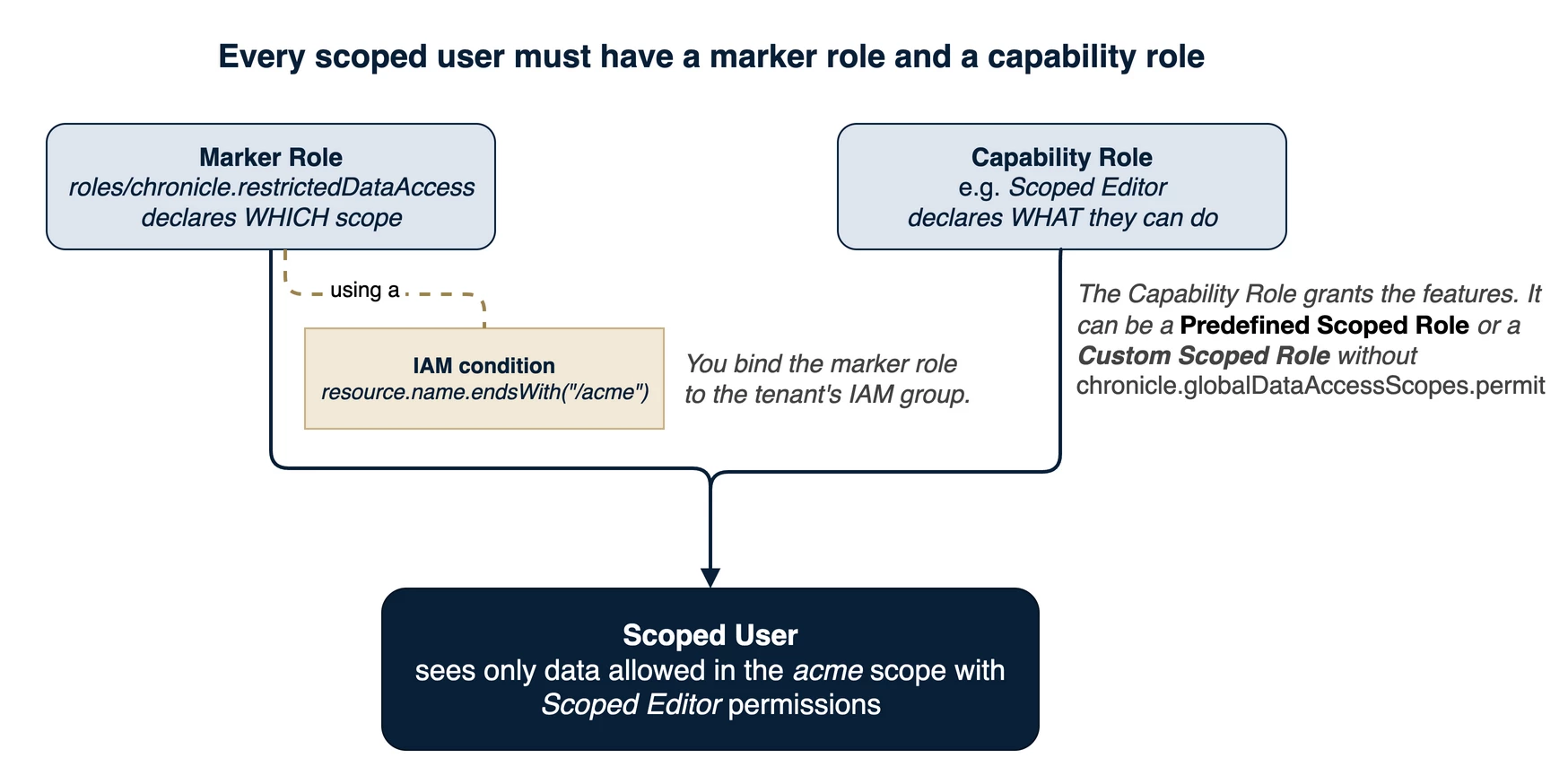
Figure 4 — Every scoped user is a marker role (which scope, via an IAM condition on the scope name) plus a capability role (what they can do). The Scoped Editor shown is only an example of a capability role: any predefined scoped role, or a custom one stripped of chronicle.globalDataAccessScopes.permit, plays the same part.
Warning: Enabling Data RBAC enforcement is effectively one-way
Reverting it needs a Google Support ticket. Before you flip it, do two things in the same window: strip every global-data-access role and permission from any principal that is supposed to be scoped (a leftover global role silently bypasses every scope you just built); and make sure your intended break-glass admins hold a global-access role, so they keep full visibility once the feature is on.
Bypass and the control-plane gate
You will want a clean way to run unscoped for admin or cross-tenant work. The tidy mechanism is the predefined Chronicle API Global Data Access (Beta) role we mentioned earlier, which contains exactly one permission and no features. Bind it to a user and they see all data regardless of scope. Unbind it and they fall back to their scoped view. Because it is a single permission, the toggle is fast and it does not disturb the admin's feature access on the way through. Roughly, from internal tests, it takes between 1 and 3 minutes to take effect — the time Google Cloud needs to forward the configuration change to Google SecOps.
One more non-obvious lever. In the Google SecOps UI, the scope picker that appears when you assign a YARA-L rule to a scope is gated by a separate single permission (chronicle.dataAccessScopes.permit). A standard Editor lacks it and therefore sees a scope picker filtered to their own bound scopes; an Admin has it and sees the whole instance catalog. If you build a "scoped admin" who should have full features but must not see other tenants' scope names in a picker, you strip that permission too.
The scaling ceiling
Google SecOps enforces a 200-unique-value cap in three independent places — on scopes, on custom labels, and on each ingestion label. In Google's documentation:
The platform limits scopes, custom labels, and ingestion labels to 200 unique values each. If an ingestion label exceeds this cardinality, the platform bans it.
Two of those bind the tenant count. The tenant namespace is an ingestion label, so it can hold at most 200 distinct values across the platform; and the scope object is itself capped at 200. Either way, a single instance — the whole platform the license holder operates — tops out at roughly 200 distinct tenants. It is a generous ceiling for most operators, but it is a real wall: plan a multi-instance split, or tenant consolidation, before you approach it rather than after.
About Feature RBAC
For the pairing of Data RBAC with Feature RBAC (which features, as opposed to which data, a role may touch), the community already has a good end-to-end walkthrough; rather than re-derive it, I will point you there in the references and keep this part focused on the tenant-isolation thread.
The SOAR side: an environment is where a tenant's alerts route
Cross to the SOAR side and the question changes from "what can this analyst read?" to "which queue does this alert land in?" The SOAR unit of tenancy is the environment, and (you can see the pattern coming) there is one environment per tenant slug.
Start with the environments themselves, because nothing can route to an environment that does not exist yet. An environment is a SOAR-side container that partitions cases and analyst visibility; you create them in the SOAR settings and, following the convention, you stand up one per tenant slug — an environment named (or aliased) acme-cdmx for that tenant, and so on. Build these first. Only then does it make sense to wire the connector that fills them.
With the environments in place, a Google SecOps SIEM-side alert crosses into SOAR through the Chronicle Alerts Connector, which builds a SOAR-side alert from it and files that alert into a case. The connector reads a field off every incoming alert and resolves it to an environment. That field is the one we have been feeding all along: the Environment Field Name, which by default points to event_metadata_baseLabels_namespaces_1, i.e. the namespace. So the alert routes to the environment whose identity matches its namespace.
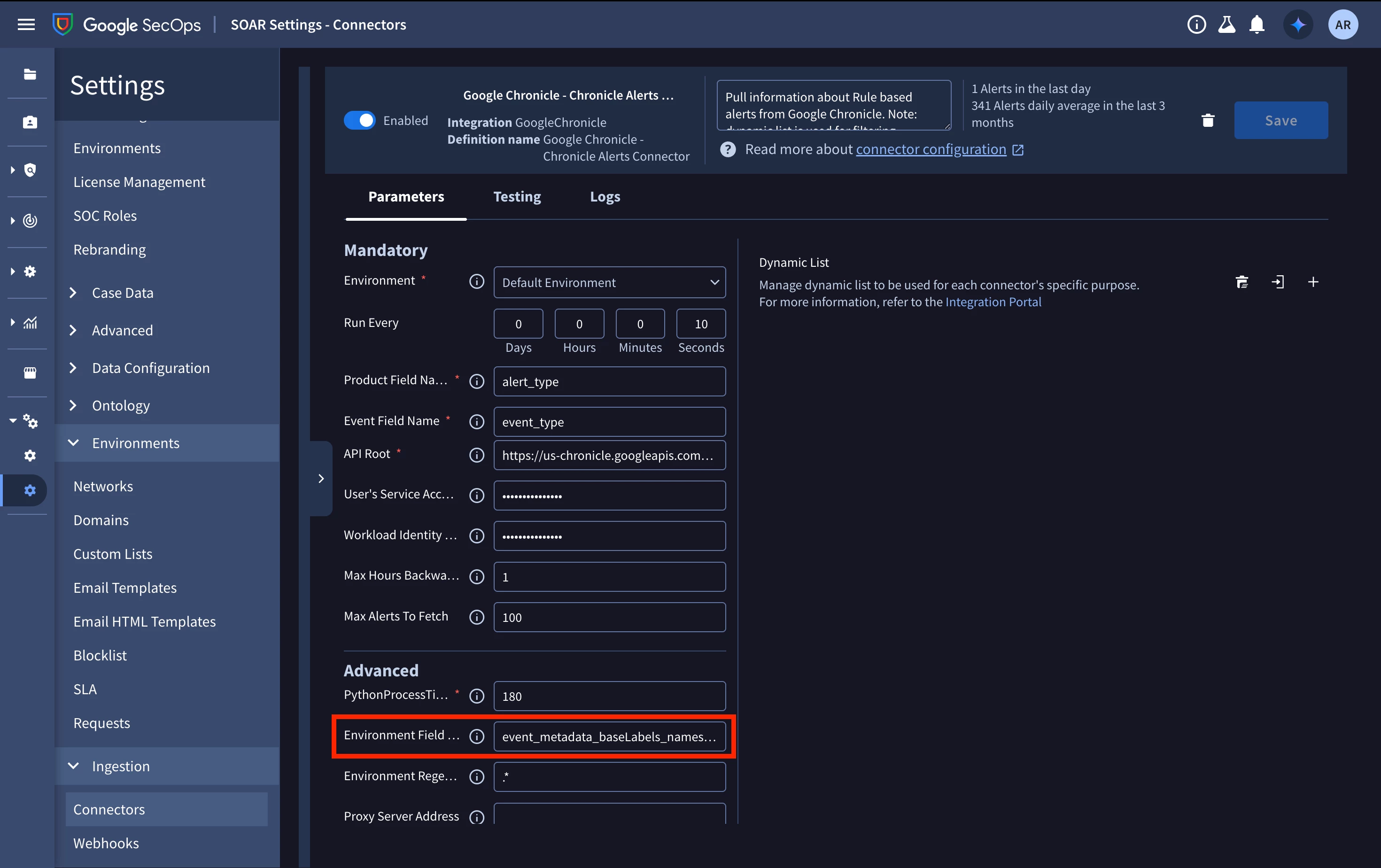
Figure 5 — The Chronicle Alerts Connector, on the instance. The Environment Field Name (boxed) is set to event_metadata_baseLabels_namespaces_1.
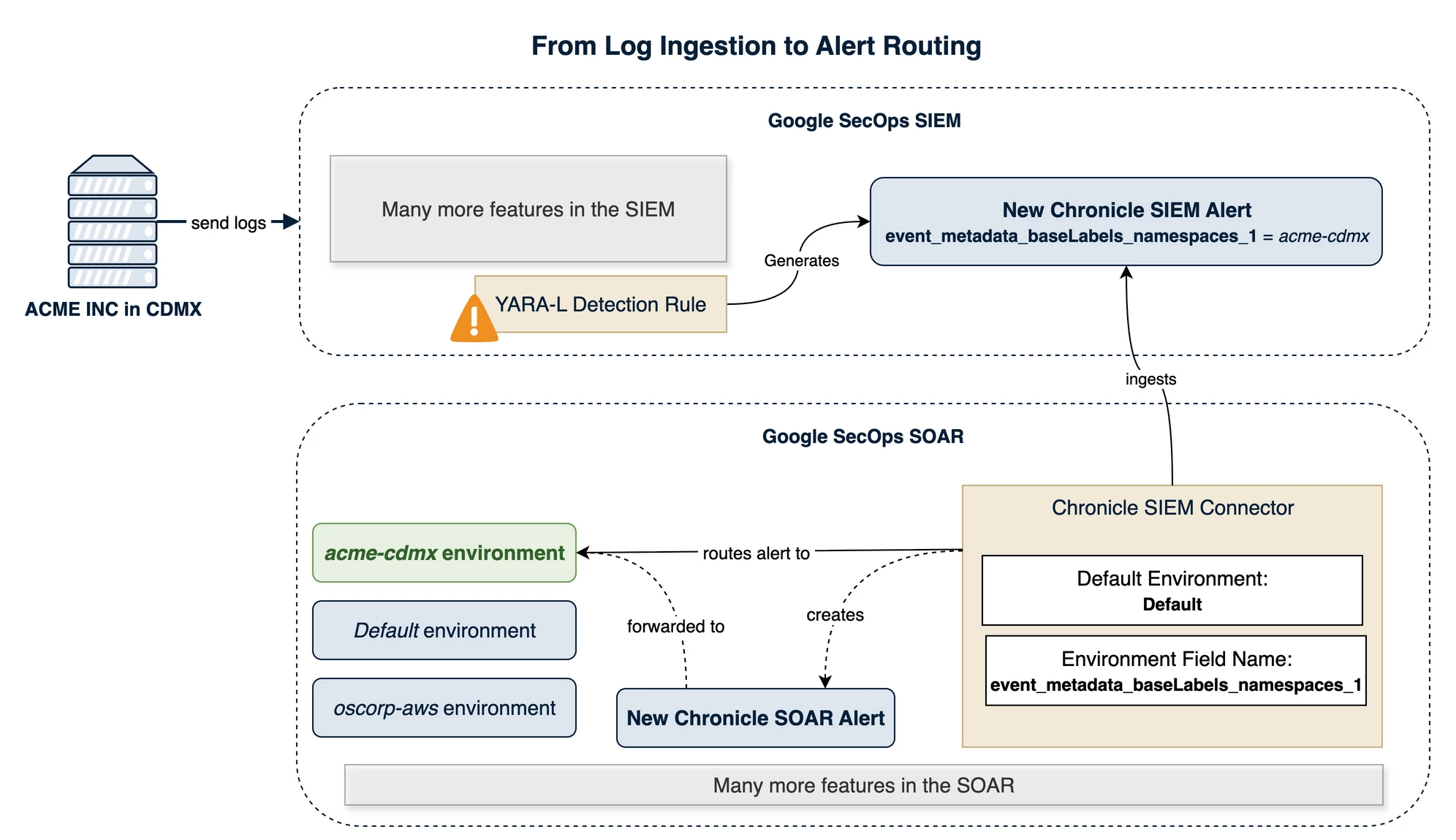
Figure 6 — Alert routing. The Chronicle Alerts Connector reads the namespace off each alert (event_metadata_baseLabels_namespaces_1) and drops it into the environment whose name or alias equals that slug.
Name versus alias
Back in Part 1, Figure 5 showed the slug serving as the SOAR environment "name (or alias)" and I promised to explain the parenthetical here. This is it.
The connector matches the namespace against an environment's display name or its alias, and the match is case-sensitive. The clean setup is an environment whose name simply is the slug. But you will often inherit environments that already have names you cannot change — a camelCase AcmeCDMX, say, or a human label like "ACME – Mexico City". You do not have to rename them (and you can't anyway). Instead, you attach a lowercase alias equal to the slug (acme-cdmx), and the connector matches on the alias while humans keep the readable name. The alias is the fallback that lets the convention hold even when an environment name cannot.
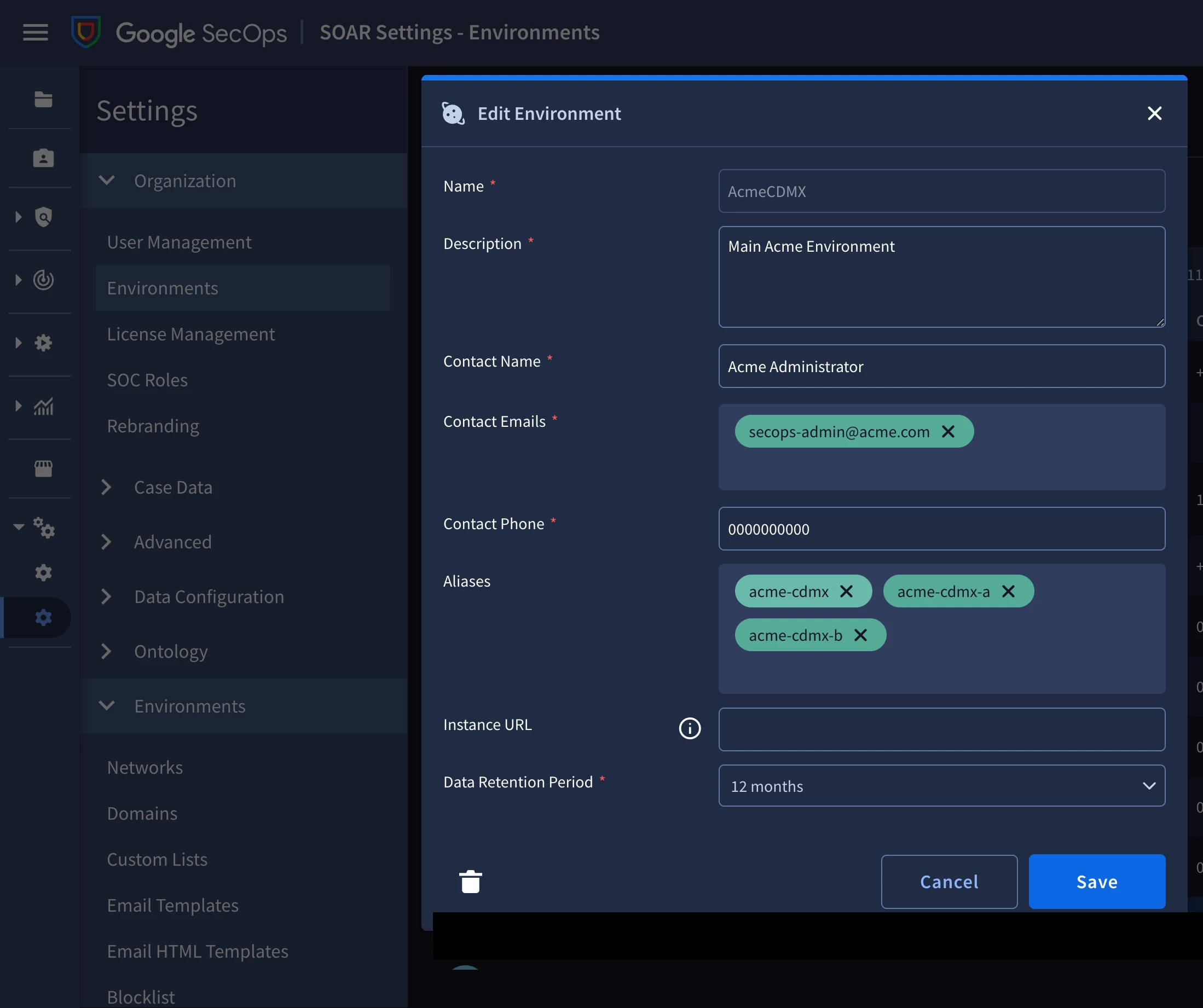
Figure 7 — Name versus alias, on the instance. The environment keeps the human-readable display name AcmeCDMX, while lowercase aliases (acme-cdmx, plus acme-cdmx-a/acme-cdmx-b) give the connector the exact slug to match. Screenshot from the operator's own instance.
Collapsing a third-party tenant's units into one environment
One-environment-per-slug is correct, but it has a consequence: an organization with several unit namespaces (acme-cdmx, acme-gdl) produces several case queues when you map each namespace to its own environment. An analyst expected to keep a "hawk-eye" view across all of ACME then has to pivot through each of its environments. Sometimes that is what you want; often it is not.
Some connector versions expose an Environment Regex Pattern parameter that extracts a piece of the namespace and routes on that. A pattern like ^(acme)-.*$ captures the org segment, so every acme-* alert lands in a single acme environment while the SIEM-side namespaces (and therefore the entity-graph correlation isolation) stay fully separate. It is the SOAR-side answer to "coarse routing, fine tagging."
Warning: Environment Regex Pattern support is version-dependent
Whether the Chronicle Alerts Connector exposes this parameter at all is version-dependent and undocumented in the general SOAR docs. Verify it by opening the connector form in your instance before you design around it. If it is not there, you have two honest options: accept one queue per unit, or, as a last resort, point the connector's Environment Field Name at a custom ingestion label holding just the org segment.
There is also a second, more explicit route to the same outcome that does not depend on regex support. Instead of one connector splitting traffic by pattern, you run multiple connector units — one per environment — and set each unit's Default Environment to the tenant it serves. To govern which alerts a given unit accepts, you attach a Dynamic List filter, which narrows the set of alerts that connector is allowed to route down to one tenant's alerts and, if needed, a specific slice of them. This trades a single connector's regex for several purpose-built units, but each unit's routing is explicit on its own form rather than encoded in a pattern, and it does not hinge on the Environment Regex Pattern being present in your connector version.
If you scope by group, read this first
Most operators want to bind access to groups, not individuals. Two SOAR-side facts will save you an afternoon:
- Group emails do not expand: Dropping a group's email into a SOAR Group Mapping row does not fan out to the group's members at sign-in. Only individual user emails (and service accounts) match. This is the single most common "why is my group mapping doing nothing" cause.
- Only three predefined roles auto-match: SOAR seeds three reserved rows (SOAR Admin, Threat Manager, Vulnerability Manager) that auto-match holders of the corresponding predefined Cloud IAM roles. Custom roles carrying the equivalent permissions do not auto-match.
These live on the SOAR IAM side rather than the routing side, but they determine whether the people you routed an alert to can actually open its case, so they belong in the same design pass.
Note
This remains mostly true even after SOAR IAM Migration, except that SOAR feature-access permissions are now handled in Cloud IAM, and these can be assigned to IAM groups. Environment and SOC roles still remain authoritative in the SOAR Group Mapping page, and users must be listed individually to map them to an environment and SOC role.
Where the two planes meet: routing is not visibility
Here is the trap I promised, and it is the most important paragraph in this part.
Alert routing and data visibility are decided independently, by different mechanisms, at different times. The environment an alert lands in is decided by the connector, from the namespace, at ingestion time. How far a scoped analyst can see from the resulting case — how far they can pivot out of it back into the SIEM — is decided by the emitting detection rule's scope. These do not consult each other.
The consequence is a failure mode that looks like a bug and is not: an alert can route to exactly the right environment, yet produce a case a scoped analyst cannot fully work. It happens when a globally-scoped detection rule fires on a tenant's data. The alert routes fine — the namespace is on it — and the SOAR-side alert still surfaces some of what the SIEM-side alert carried, so the analyst is not necessarily staring at a blank case. But their Data RBAC scope does not include "global," so they cannot pivot from that alert back into the SIEM-side detection: the underlying events, the curated detections, and any other scoped rules' detections stay invisible to them. The queue is right; the depth they can reach into the case is not.
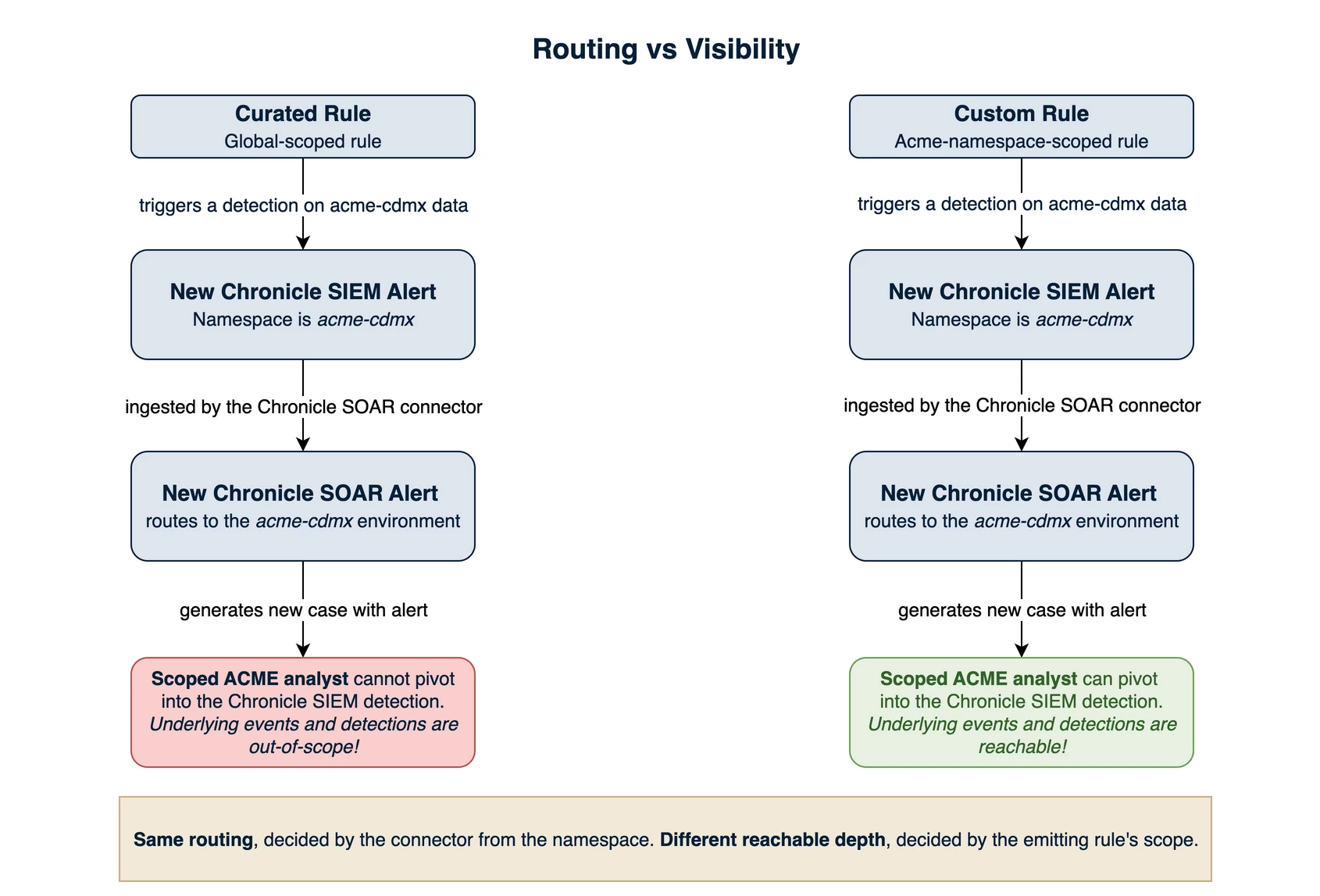
Figure 8 — Routing ≠ visibility. A globally-scoped rule produces a correctly-routed alert whose case a scoped analyst cannot pivot into the SIEM from (left); a rule scoped to the tenant produces one they can fully work (right). Same routing, different reachable depth. The curated and custom rules shown are only examples of each case — a curated rule is always global, which is what makes it a convenient illustration. What decides the outcome is the rule's scope, not its type: a custom rule left global behaves exactly like the left-hand path.
That is the model. Here is the behaviour, on one real case, seen by two identities.
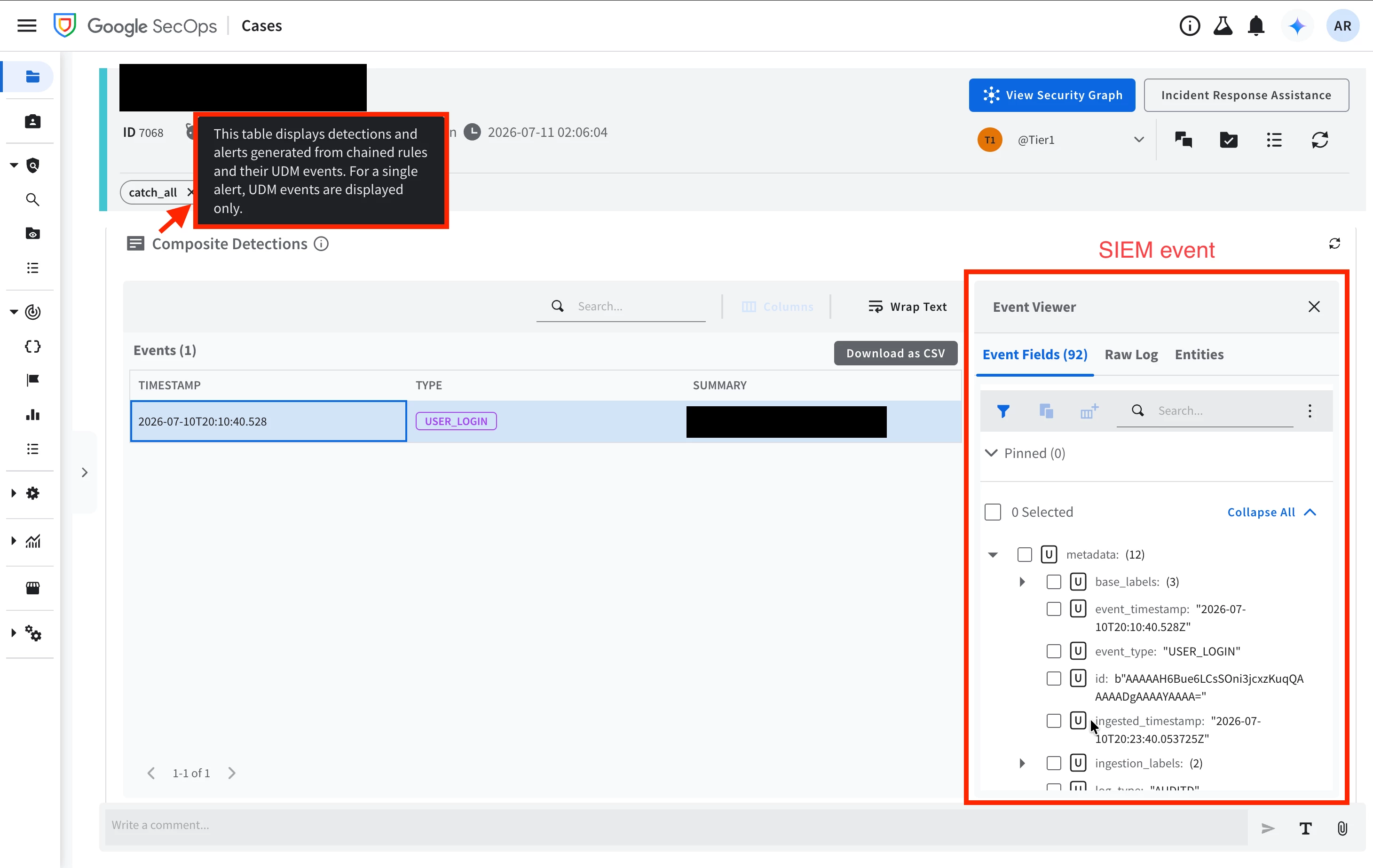
Figure 9 — The same case, read by a user with global scope. The alert's underlying detection resolves: one USER_LOGIN event, and the full UDM record behind it in the Event Viewer. This is the depth the case is supposed to have. Screenshot from the operator's own instance.
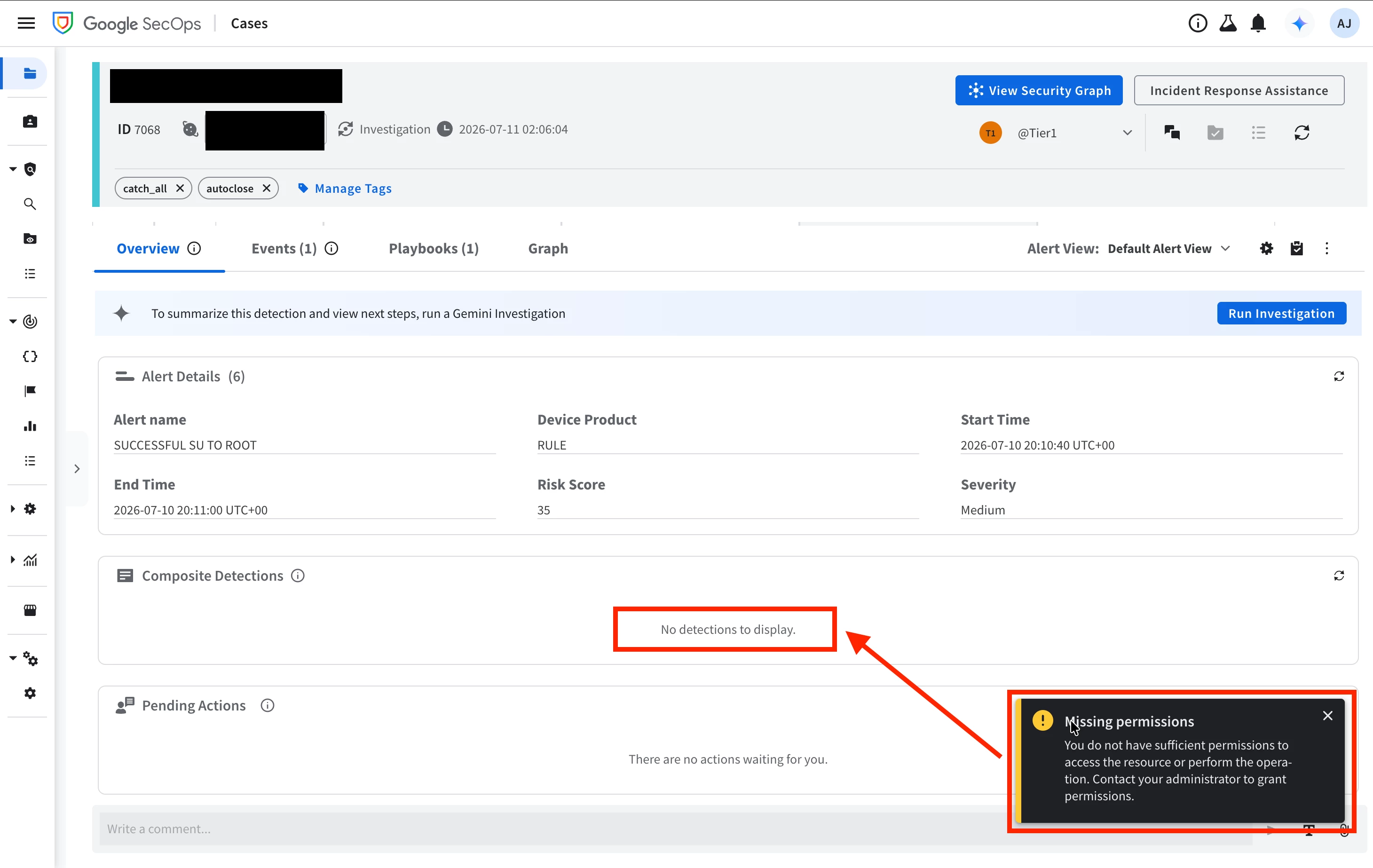
Figure 10 — The same case, same moment, read by a scoped user. The case routed correctly and the alert is entirely legible — name, product, risk score, severity, timings. But Composite Detections is empty and the platform says why: Missing permissions. The detection behind the alert came from a globally-scoped rule, and a scoped user cannot reach a global rule's detections. Screenshot from the operator's own instance.
Read the two together, because the gap between them is the thing to understand. Nothing failed here. The alert routed to the right queue, the case opened, and the analyst can read every field of the alert and act on it — which is rather the point: an alert is meant to carry enough of its own context that the person who owns it can work it without pivoting anywhere else. What the scoped analyst cannot do is answer the question an analyst reaches for next — show me the events that caused this — because those events sit behind a globally-scoped rule, and a global rule's detections are not theirs to read. That is the boundary doing its job, not failing at it. The one operational catch is that the platform says so quietly: an empty panel and a toast. An analyst who has never seen the global-scope view has no way to tell that the panel is empty because of a permission boundary rather than because the detection genuinely had nothing beneath it.
Which scope a rule gets is a design decision, not a correctness one, and both answers are good ones. A single (well-designed) global rule serves every tenant at once: it still attributes and routes per tenant, because the namespace rides on the event and the connector reads it from there — and it spends one rule from your quota rather than one per tenant, which matters on an instance where rule capacity is finite. For a detection that should apply everywhere, that is both the right call and the economical one. A scoped rule, or a per-tenant instance of one, is the right call when the content itself is specific to a tenant, or when that tenant's analysts need to pivot from the case into the SIEM beneath it. The choice follows from what the rule is for and who has to work its output. What to carry forward is the behaviour rather than a rule of thumb — a correctly-routed alert does not guarantee a case its analyst can pivot out of — so that when you test your setup, you check both planes and not just the queue. Part 4 takes up the choice itself, and the same question for playbooks.
One slug, four surfaces, one grep
Step back and look at what the single slug has done across the series.
- the namespace stamped on ACME's telemetry at ingestion (Part 2),
- the Data RBAC scope labels that let ACME's analysts read scoped telemetry (this part),
- the SOAR environment name (or alias) that routes ACME's alerts into the appropriate queue (this part),
- and the optional Bindplane project that holds ACME's collector config (Part 1).
I want to be honest about the epistemics, though, because this series has tried to be throughout. Treat the mechanics here as a map to verify in your instance, not as guarantees. The one-slug discipline holds regardless; the exact knobs may sit in slightly different places on your version, and they may change in the future — with a fast-moving platform like Google SecOps, staying ahead of the changes matters.
What's next
We now have data in and tagged (Part 2), analysts scoped to their tenant (this part), and alerts routing to the right queue (this part). In Part 4 we are going to write detection rules and response playbooks that respect the boundary you have built. A single global rule can still attribute and route per tenant. When is that the right call, and when do you reach for a per-tenant rule instance instead? And how do you parameterize a single playbook by environment so it serves every tenant without hard-coding any of them? The platform is isolated; making the content respect that same boundary is the job of Part 4.
References
- Google SecOps — Data RBAC overview: access control with scopes and labels (also the source for the 200-unique-value cap on scopes, custom labels, and ingestion labels — see the Caution note just above that section)
- Google Cloud — Launch of the MSSP Partner Program with Google Chronicle (the native instance-per-customer multi-tenancy model and Customer Management API; contrast with this series' single-instance approach)
- Google SecOps — Configure data RBAC (creating labels and scopes, and assigning a scope to users via IAM conditions on the Chronicle Restricted Data Access role)
- Google SecOps — Define environments in SOAR connectors (Environment Field Name, Environment Regex Pattern) and Environments overview (aliases, Default Environment)
- Google SecOps — Manage asset namespaces (the correlation boundary, carried from Part 1)
- Community — Implementing unified Data and Feature RBAC in Google SecOps (the Feature-RBAC pairing referenced above)
- This series — Part 1 (Foundations: the isolation challenge) and Part 2 (Getting telemetry in safely)
