



This is the final part of a four-part series on running many tenants on one Google SecOps instance. Part 1 built the mental model: this kind of multi-tenancy is really three independent isolation challenges, and one slug per tenant can carry all three. Part 2 got each tenant's telemetry in, correctly tagged, without trusting the partner's machines or leaking the ingestion key. Part 3 made each analyst see only their own tenant and each alert land in the right queue. This part closes the series with the content that runs on top of that platform work, and a few corrections the platform work itself earned along the way.
Everything so far has been platform configuration and architecture: a namespace stamped, a scope stood up, an environment wired. None of it detects anything or responds to anything on its own. This part covers the detection rules that fire across many or specific tenants and the SOAR playbooks and integrations that act on them. Additionally, this part begins with three corrections to Part 3.
The scenario
In this final part, I decided to make things more relatable, by giving you a story line that makes more explicit every architectural and development decision.
Zevorus runs one Google SecOps instance for two independent organizations. ACME is a fully-managed customer: Zevorus's own SOC watches ACME's telemetry end to end, and ACME never logs into the platform itself, what we call a Managed Detection and Response contract. Conversely, OSCORP is self-managed: Zevorus hosts and administers the instance, but OSCORP runs its own SOC on top of it, with its own analysts scoped to see only OSCORP's data and responsible for developing their own rules and playbooks.
The rest of this part plays out between these two tenants, and the difference between them is what makes several of the choices below matter in practice rather than in the abstract.
A few considerations
Before this part moves on to new content, three points from Part 3 are worth stating more precisely. None of them undoes anything if you followed Part 3 — but the first one changes what you should go check.
Ingestion path and scope-eligible labels (bug?)
A Data RBAC scope's condition can be built on more than one field. Two of its condition types matter here: an Ingestion Metadata Key/Value condition matches an exact key/value pair carried by an event's metadata.base_labels.ingestion_kv_labels field, and a Custom Label condition matches the result of a UDM Search query evaluated once at ingestion time, which on success populated the UDM field metadata.base_labels.custom_labels. Part 3 used the first of these as its running example for scoping access beyond the namespace level: a scope built directly on a custom ingestion label's key and value pair appended by the Bindplane Google SecOps Standardization Processor.
That example silently breaks depending on how the tenant's telemetry reaches the instance. Google SecOps ingests through two different paths: the legacy, now deprecated, malachiteingestion-pa gRPC endpoint, and the modern chronicle.googleapis.com HTTP endpoint from the new Chronicle API. Both accept a custom ingestion label attached to a log, and both make that label searchable through the UDM field metadata.ingestion_labels. However, only the legacy endpoint also writes the label into metadata.base_labels.ingestion_kv_labels, which is the field an Ingestion Metadata Key/Value scope condition actually reads. Ingest the identical label through the modern endpoint, and ingestion_kv_labels stays empty, and hence, the data RBAC condition built to enforce access on it matches nothing, failing silently.
Warning
- Nothing about the label looks wrong. It appears in search with the right UDM field, key, and value, and the scope built against it saves without error. The only symptom is that a user confined to that scope sees no data at all.
The practical reason for highlighting this in this part is because it matters for our scenario. If a tenant's telemetry ships over the modern ingestion API (something you should do), an ingestion-label scope modeled on Part 3's example using Custom Ingestion Key/Value labels, like class or asset-type, matches nothing, because the modern Ingestion API doesn't populate the metadata.base_labels.ingestion_kv_labels field that the Data RBAC reads. For Zevorus and the tenant organizations ACME and OSCORP, this matters, because they may need custom access controls that this bug? may block.
Two checks tell you which side of this you are on. Ask which endpoint your ingestion path actually targets; if you cannot answer that from configuration alone, pull one representative event with a UDM Search and read metadata.base_labels.ingestion_kv_labels directly. Populated means the scope condition works as documented. Empty means it does not, regardless of what metadata.ingestion_labels shows for that same event.
The workaround when using the modern endpoint at the moment of writing is the other condition type. A Custom Label scope built as a UDM Search query over metadata.ingestion_labels. This is not exempt from the gap by virtue of being a Custom Label — a Custom Label whose query only reaches ingestion_kv_labels has the identical problem. Moreover, Custom Labels also affect performance at a certain degree. Small, but real.
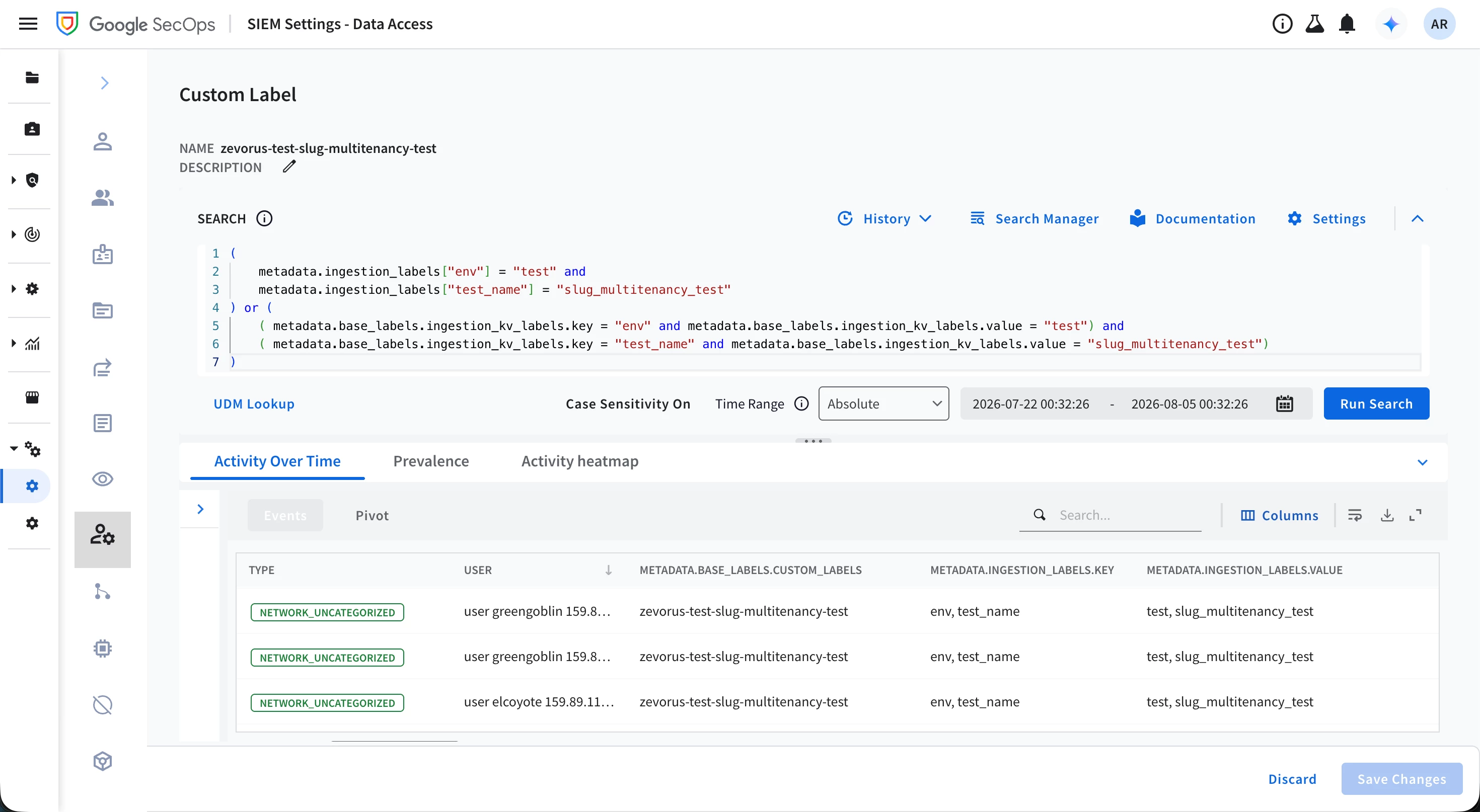
A scope with a custom label whose query ORs both fields is portable across either ingestion path and is the pattern worth adopting if a tenant might change ingestion endpoints later. An example is shown below:
(

    metadata.ingestion_labels["env"] = "test" and

    metadata.ingestion_labels["test_name"] = "slug_multitenancy_test"

) or (

    ( metadata.base_labels.ingestion_kv_labels.key = "env" and metadata.base_labels.ingestion_kv_labels.value = "test") and

    ( metadata.base_labels.ingestion_kv_labels.key = "test_name" and metadata.base_labels.ingestion_kv_labels.value = "slug_multitenancy_test")

)
Figure 1.
Custom Labels evaluate once, at ingestion
A Custom Label is easy to misread as a live filter (a mistake I did) as if its UDM Search query quietly re-joins against whatever a user asks for later. It does not. The query runs exactly once, at the moment an event is ingested. A match at that moment permanently stamps metadata.base_labels.customLabels onto the event, and a scope built on that label is then confined to whichever events already carry the stamp. Editing the query afterward, or having older data that would match the new query today, changes nothing about data already ingested. There is no re-evaluation pass at the moment of writing, and is also documented in Google Docs.
Onboarding a scoped tenant user
One mechanical step from Part 3 deserved more space than it got: what actually puts a user on the right side of the tenant boundar? In the slug multitenancy architecture, the namespace, the scope, and the environment are what actually define a tenant, linked by the same slug. The scope is the SIEM-side data access boundary (that references the namespace in the raw events), and the environment is its SOAR-side counterpart. The environment does the linking by matching the slug in the namespace and the Data RBAC scope on the SIEM side, so all features in both systems agree on one tenant.
Group Mapping does not create or extend that link; it only assigns a signed-in user to environments already defined that way, along with settings like SOC Roles. A scoped tenant user does not become scoped by having a role assigned in the abstract — they must be listed, either individually in the IDP / User Group column or appended in the multi-value Group Members column, on the Group Mapping page, mapped to the group that carries their tenant's environment.
Note
- The above claim assumes not federated identities.
Figure 2.
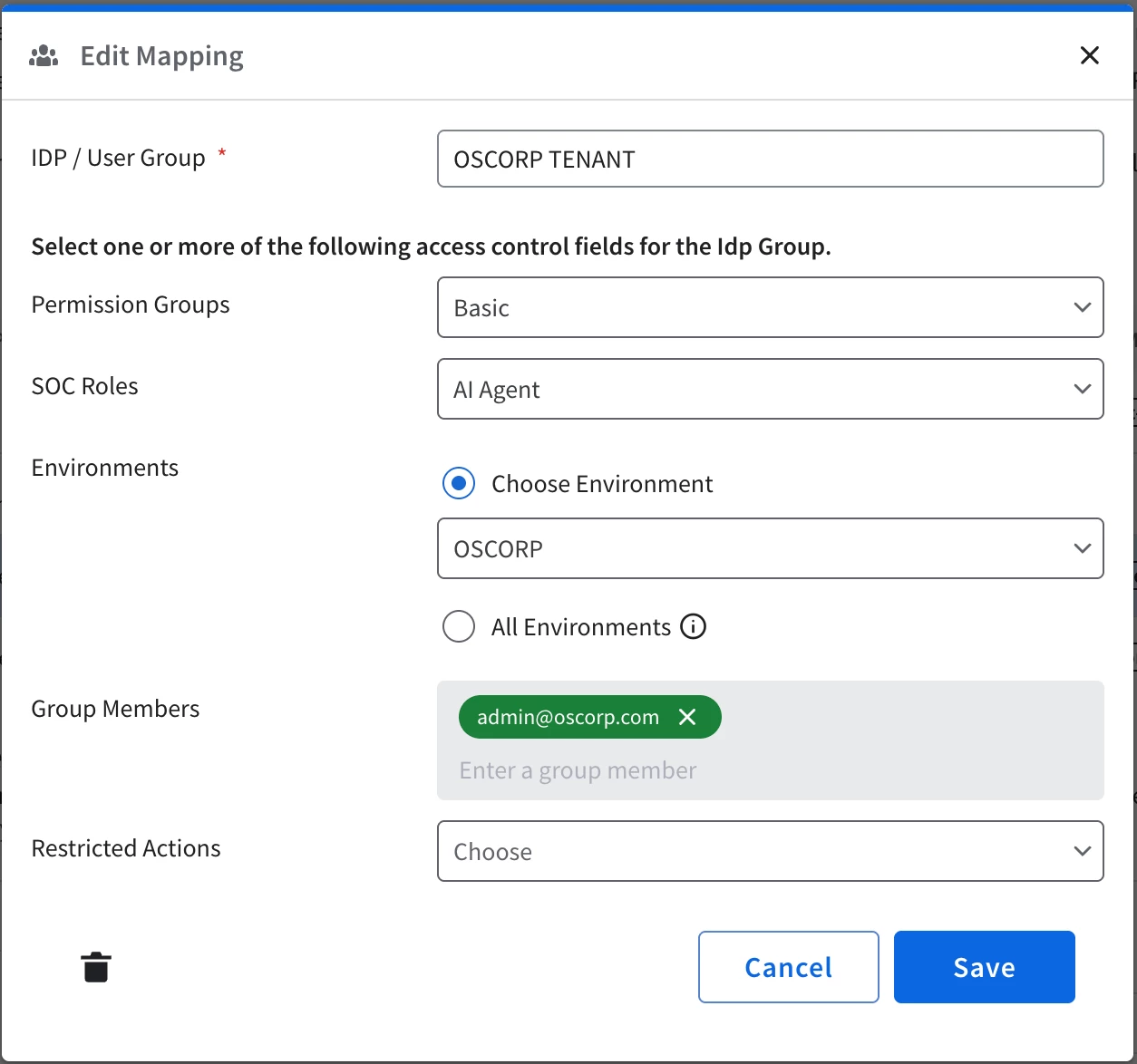
Two more things are worth knowing before you treat this page as the whole picture.
First, on an instance that has already run the SOAR Permissions-to-Cloud-IAM migration, the Permission Groups column keeps rendering on this page but stops doing anything for a signed-in user like admin@oscorp.com above. Google's own migration guidance says the column is retained purely for backward compatibility and is scheduled for removal by September 30, 2026 without customer impact; Chris Martin's practitioner write-up on an already-migrated instance, "Using Google SecOps with Gemini CLI and Hosted MCP", goes further, describing Permission Groups as applying to API access only once migrated, cloud users included — though even that account flags its own uncertainty on the point ("I am not 100%"). SOC Roles and Environments stay authoritative either way. Permission Groups on a migrated instance is a column you can generally ignore for onboarding a user.
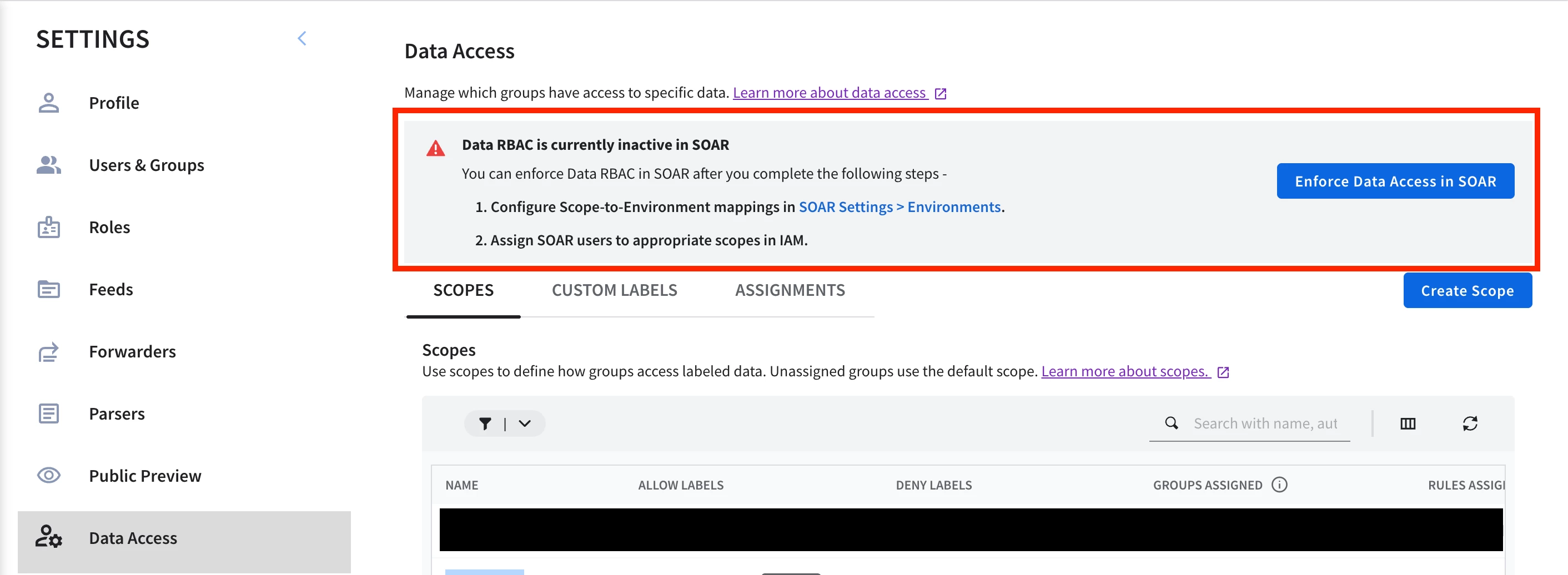
Second, if the instance also has Data RBAC enabled for SOAR, Group Mapping alone stops being the whole access story. A case's visibility then also depends on the viewer holding the case's Data RBAC scope, on top of this user-to-environment mapping, not instead of it. That gate is separate from whether anyone has bothered configuring a scope-to-environment mapping. The mapping only changes which environment an alert routes to, not whether a viewer can open the case once it lands there. That mechanism, tested directly on this instance, is covered in full later in this part under "A short note on Data RBAC reaching into SOAR" rather than repeated here.
Important
- Just keep in mind that this article was written mostly before scope-to-environment settings was enabled. Some claims may change if you decide to enable the feature, but those are already addressed in the referenced section.
Figure 3.
Now, we are ready for the content on top of the slug multitenancy architecture!
Multi-tenant-aware detection rules
Detection rules are where that foundation gets put to work, and where a carelessly designed rule has the chance to leak across the tenant boundary. Four things matter: how a rule's scope works, what changes when a rule correlates multiple events, how much to trust curated content out of the box, and where single-event rules differ from both.
Rule scopes and multi-tenant rules
A YARA-L rule carries a single Data RBAC scope. That means there's no "this rule applies to ACME and OSCORP but not the rest" on one rule object. That constrains the whole design (and it would be nice if Google SecOps would solve this limitation!).
A global rule watches every tenant's data at once, and because the namespace rides on each event, the detection it produces still attributes and routes correctly per tenant. A scoped rule watches only a specific tenant's telemetry. For logic that's genuinely tenant-specific, or for a tenant whose own analysts need to pivot from a case down into the SIEM detection beneath it, scoped rules are still good candidates to use.
In our story, this is exactly the asymmetry ACME and OSCORP create. Zevorus's own analysts can already reach every detection on the instance regardless of scope (they are instance holders), so ACME rarely needs a scoped rule, unless it is for a very specific detection requirement. OSCORP's own SOC, tenant-scoped, can't see global rules, so a rule OSCORP's analysts are meant to work from has to be scoped to them specifically.
For a cheatsheet:
- Use a global rule for a detection that should apply everywhere; usually baseline detection rules. Use a tenant-scoped rule only for a deliberate, tenant-specific exception.
Warning
- This cheatsheet assumes Data RBAC has not also been extended into SOAR. Where it has, see "A short note on Data RBAC reaching into SOAR" later in this part. A global rule's resulting cases become invisible outright to any tenant-scoped SOAR user, not just unreachable from the SIEM side the way Part 3's routing-versus-visibility trap already described. At that point "global rule for efficiency" only holds for a fully-managed, MDR-style tenant whose own people never log into SOAR to begin with. The moment a tenant runs its own scoped SOC, its cases need a rule bound to its actual scope.
Tip
- Rule Exclusions cut false positives per tenant without giving up a global rule's reach, which is useful when one tenant's environment is noisier than the rest under an otherwise-good global detection.
Composite rules add one more wrinkle to scope. A composite rule's events block can match against detection objects other rules already produced, which is what lets it chain a lightweight baseline into a sharper, higher-confidence detection, or combine that detection with a fresh raw signal, without re-deriving the same telemetry twice.
Like any other rule, a composite rule carries exactly one Data RBAC scope, and that scope gates everything the rule reads at evaluation time. Hence, the detection objects it correlates against are gated by the same boundary: the scope. A composite rule's scope MUST match the scope of every rule it reads a detection from, or the read simply returns nothing.
I tested this myself. A composite rule scoped to ACME, built to raise severity when ACME's own recon telemetry followed a detection from a global, namespace-bound brute-force rule, never fired against telemetry that satisfied both of its own conditions. Redeployed unscoped, or with both rules scoped to ACME's tenant, the same rule text fired immediately against the identical data in either case.
rule Demo_SlugMultitenancy_Composite_ACME_ReconAfterBruteForce {


  meta:

    author = "rodajrc"

    description = "Composite rule that fires when a sudo -n -l privilege-escalation recon command runs on a host that Demo_SlugMultitenancy_MultiEvent_BruteForce_NamespaceBound (global scope) flagged as compromised within the last 1h."

    tactic = "TA0007"

    technique = "T1069"

    platform = "Linux"

    data_source = "auditd"

    severity = "Medium"

    priority = "Medium"


  events:

    $bf.detection.detection.rule_name = "Demo_SlugMultitenancy_MultiEvent_BruteForce_NamespaceBound"

    $bf.detection.collection_elements.references.event.target.hostname = $hostname


    $recon.metadata.log_type = "AUDITD"

    $recon.metadata.product_event_type = "EXECVE"

    re.regex($recon.target.process.command_line, `sudo -n -l`)

    $recon.principal.hostname = $hostname


  match:

    $hostname over 1h


  outcome:

    $risk_score = 70


  condition:

    $bf and $recon

}
This is the exact rule text from that test. When Demo_SlugMultitenancy_MultiEvent_BruteForce_NamespaceBound is global (the producer rule) and Demo_SlugMultitenancy_Composite_ACME_ReconAfterBruteForce is scoped to zevorus-test-acme (the composite rule), it will neither trigger a detection nor fire an alert. Patch both to the same scope — either both scoped to zevorus-test-acme or both left unscoped — and the composite rule fires.
That constraint is really a design question about which category a rule belongs to, and it splits cleanly into two cases.
Global rules cover two situations. The first is baseline rules: single-event or multi-event rules (a composite rule is generally overkill for a baseline) meant to detect a typical security event the same way for every tenant, without hardcoding anything tenant-specific. The NamespaceBound brute-force rule later in this section is exactly that shape. Google SecOps' risk analytics and its metric functions are built for similar use cases, letting a rule score behavior against a baseline or a metric rather than a fixed condition, which is what makes a properly designed, genuinely tenant-agnostic rule possible in the first place.
The second use case is threat-informed detections: a composite rule built around a specific MITRE ATT&CK technique, a TTP, or a known threat actor. Keeping these global only makes sense when an instance's tenants are related units of one organization, like branches or dependencies of the same company, because that is the only setup where a shared threat profile is a reasonable assumption to design around, and because a global rule spends from the same shared rule quota every tenant draws from, which is better reserved for detections that help many tenants at once.
Scoped rules are the alternative. They can be of any type. Single-event, multi-event, or even composite, depending on the use case. This is where tenant-specific business logic belongs, like a login outside a tenant's own working hours, and where a tenant's own threat-informed detection rules lives. The natural fit when an instance holder maintains tenants for genuinely unrelated third parties who do not share a threat profile at all.
In our scenario, Zevorus would be managing ACME's rulesets while OSCORP accesses the platform with their scoped tenant user accounts to write their own tenant-specific rules. Both OSCORP and ACME can still rely on any curated rule or custom unscoped rule Zevorus has developed.
Figure 4.
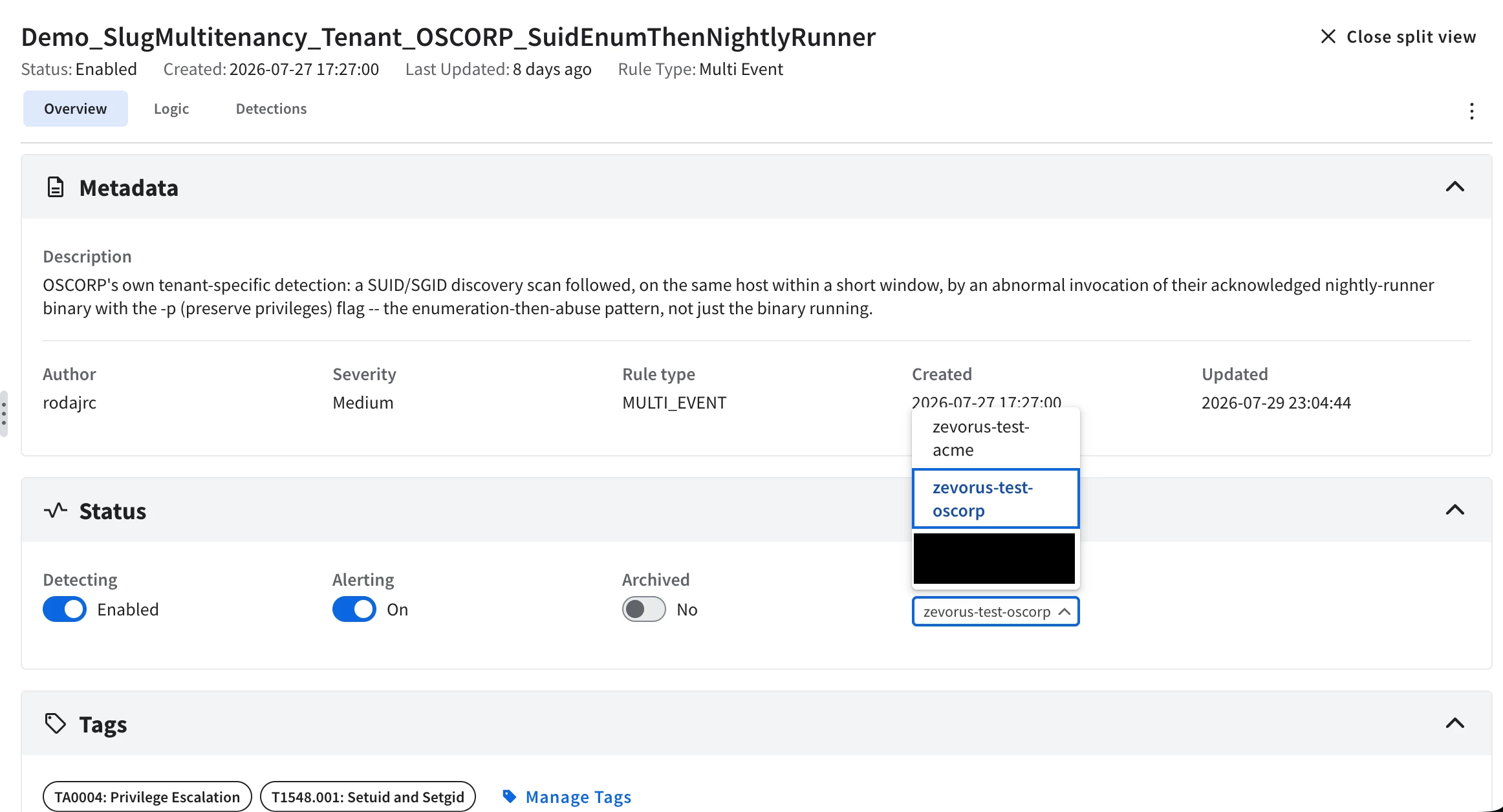
One more scope detail worth knowing: when I say tenant-scoped rule, I refer to the Data RBAC scope assignment on the rule object itself, as shown in the picture above. Apart from this, a rule can still filter by namespace, or by a custom ingestion label, inside its own query. For instance, a rule can be scoped to a large tenant — say acme, as in the earlier parts of this series — which is allowed to see data from the sub-tenants acme-cdmx and acme-gdl. You can make that rule match only acme-cdmx telemetry by adding an explicit event query line to the rule definition ($e.metadata.base_labels.namespaces = "acme-cdmx"), while keeping the rule itself unreachable to users scoped only to acme-cdmx. However, this technique won't work as expected if you enabled the scope-to-environment feature.
The query decides which events the rule can match, and the rule's scope decides who can even see the rule definition.
Note
- Every scoped instance draws from the same per-instance YARA-L rule quota. Check your own instance's Rules capacity dialog, since the number depends on entitlement.
Multi-tenant multi-event rules
Unscoped multi-event rules carry a sharper risk. When a rule correlates events by joining on a shared value, like the same IP across a failed and a successful login in a brute-force detection rule, two tenants on one instance can legitimately produce that same value from two completely unrelated events; unlikely to happen, but still possible. If the join doesn't also require the events to share a tenant, the rule can stitch one tenant's activity to another's and raise a detection describing an attack that never happened. The fix is to bind the namespace into the rule's match clause alongside whatever you're really correlating on, so events only ever group within one tenant.
For example, in our scenario, OSCORP was genuinely under a brute-force attack — a real string of failed logins against one of its hosts, and soon, a successful unauthorized login was about to happen. However, in the same correlation window, ACME had one ordinary, unrelated successful login on its own host, nothing anomalous about it on its own. The detection rule triggered an alert describing a brute-force attack, distorted by grouping the fail login events in the OSCORP tenant and the benign successful login in the ACME tenant. The cause: the rule was correlating without including the namespace, and ACME's and OSCORP's assets happened to share the same grouping variable by coincidence.
Note that this behavior happens regardless of which variable you use. The difference is that some grouping-value overlaps are more or less likely to occur. In the example below, the rule correlates only on principal.ip, which will only produce that kind of overlap if the failed and login events of ACME and OSCORP happened to occur from the same source IP.
rule Demo_SlugMultitenancy_MultiEvent_BruteForce_Baseline {


  meta:

    author = "rodajrc"

    description = "Correlates repeated failed SSH logins from one source IP with a subsequent success within 10 minutes."

    tactic = "TA0006"

    technique = "T1110"

    platform = "Linux"

    data_source = "nix_system"

    severity = "Medium"

    priority = "Medium"


  events:

    $fail.metadata.log_type = "NIX_SYSTEM"

    $fail.metadata.event_type = "USER_LOGIN"

    $fail.security_result.action = "BLOCK"

    $fail.principal.ip = $src


    $ok.metadata.log_type = "NIX_SYSTEM"

    $ok.metadata.event_type = "USER_LOGIN"

    $ok.security_result.description = "Accepted password"

    $ok.principal.ip = $src


  match:

    $src over 10m


  outcome:

    $risk_score = 65

    $failed_attempts = count_distinct($fail.metadata.id)

    $source_ip = array_distinct($src)

    $compromised_user = array_distinct($ok.target.user.userid)

    $compromised_host = array_distinct($ok.target.hostname)


  condition:

    #fail >= 3 and $ok

}
According to Google SecOps UDM model, the principal.ip UDM field in a USER_LOGIN event is only populated in network-based login using the IP of the host that initiated the connection to perform the action. Therefore, this rule carries the very unlikely risk of triggering a wrong detection when two tenants' assets are hit by a brute-force attack from the same adversary infrastructure inside the same time window, and at least one of them is successful (this is astronomically unlikely of course! but depending on the use case, the group-value overlap might promote more likely collisions).
Figure 5.
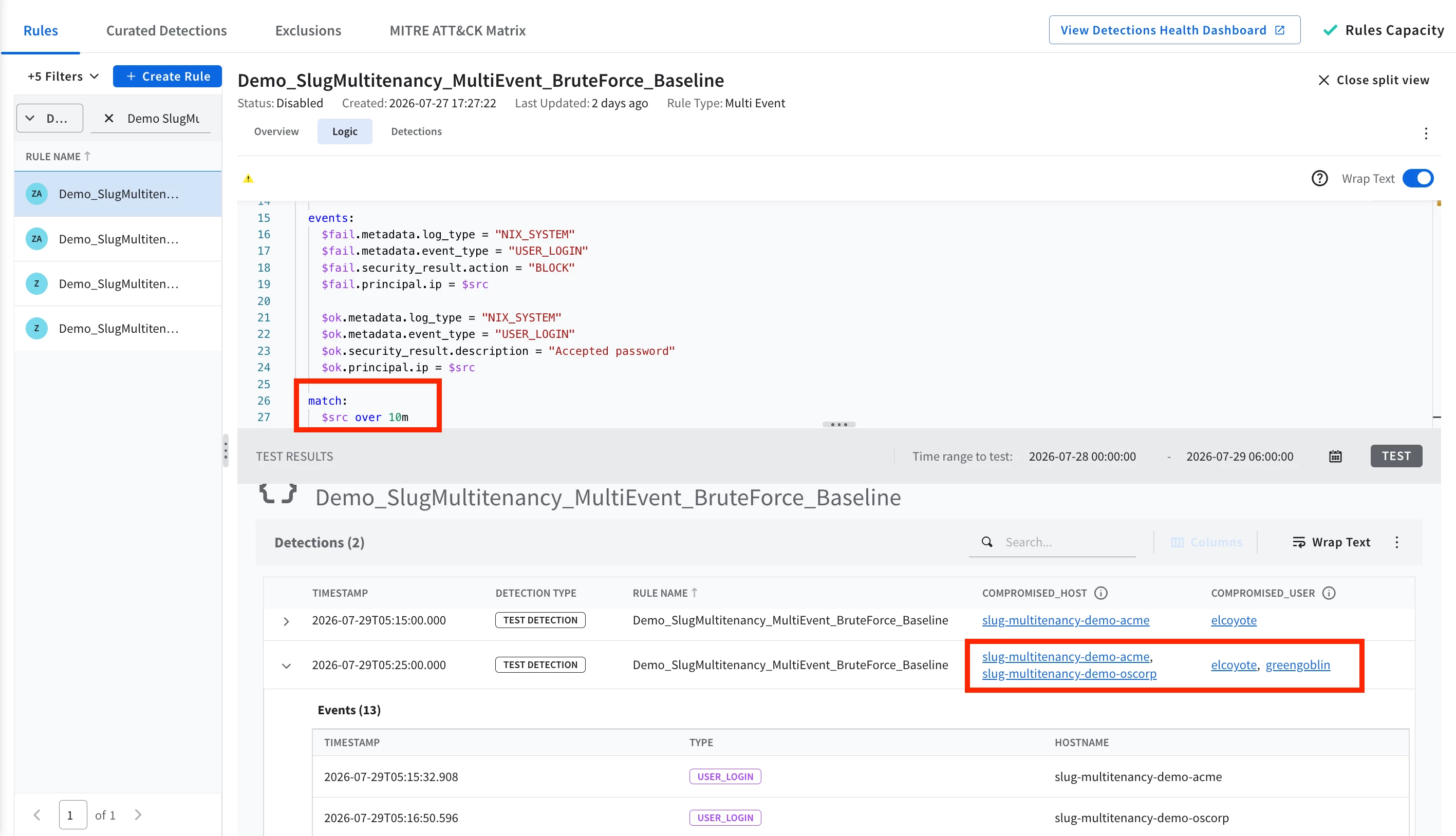
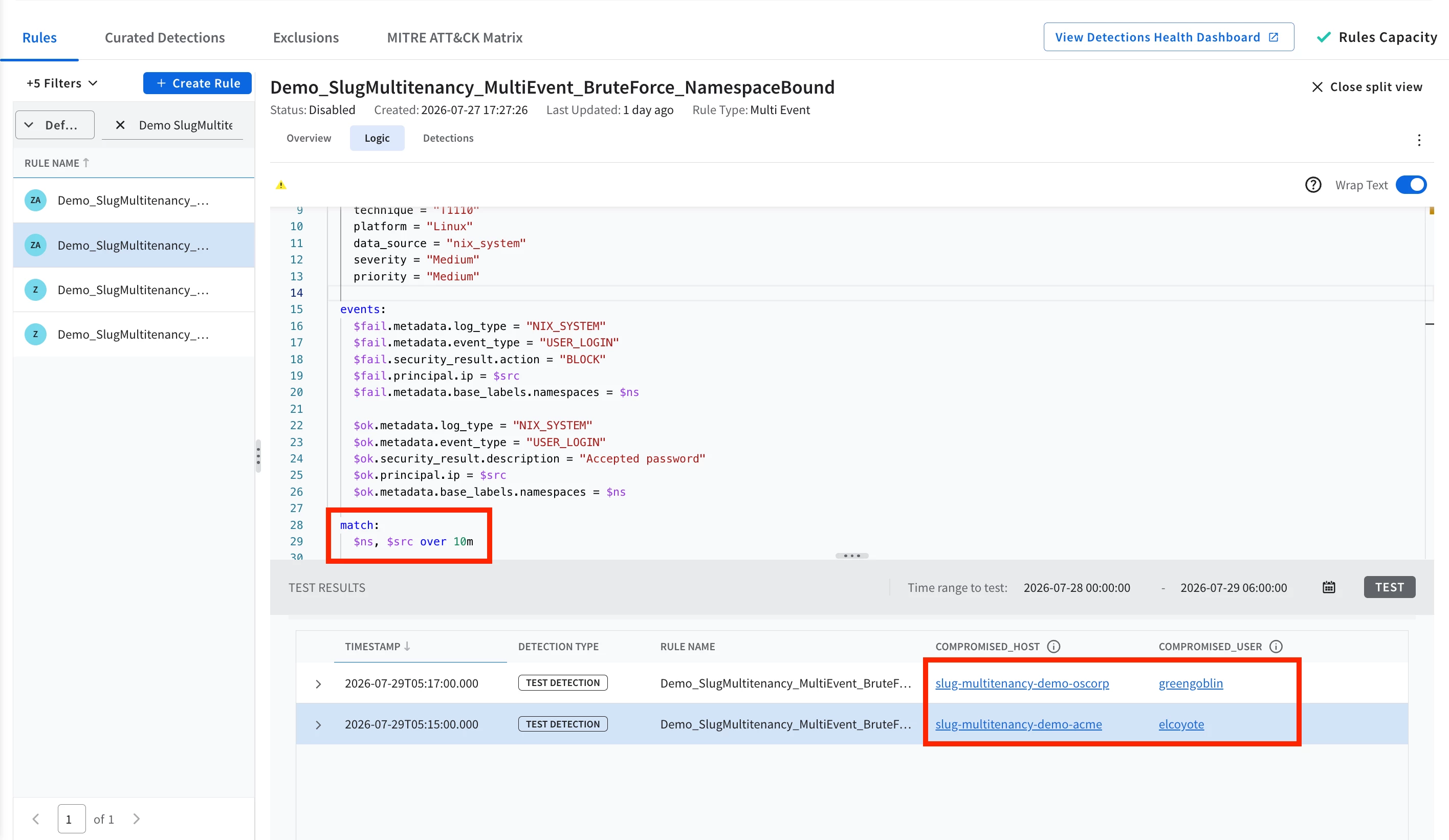
The fix is straightforward. Add the namespace to the same rule's match clause and replay the identical telemetry, and the picture changes.
rule Demo_SlugMultitenancy_MultiEvent_BruteForce_NamespaceBound {


  meta:

    author = "rodajrc"

    description = "Same brute-force correlation as the baseline variant, but with the event's own namespace added as a second match variable alongside the source IP."

    tactic = "TA0006"

    technique = "T1110"

    platform = "Linux"

    data_source = "nix_system"

    severity = "Medium"

    priority = "Medium"


  events:

    $fail.metadata.log_type = "NIX_SYSTEM"

    $fail.metadata.event_type = "USER_LOGIN"

    $fail.security_result.action = "BLOCK"

    $fail.principal.ip = $src

    $fail.metadata.base_labels.namespaces = $ns


    $ok.metadata.log_type = "NIX_SYSTEM"

    $ok.metadata.event_type = "USER_LOGIN"

    $ok.security_result.description = "Accepted password"

    $ok.principal.ip = $src

    $ok.metadata.base_labels.namespaces = $ns


  match:

    $ns, $src over 10m


  outcome:

    $risk_score = 65

    $failed_attempts = count_distinct($fail.metadata.id)

    $source_ip = array_distinct($src)

    $tenant_namespace = array_distinct($ns)

    $compromised_user = array_distinct($ok.target.user.userid)

    $compromised_host = array_distinct($ok.target.hostname)


  condition:

    #fail >= 3 and $ok

}
OSCORP's detection now carries only OSCORP's host and user; ACME's login sits in its own, correctly-attributed detection; neither touches the other. The only difference between the two rule variants is one variable in the match clause — the fix costs nothing in detection coverage and closes the leak entirely.
Figure 6.
Multi-tenant curated rules
Some curated rules generally behave tenant-safely without any extra work, but I cannot assert confidently it will work properly with all curated rules. From my tests against a privilege-escalation simulation, ACME's host escalating through su abuse and OSCORP's through SUID-binary abuse, two curated rules answered the question directly: Successful SU to Root fired cleanly on ACME's escalation, attributed only to ACME's namespace, and correctly produced nothing for OSCORP's unrelated path; User Accessed Sudoers File did the same for both tenants independently, one detection each, no cross-tenant bleed.
More important than multitenancy, you must worry about the curated rule's own detection logic first! A third curated rule aimed squarely at OSCORP's attack path produced nothing at all — not a multitenancy defect, just a detection whose regex didn't recognize the exact command used in the simulated attack I built. The lesson isn't that curated content is unreliable; it's that trust is earned per rule, by testing against your own telemetry, the same as with any custom rule.
Warning
- Curated rules can be just as multi-tenant-unsafe as a poorly written custom one — by design, they behave like global-scoped rules. Audit whatever curated content you enable on a multi-tenant instance the same way you would your own.
Tip
- If a curated rule doesn't fit a tenant's specific attack surface, clone its definition into a custom rule and adapt it rather than trying to force the original to fit.
Multi-tenant single-event rules
Single-event rules are safe by design. A true single-event rule has no match clause at all, and match-based grouping across multiple events is a multi-event-only mechanism — a single-event rule evaluates one event at a time and emits one detection per matching event, carrying that event's own real namespace and principal data. There is no join step where two tenants' events could ever end up sharing a detection, regardless of what values they happen to share. The curated Successful SU to Root rule is a live example: every detection it produced in this lab stayed attributed to ACME's own namespace and host, one detection per matching event.
The trade-off is alert sprawl, not multitenancy. A single-event rule is excellent for immediate detection and as a building block inside a larger composite rule, but on its own it can produce one alert per matching event rather than one alert per incident — a real source of duplication and analyst fatigue, tenant boundary aside.
One example worth knowing as a general lesson, learned while testing this lab: this instance's AuditD parser can emit two separate records for a single real command — a noisier PROCTITLE-derived one, which generated dozens of similar events, and a cleaner EXECVE-derived one. Match a single-event rule against the PROCTITLE events and, depending on the rule's logic, you can end up with dozens of alerts or none at all.
The takeaway generalizes: know your data sources and telemetry. Which fields in the UDM a given action fills, and which events your parser actually emits for it, matters as much as the rule logic itself.
SOAR playbooks and integrations
Cross to the SOAR plane and the isolation unit changes from the Data RBAC scope to the SOAR Environment, and so does the way content gets written.
A few terms are worth defining first:
- A playbook in Google SecOps SOAR is an automation that runs integration actions attached to an environment, and it runs when a case or alert in that environment matches its trigger. Playbooks also have their own access control apart from the standard SOAR Environment boundary.
- An Integration is a connection to an external tool that provides playbook actions and other assets like connectors, all implemented as Python scripts a playbook's steps can call. An integration is installed by the instance holder and configured as one or many Integration Instances per SOAR Environment, each carrying its own credentials and settings.
Both objects raise the same multitenancy question rules did: one for everyone, or one per tenant? For playbooks and integrations, the answer leans further toward "one for everyone" than it did for rules, because both are easy to parameterize by environment rather than duplicated by tenant.
Playbook design
Every Google SecOps SOAR instance benefits from a baseline playbook; i.e., one that reacts to any alert with no more specific playbook attached, but the platform does not ship one out of the box. Zevorus built its own: a custom Rule CatchAll playbook that handles case initialization, alert scoring and triage, and alert notification, all in one place. Such a playbook is the baseline for all Google SecOps SIEM-generated alerts ingested into SOAR.
Figure 7.

Zevorus uses exactly this playbook to give both ACME and OSCORP a working alert handling and notification path with no required tenant-specific playbook logic, out-of-the-box.
Figure 8.
Note
- In this slug-multitenancy architecture, a "multitenant playbook" is simply a playbook bound to All Environments, running against tenants that are each configured under the same slug model — namespace, Data RBAC scope, and SOAR environment all keyed off the same slug — with its actions resolving integrations dynamically per environment for whichever alert the playbook happens to be running for.
This section deliberately narrows in on its notification block, since that piece is what actually carries a simple, yet strong multitenancy design worth explaining.
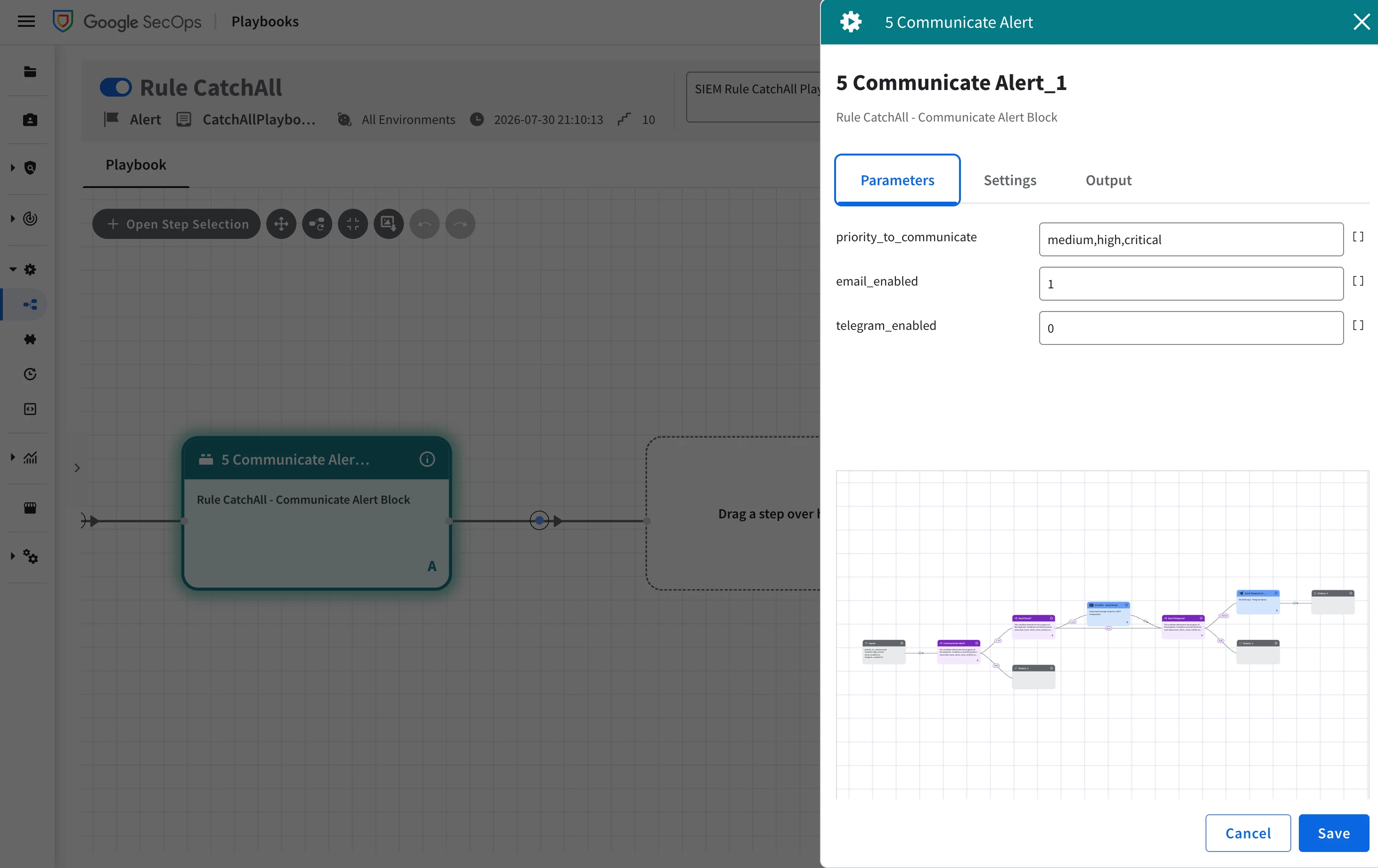
Opening that block shows the actual chain: a Communicate Alert? condition gates everything else on the alert's severity (true when medium, high, or critical). From there, a Send Email? condition and a Send Telegram? condition each gate their own action independently, reading the block's own email_enabled and telegram_enabled inputs shown in Figure 8 above, alongside the shared priority_to_communicate list, so either channel can be toggled off per alert without touching the other. When enabled, Send Email? leads into the EmailV2 - Send Email action that reads the environment's own email address, and Send Telegram? leads into a Telegram notification action the same way. None of this is tenant-specific; the same chain runs regardless of which environment the alert belongs to, and disabling one channel does not disable the other.
Figure 8a.

Dynamic Mode and Shared Environment
Making one playbook serve every tenant rests on two mechanics working together.
The first is where the playbook itself gets attached. A multitenant playbook has to be bound to All Environments, not to some named subset of tenants (technically wrong, but you'll see why). Binding a playbook to two or three specific environments out of many rarely makes sense for an instance holder — there is no natural boundary that makes "these tenants, not those" a sensible unit for shared automation, so a playbook is typically built either for one specific tenant or for every tenant at once (the exception is an organization that itself holds more than one environment, where binding a playbook to that organization's own environments is a deliberate, narrower version of the same idea.)
In our scenario, ACME has no playbooks of its own at all. So, as a fully-managed customer it relies entirely on Zevorus's All-Environments playbooks like Rule CatchAll. OSCORP, with its own scoped access to the instance, is free to build tenant-specific playbooks alongside the ones it inherits from Zevorus. None of these parties can create an All Environment playbook; that remains an instance holder only capability to do.
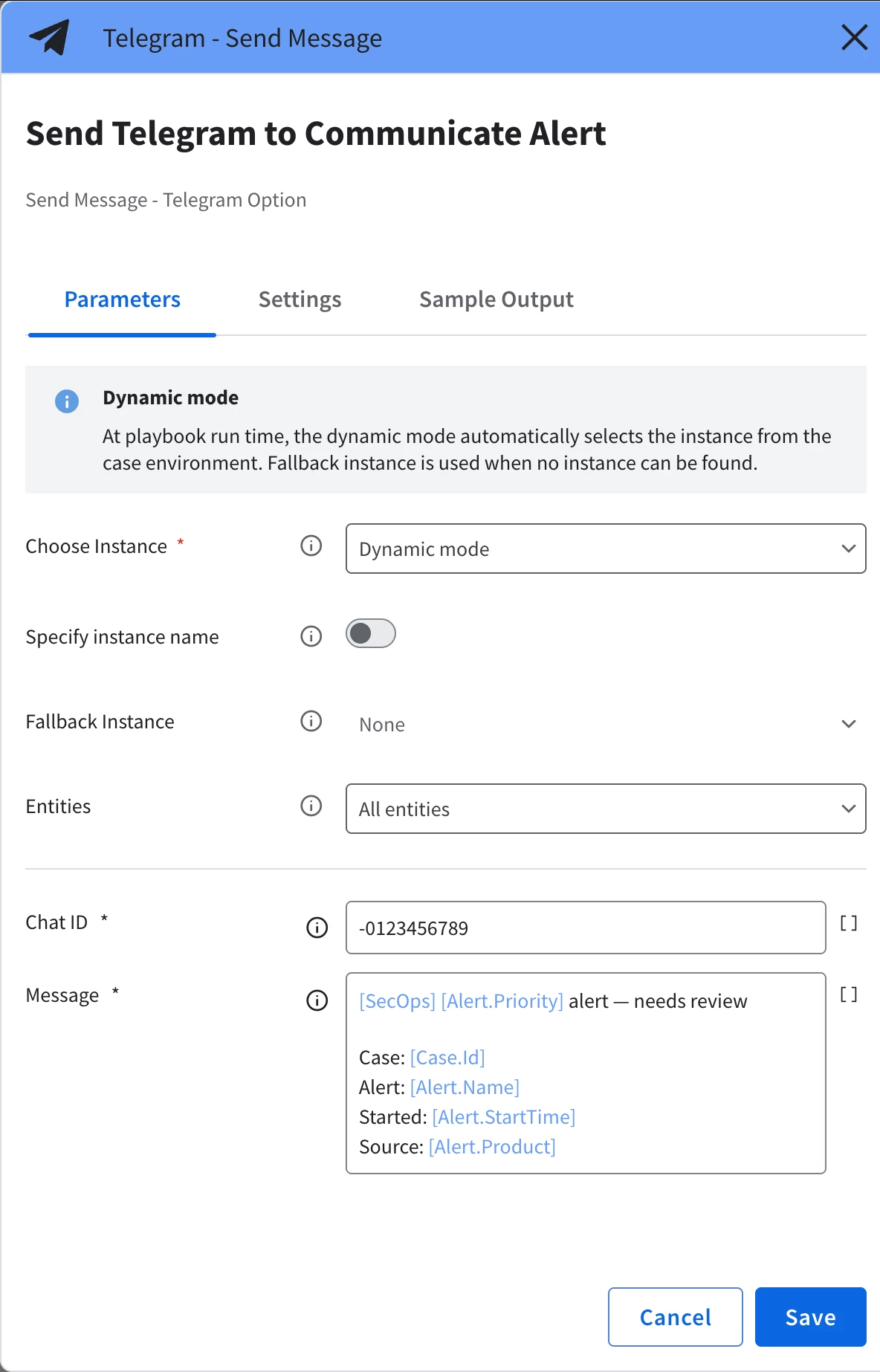
The second mechanic is Dynamic Mode on a Playbook Action. An action's integration instance does not have to be hard-picked at design time. You set Choose Instance to Dynamic, and the platform resolves the right instance at run time from the case's own environment, optionally falling back to a named instance when no per-environment one exists or no integration instance at all.
Whether an action should even offer a fallback depends on what the integration represents. For example, EmailV2 is a safe candidate for one. Zevorus can reasonably offer outbound email as a built-in integration capability, so neither ACME nor OSCORP needs to stand up its own SMTP configuration, and Shared_EmailV2 is exactly that default. Conversely, Telegram is not a good candidate. Telegram integration requires a bot inherently tied to one tenant user or administrator, so Zevorus does not, and typically should not, provide a shared fallback for it; the CatchAll playbook's Telegram step depends entirely on whichever environment the alert belongs to having configured its own Telegram integration instance.
Figure 9.
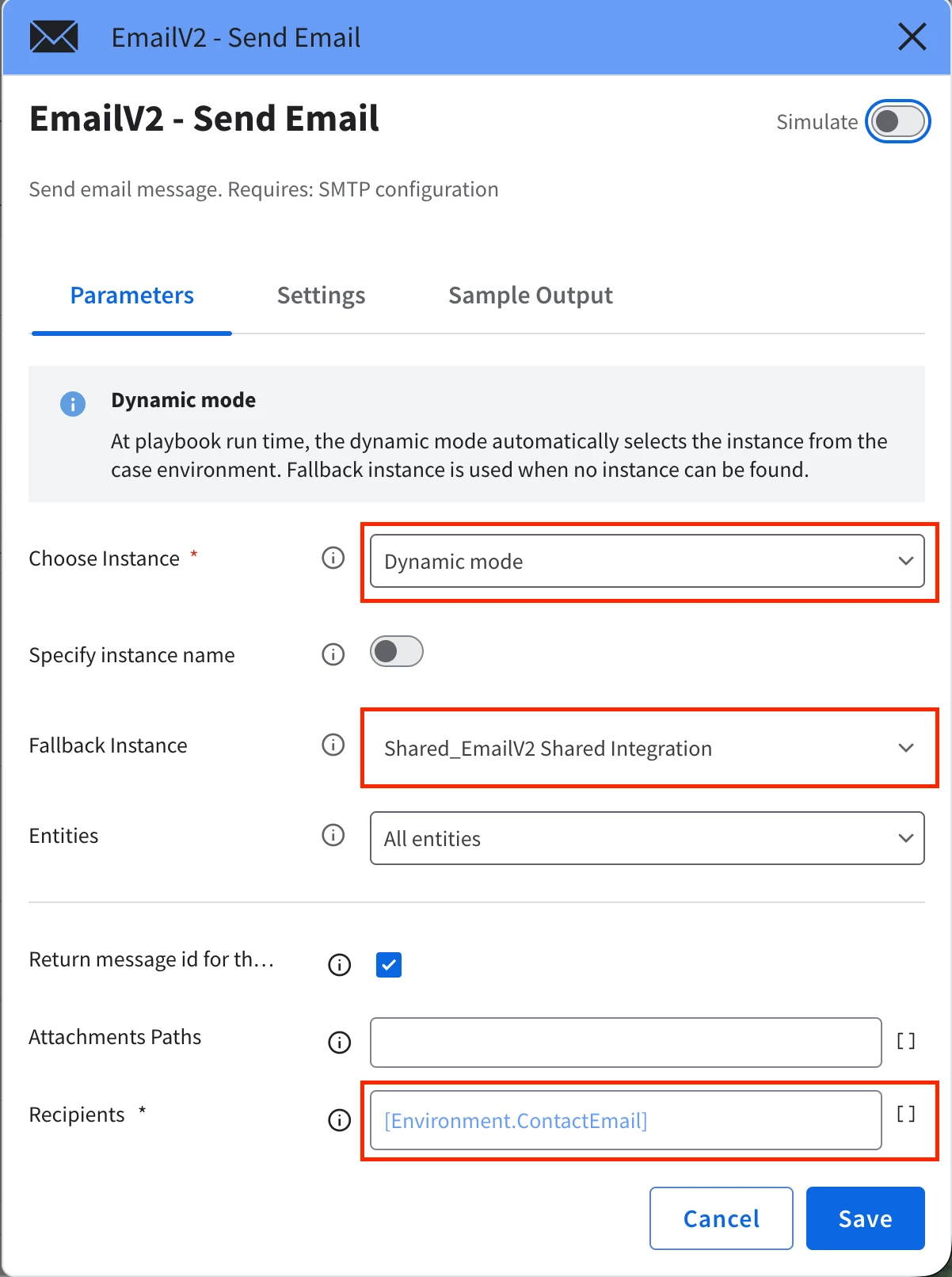
Figure 9a.
Tip
- That asymmetry has a real failure mode worth designing around. Onboard a third tenant with no Telegram instance of its own configured yet, and Dynamic Mode has nothing to resolve to and no fallback to reach for. The fix is not to avoid Dynamic Mode for tenant-specific integrations; it is to make sure the playbook never treats an unresolved action as fatal. Rule CatchAll's own Telegram step is already configured this way by setting the option If step fails to Skip step rather than Stop playbook, so a tenant with no Telegram instance configured simply loses that one notification channel instead of blocking the rest of the run.
Paired with a recipient field driven by a placeholder rather than a literal address the same action step sends ACME's alert to ACME's contact and OSCORP's alert to OSCORP's contact, with nothing in the playbook itself naming either tenant.
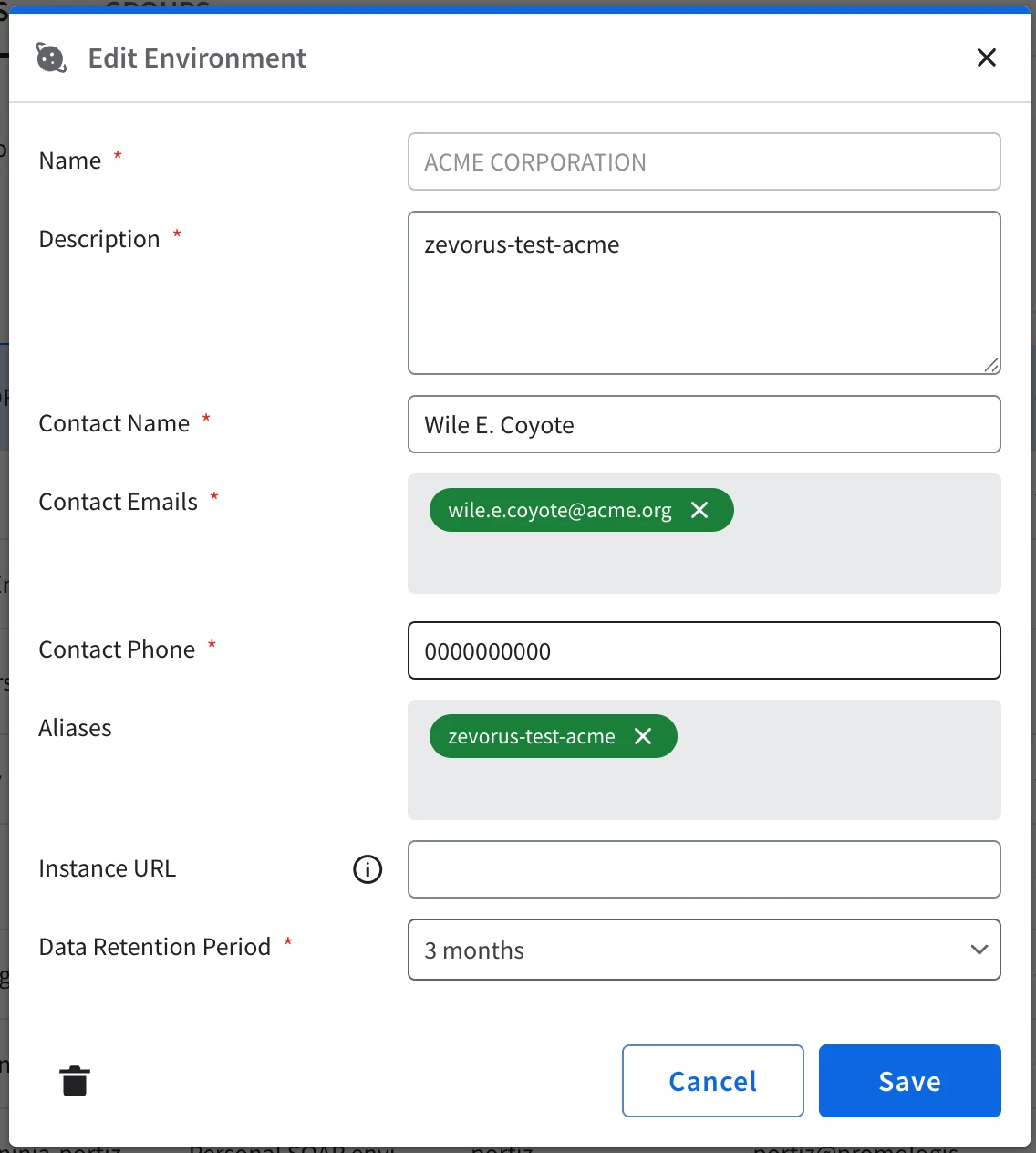
That placeholder, [Environment.ContactEmail], resolves directly to the environment's own Email field. The environment carries its tenant's contact information natively, and a comma-separated value there fans a single send out to more than one address. There are other ways to reach the same result, like using a custom field or a data table holding a distribution list, but those implementations are use cases beyond the scope of this article. The important takeaway for you is how to configure playbooks to be multitenant safe.
Figure 10.
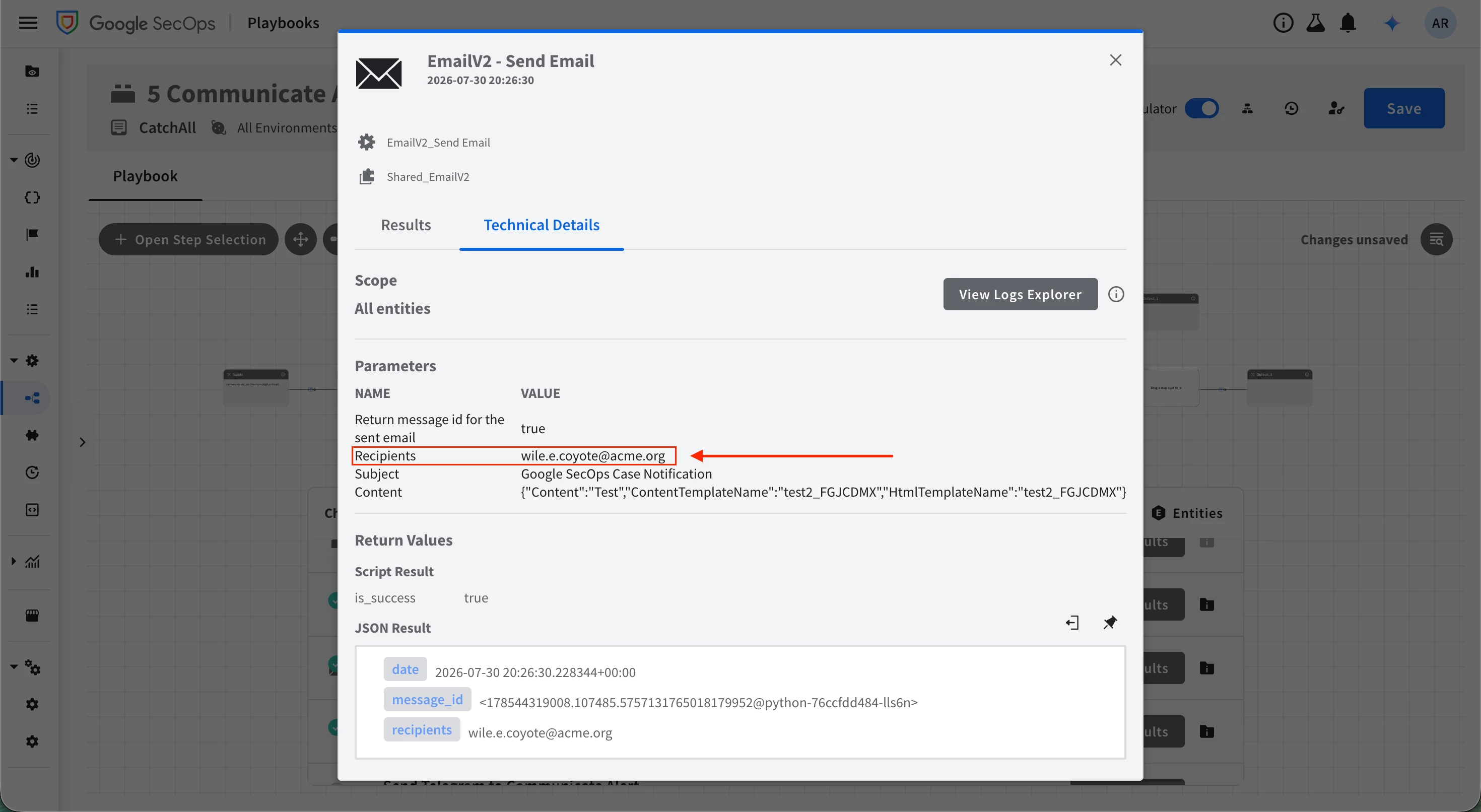
One more layer is worth flagging here. A playbook's visibility does not follow the same all-or-nothing rule a scoped YARA-L rule does when attached to a Data RBAC scope: a rule scoped to one tenant is invisible to every other tenant's users, but a playbook bound to All Environments, like Rule CatchAll, is visible to any tenant-scoped user by design. Why, and where that stops holding true for editing rather than viewing, is covered in full under "Playbooks ACLs" later in this part.
SOAR Environment Fields
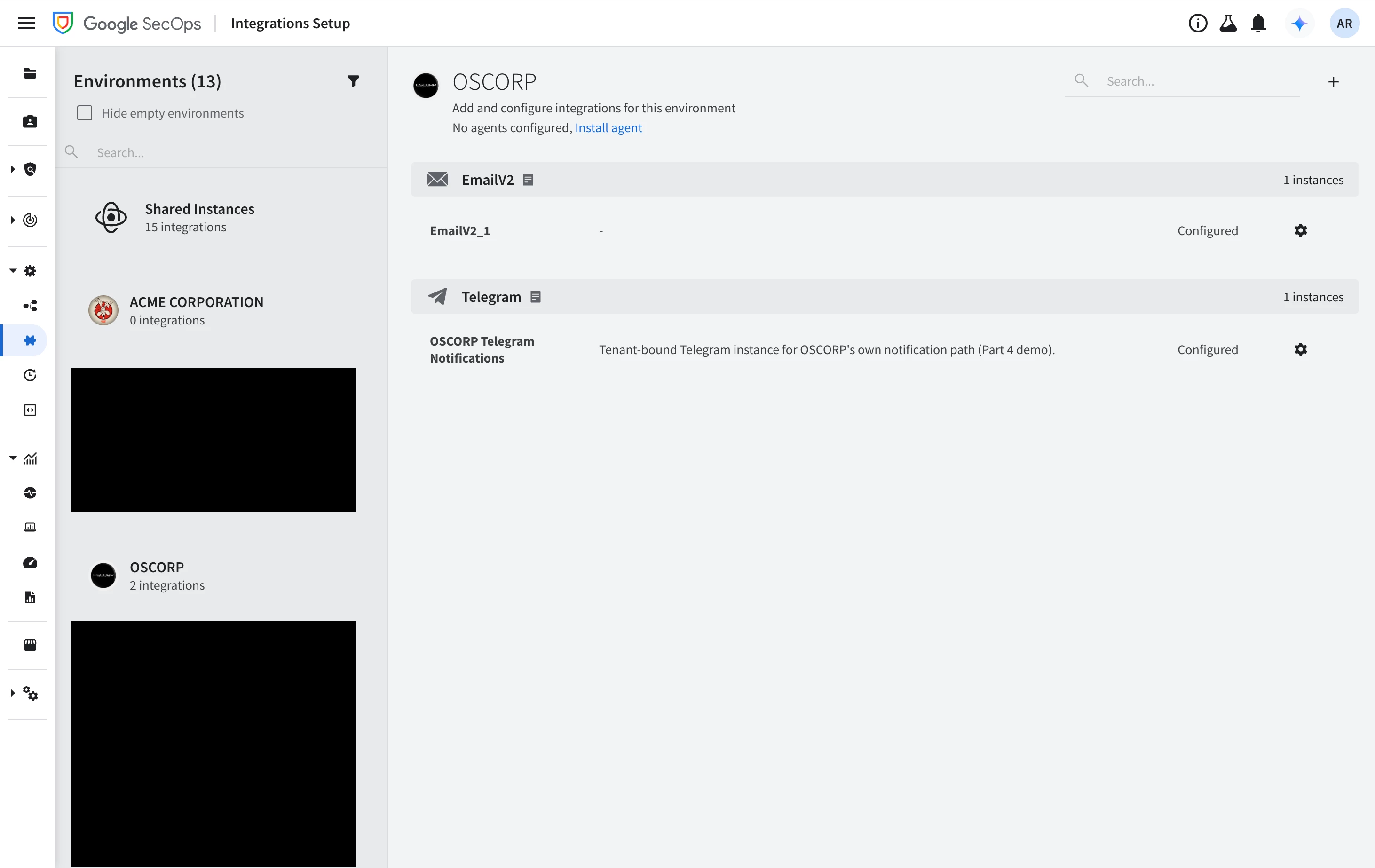
An environment already carries native Contact and Contact Emails fields. There is no need to invent a custom field for a tenant's notification address, because the object built to represent a tenant already has one. ACME's environment holds its contact as Wile E. Coyote at wile.e.coyote@acme.org and OSCORP's holds Norman Osborn at norman.osborn@oscorp.com. Editing either is a normal environment-configuration action, not an integration-specific one.
Figure 11.
Note
- Google also documents a separate Dynamic Parameters on Environments feature (Settings > Organization > Environments > Add Dynamic Parameters), explicitly aimed at the MSSP-style deployments that need to carry more per-tenant configuration than the built-in fields cover. This part's demo only needs the native Email field, but the general-purpose mechanism is worth knowing if a tenant's playbooks need to key off more than a contact address.
Integration Setup
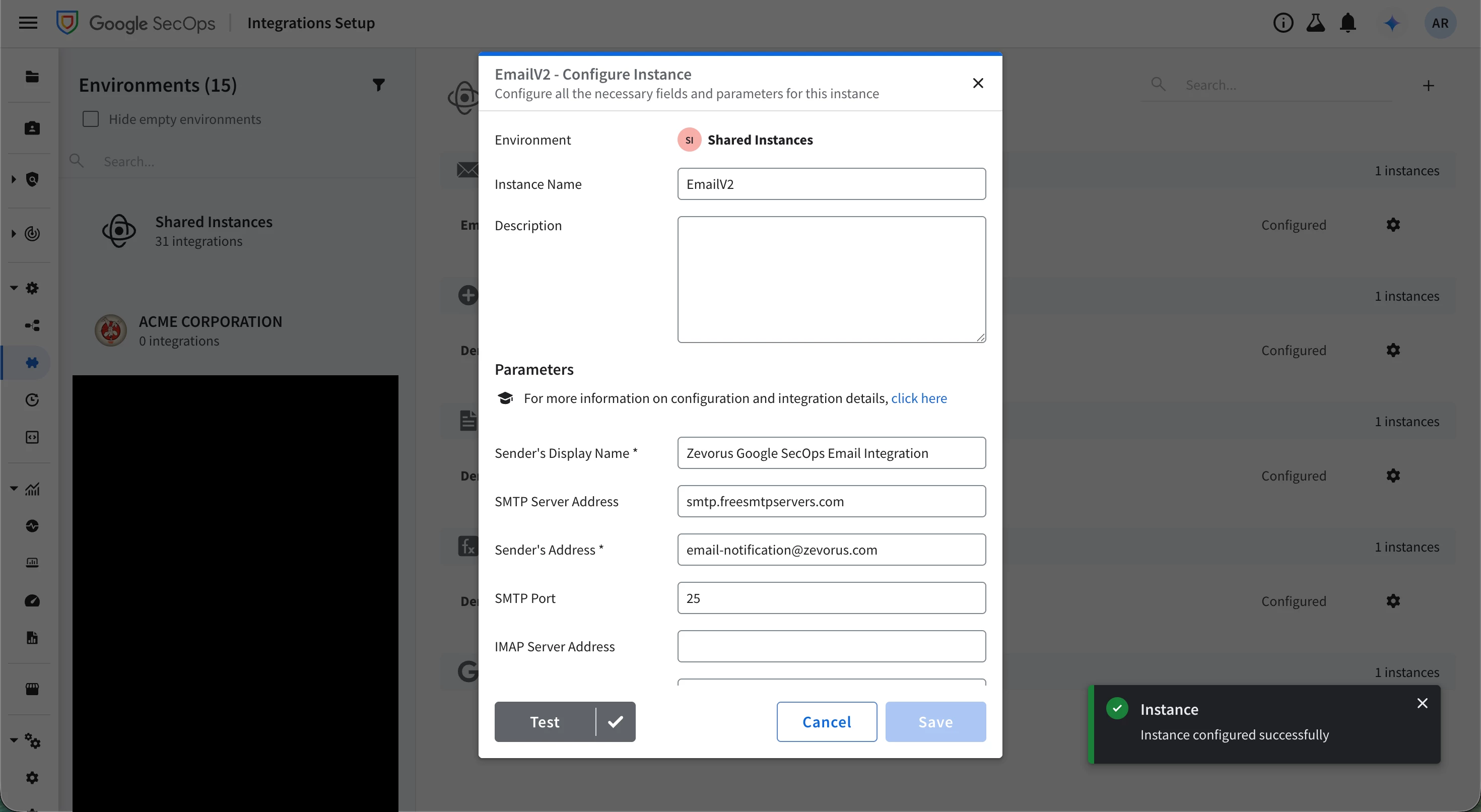
An integration instance can live at two different levels. The instance holder configures shared integrations once, under the Shared Environment. This is a dedicated integration scope, separate from any tenant's own environment, that exists specifically to hold instances not bound to one tenant, and every environment's Dynamic Mode action can fall back to them, exactly how Zevorus's single EmailV2 instance does.
Not every integration fits there equally well. Generic, instance-wide services like EmailV2, and the built-in Siemplify and Tools integrations are natural Shared Environment candidates, because one configuration genuinely serves every tenant the same way, and usually these integrations either have no settings to set or have non-organization-specific settings to apply.
Conversely, a tenant-specific integration, like Telegram or Active Directory, require organization-specific credentials inherently tied to one tenant, so a single shared instance would either not work for most tenants or, worse, quietly point every tenant at the same external account. That is exactly the asymmetry the earlier Dynamic Mode discussion flagged: EmailV2 safely falls back to the Shared Environment, Telegram does not, which is why OSCORP ends up configuring its own Telegram instance next.
Figure 12.
Warning
- I used a free service only for testing and demonstration purposes. You must never use a public service like the one shown in the picture above.
With email already covered out of the box by the instance holder, the tenant-level question narrows to whether a tenant user can bring its own integration instance (for example, OSCORP).
Tested directly against the platform's API with a properly scoped OSCORP identity, the answer is yes, with a caveat: creating, updating, or deleting an integration instance is a server-side action genuinely bound to the caller's own environment and IAM permissions, but the UI does not expose it the same way. The Integration Setup page itself calls an internal endpoint that pulls every environment in the instance to populate its own interface, and a tenant-scoped identity is correctly denied that broader read.
Note
- Treat this as a reminder not to take the UI's word for what you can and cannot do. A page being blocked reflects that page's own read requirements. The same identity denied a UI page can still hold every permission the underlying API call actually needs except one needed to load the page.
As a result, today the workaround for a tenant-scoped user to configure their own integration instance is through the API directly, not the UI (with properly set Feature RBAC and IAM permissions).
Figure 13.
Note
- This is deliberately the smallest example that proves the mechanism. A small friendly wrapper around list/create/update/delete for a scoped tenant admin's own integration instances would be better follow-up work than letting a tenant user run API calls directly against the instance.
A short note on Data RBAC reaching into SOAR
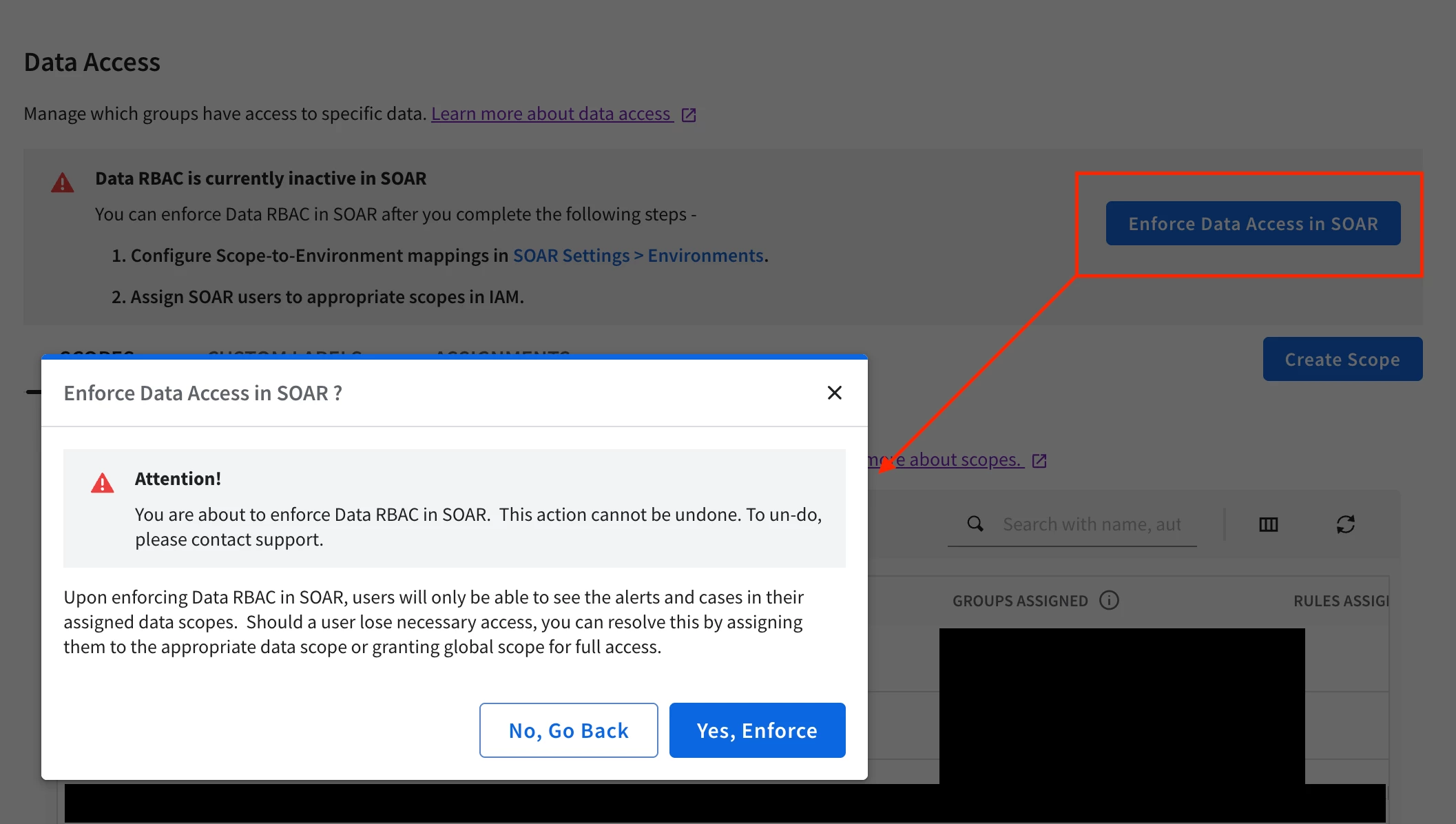
Google SecOps can optionally propagate a first-party alert's Data RBAC scope onto the SOAR case built from it, so that opening the case requires environment access and scope access simultaneously. It only applies to first-party alerts; i.e. ones the Chronicle connector builds from a SIEM detection; a third-party alert ingested straight into SOAR through its own integration connector never carries a SIEM scope to propagate. Enabling it is two steps:
- SIEM Settings > Data Access gets an Enable Data Access in SOAR action, and
- SOAR Settings > Environments gets a new Data access scopes field per environment
That first step is a one-way switch: the confirmation dialog for Enforce Data Access in SOAR states plainly that the action cannot be undone, and that un-doing it means contacting Google support rather than flipping a self-service setting back off -- validate on a non-production instance before enforcing it, not after.
Figure 14.
A scope maps to exactly one environment, but an environment can take several scopes.
Figure 15.
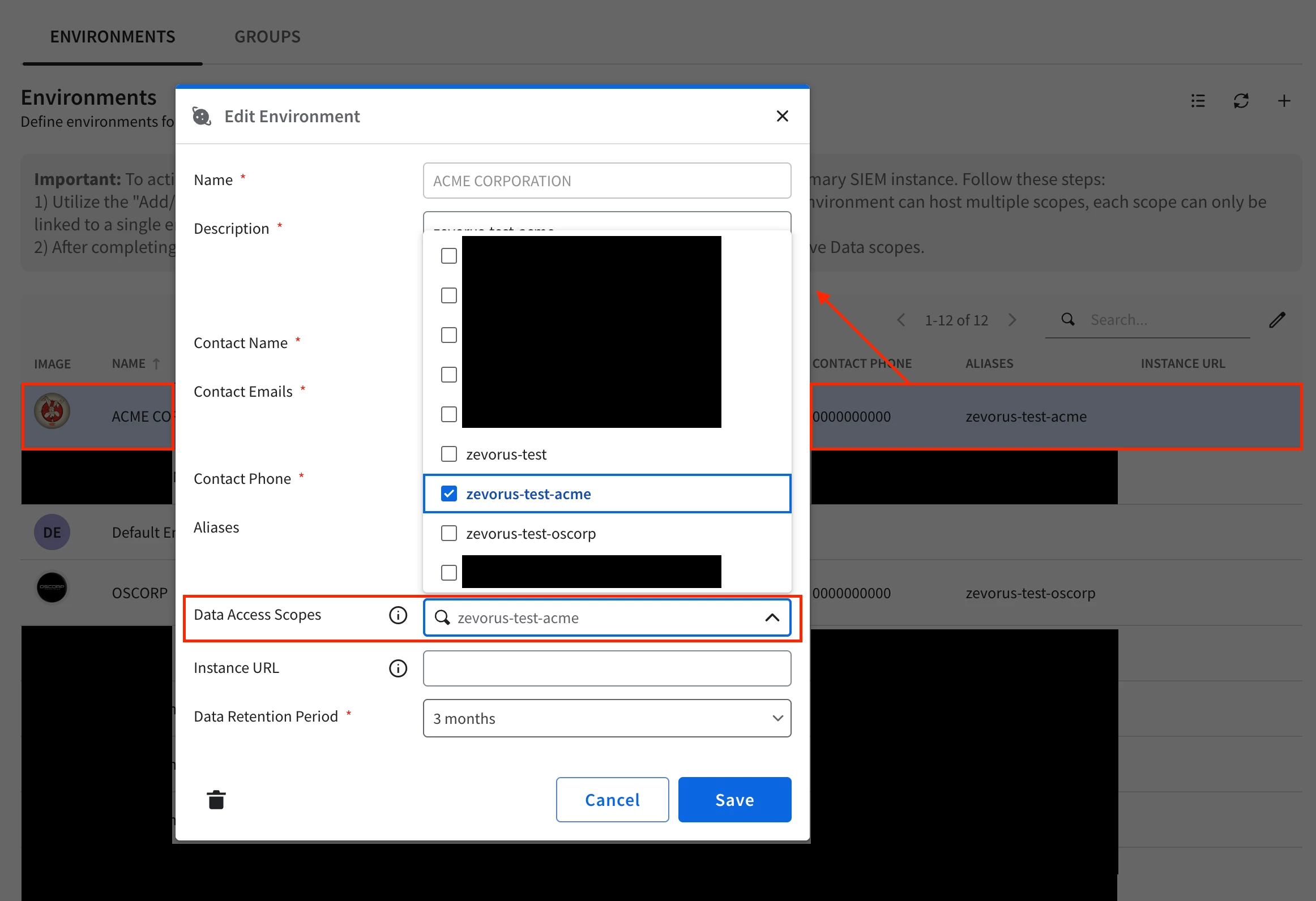
Routing held, but visibility did not. A scope-to-environment mapping, once configured, is documented to override the connector's own field-based routing for anything carrying that scope.
When an environment is unmapped, every alert kept routing through the connector's existing namespace-based fallback path exactly as Part 3 described. Visibility is a different story. Every rule in this series' demo content that is left global — including the example NamespaceBound baseline rule — produces detections carrying the instance's own global-data marker rather than a real tenant scope. Once Data RBAC reaches into SOAR, a case built entirely from globally-scoped alerts requires global access to open at all: not degraded, not partially readable the way Part 3's routing-versus-visibility trap describes for SIEM pivoting, just gone from a scoped user's case list.
I tested this against a scoped SOAR identity bound to both zevorus-test-acme and zevorus-test-oscorp: of eight cases sitting in environments it otherwise had full access to, five carried only the global marker and disappeared from its SOAR UI case list entirely; only the one built from a rule actually carrying one of its two scopes, plus two more cases discussed below, stayed visible.
That is the practical consequence for the cheatsheet earlier in this section: "use a global rule for anything that applies everywhere" only holds once you also ask who has to open the resulting case. ACME's MDR contract means the answer is always "a Zevorus analyst with global reach," so nothing changes for ACME. OSCORP runs its own scoped SOC, so the moment this feature is on, any case OSCORP's own people need to work has to come from a rule actually scoped to zevorus-test-oscorp.
Playbooks ACLs
A last topic to cover is that playbook's visibility does not come from a single access check. The flat permission (View playbooks or Edit playbooks) is identical for every holder of a role. That check sets a different bar depending on whether the user is viewing or editing: viewing needs access to at least one of the environments a playbook is bound to, while editing needs access to all of them.
For a playbook bound to a single environment, those two thresholds collapse into one — a user either holds that environment or does not, so viewing and editing rise and fall together. A playbook can also be bound to all environments, the binding an operator reaches for when building baseline automation meant for every tenant to inherit, and here the two thresholds pull apart. Viewing still only needs "at least one," and any tenant's own environment is trivially one of "all environments," so a tenant-scoped user can open and read an all-environments playbook — Rule CatchAll, say — without holding any special grant. Editing needs "all" of the playbook's environments, which for an all-environments playbook specifically means holding a distinct All Environments grant.
Note
- The underlying grant is a Group Mapping assignment, not an IAM permission. "All environments" is the All Environments option on a Group Mapping row (Settings > SOAR Settings > Advanced > Group Mapping).
Beyond viewing and editing, creating, debug-running, and deleting a tenant-scoped playbook were all tested directly against a real OSCORP-scoped identity and came back clean: a new playbook bound to environments: ["OSCORP"] saves without touching anything outside that environment, the Playbook Simulator runs against it with no extra grant needed, and deleting it succeeds while an attempt to delete a not-owned, instance-wide playbook is correctly refused.
One thing is worth knowing before relying on that delete result, though: "delete" in the API response is literally status: "ARCHIVED", and Google's own documentation doesn't mention archival or recoverability anywhere. Whether that archived content stays retrievable by identifier indefinitely, or the backend actually refuses a pull past that point, was not independently confirmed by a direct retrieval attempt this session — treat "delete" here as a naming choice worth verifying for yourself, not an established recovery guarantee.
The layer behind that access check is a playbook's third, independent authorization mechanism, beyond Cloud IAM and environment scope: a per-object access-control list (defaultAccessLevel plus an explicit permissions array). A tenant admin with every relevant IAM permission and full environment access can still be view-only on a pre-existing playbook they were never explicitly added to — a playbook the admin creates themselves defaults to editable, so this only bites on content someone else built first, but it is real and not modeled by role permissions alone.
Figure 16.
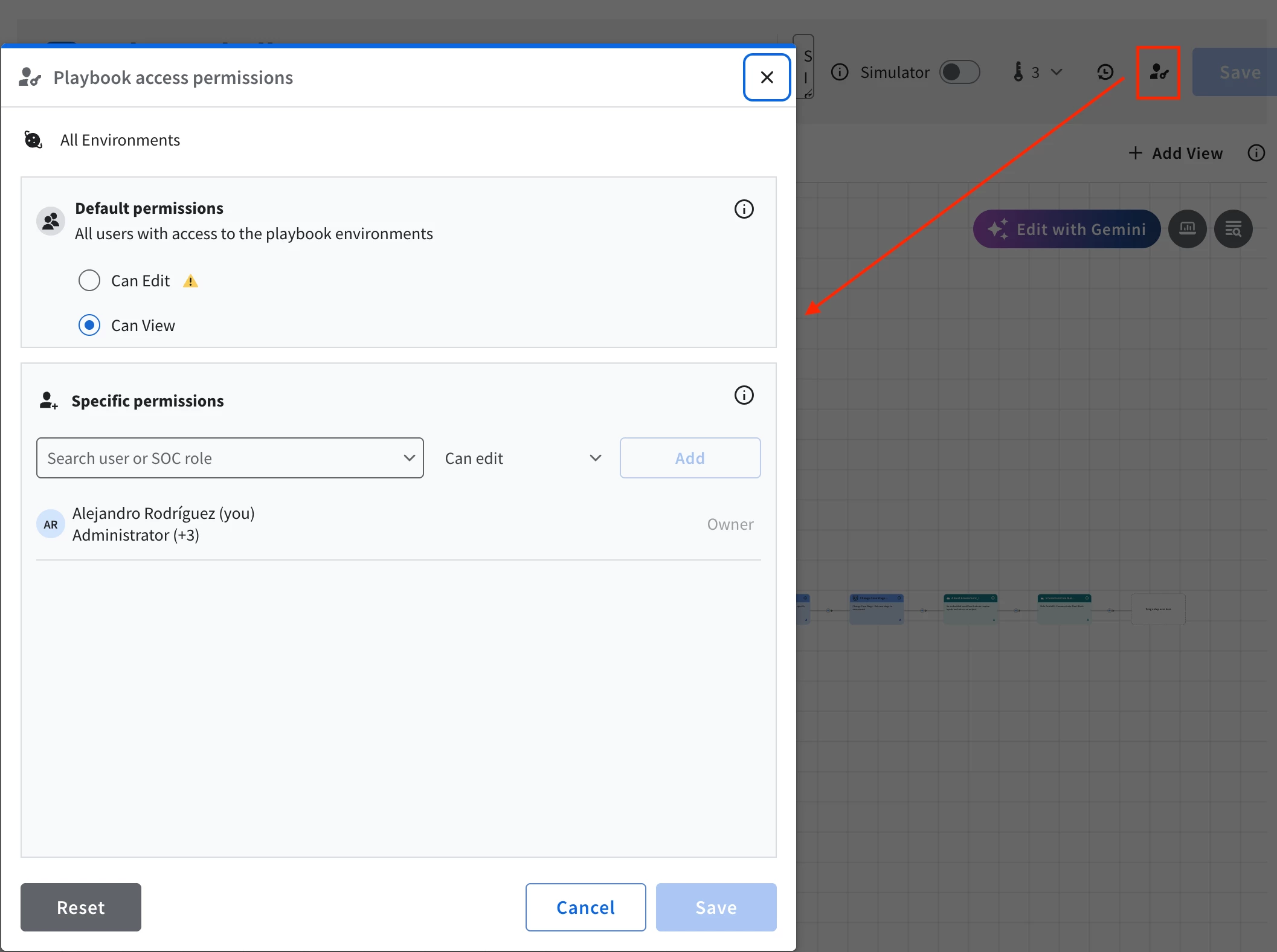
Test it before it reaches a customer
Two operational habits keep all of the above from going wrong in production, and both are cheap.
The first is a validation tenant. Part 1 reserved zevorus-dev for exactly this. New content — a rule, a playbook change, a new integration — lands there first, against synthetic or replayed data, before it is ever attached to a real customer's scope or environment. A detection tuned against a real tenant's live data is a detection you are tuning in production, on someone's actual security posture. That isn't necessarily a bad thing when you are in the continuous improvement stage of the detection engineering lifecycle, yet a validation tenant gives you a place to be wrong safely.
The second is blast-radius discipline. Shared content means a single change touches every tenant at once. Editing a global rule's logic, or the shared EmailV2 instance's relay settings, is a change to every customer's detection or response simultaneously. Use your validation tenant to test and review what the changes you are trying to enforce actually touches, and remember that a "small edit to the shared playbook" is never small when the playbook serves every tenant on the instance.
One slug, all the way through the content
Step back one last time. Across this series, a single slug per tenant has done the following work:
- the namespace stamped on each tenant's telemetry at ingestion (Part 2), and, this part adds, the specific field that stamp has to land in for a Data RBAC scope to actually read it,
- the Data RBAC scope that lets each tenant's analysts read only their own data (Part 3), now with the ingestion-path caveat this part corrects and the ingestion-time-only mechanics of a Custom Label made precise,
- the SOAR environment that routes each tenant's alerts into the right queue (Part 3) — and, in this part, the same environment that supplies each tenant's contact details to a shared playbook and, where a tenant integration is needed, the boundary a scoped identity's own integration instance stays inside,
- and the object that keeps a detection rule either global-and-attributing or scoped-and-pivotable, and that keeps a multi-event rule from correlating across tenants.
None of that work matters if the person operating it can reach past their own tenant's boundary.
The usual honesty, since this series has tried to keep it throughout: treat the specific knobs here as a map to verify in your own instance, not as guarantees. Field names, rule-capacity numbers, and which integrations behave one way or another sit behind entitlements and product versions that move — and the corrections at the top of this part are themselves proof that even a carefully verified claim can need revisiting as the platform evolves.
The one-slug discipline is what holds regardless of where the individual controls end up on your version, and on a platform that changes as fast as Google SecOps, a convention that survives the changes is worth more than any single screenshot of where a setting lives today.
That is the series. One tenant slug, carried from the wire to the content, across the planes that each had to be made isolated on its own terms.
I'll continue posting more content about architectures with Google SecOps and other interesting topics soon. Thank you for reading it!
References
- Google SecOps — Data RBAC overview: access control with scopes and labels (the Ingestion Metadata Key/Value and Custom Label scope condition types)
- Google SecOps — Configure data RBAC (creating custom ingestion labels and Custom Labels, assigning a scope via an IAM condition on the Chronicle Restricted Data Access role)
- Google SecOps — Rules capacity and quotas (the in-product YARA-L rules budget and the multi-event sub-budget)
- Google SecOps — YARA-L 2.0 language overview (the match section used to bind correlation to the namespace)
- Google SecOps — Work with playbooks and Environments overview (attaching a playbook to environments; native environment contact fields; Dynamic Parameters)
- Chris Martin (thatsiemguy) — "Using Google SecOps with Gemini CLI and Hosted MCP" (post-migration Permission Groups behavior)
- Google SecOps — Map SOAR permissions to IAM (the canonical Permission Group-to-Cloud-IAM mapping)
- Google SecOps — Migrate SOAR permissions to Google Cloud IAM and its FAQ
- Google Cloud — Understanding custom roles (building a Feature RBAC role from an explicit permission list)
- This series — Part 1 (Foundations: the isolation challenge), Part 2 (Getting telemetry in safely), and Part 3 (Who sees what, and where the alert lands)
