




Earlier this year, I wrote a handful of blogs on building multi-stage searches. Multi-stage searches, for those just joining us, are searches where we gather data in named stages and then assemble the results in a root stage. If you want to get a feel for how multi-stage searches could be used, here are a few blogs below that will get you started -
- Should I Stage or Should I Go?
- This Charming Span - Bucketing Events in Time Windows
- Sweet Dreams (Are Made of Zs)
- MAD World - The Multi-Stage Search for a Robust Metric
- Policy of Truth - Detecting Outliers with Robust Z-Scores
Today I want to highlight another capability that you can use in multi-stage searches within Google Security Operations (SecOps). The term cross join, particularly for those who have spent time using SQL, is a basic concept but also one that when applied incorrectly can have all sorts of negative outcomes associated with it.
A cross join, unlike an inner join or outer join (right/left join), does not require a join condition between two tables or datasets, so the result of a cross join is a Cartesian Product and can result in a combinatorial explosion of results. What do I mean by that?
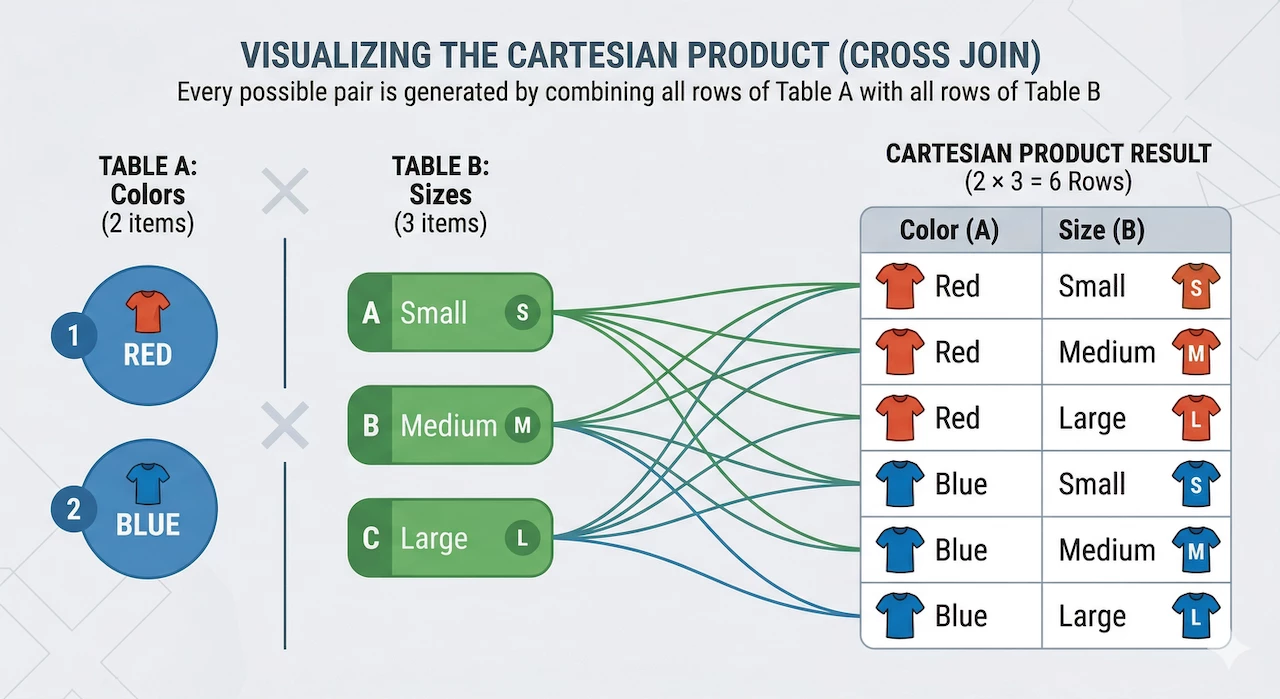
In our very simple example, we have two colors of t-shirts and three sizes. The result is a Cartesian Product of six possible combinations of colors and sizes in the results. That’s not a big deal, but when we start applying this to a large data set of disparate events, a cross join applied incorrectly can be a very expensive search operation and may not be very helpful to the analyst. Fortunately for us, cross joins are focused and guardrailed in multi-stage search to mitigate this risk.
Using Cross Joins in Multi-Stage Search
Because we’ve walked through the steps to build a multi-stage search previously, I’m not going to fully revisit that. I will point out that a really good approach to building a multi-stage search is to build the named stage searches separate from one another first so that you can easily view the output of each to better visualize how the stages will be used together to create the result set.
So, you are probably wondering how cross joins help us and how we don’t end up with a crazy result set. The way cross joins are constrained in Google SecOps is that one of the stages that is part of the cross join can only have a single row of results.
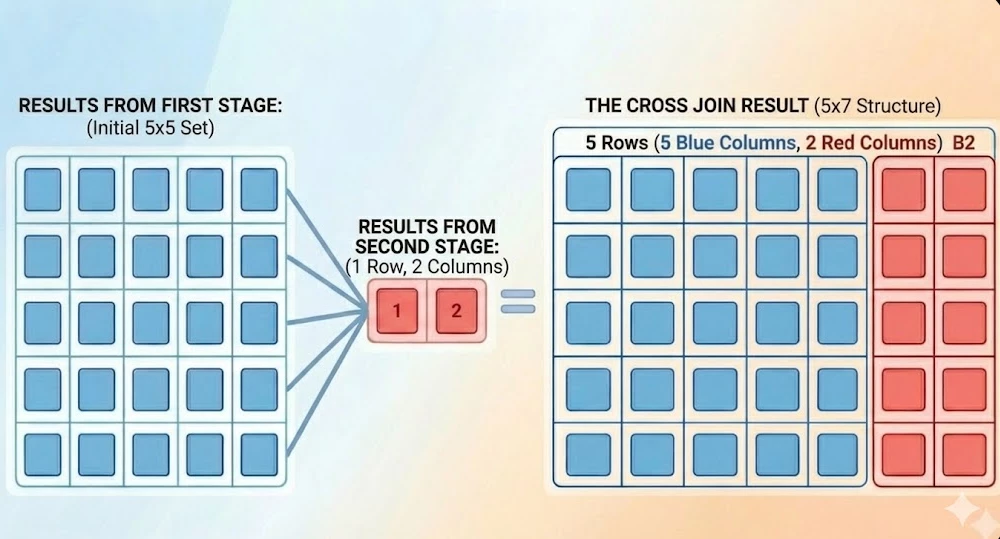
In the example above, we have a stage outputting five events with five columns in it, represented by the tabular output in blue. The second stage is the search limited to a single row, shown in red. The result with the cross join provides a marginally larger result set, but it is still limited to the five events we initially had in the first stage, with the additional columns from the second stage added to it. So, it incorporates additional data but doesn’t explode the result set like an unbound second stage would.
Enough concepts, let’s get to a practical application of this!
Measuring the Login Frequency
Let’s say we wanted to determine the login frequency for user authentications and determine which users have a greater frequency than others. Obviously, comparing service accounts to users is not going to be an apples to apples comparison, but this example highlights how we can use multi-stage search with the cross join to compare users or assets or anything else against a population. While events can have multiple security results associated with them, in an effort to not get bogged down in repeated fields, we are going to just focus on the first security result in each event.
The initial named stage search looks like this:
metadata.event_type = "USER_LOGIN"
target.user.userid != ""
target.user.userid != /\$$/
$user = target.user.userid
$action = security_result[0].action
match:
  $user, $action
outcome:
  $login_count = count(metadata.id)
This search generates a count of the number of events based on the combination of userid and action.
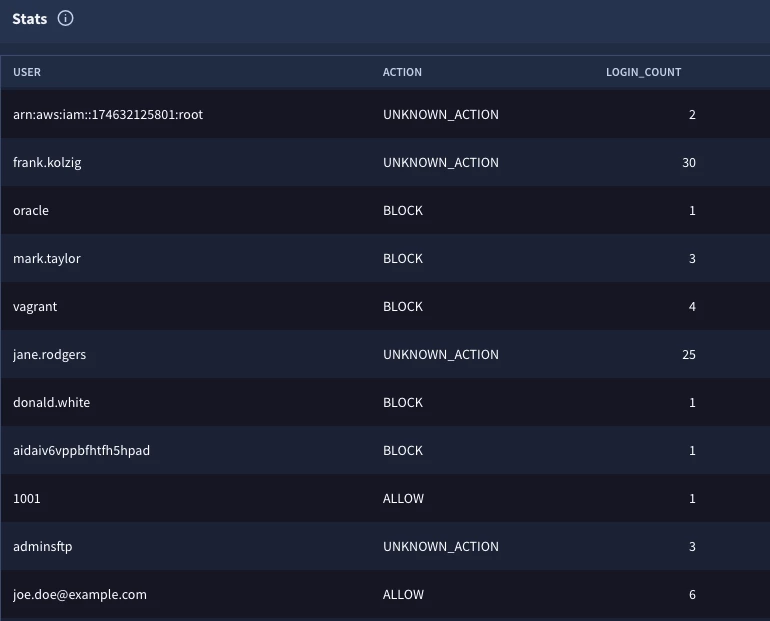
The second named stage will be the calculation of the population. The first important point that I want to make here is that the search logic should be the same in both stages if we want to compare like events. That is, if I am doing a frequency analysis, I want to make sure that the data that I am starting with in both stages is the same population set.
metadata.event_type = "USER_LOGIN"
target.user.userid != ""
target.user.userid != /\$$/
outcome:
  $total_count = count(metadata.id)
limit:
  1
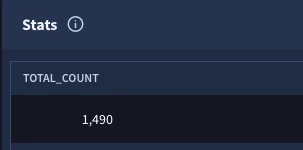
The other important point is that this stage must only have a single event in the results. Can it have multiple columns? Yes. Can this stage have multiple rows in the results? Yes, but we need to apply a limit of one in the search, otherwise the cross join will throw the following error:
compilation error compiling root stage: validating query: at least one operand in a cross join must be a stage that outputs at most one row
Once we are happy with the contents of the named stages, we can start assembling the multi-stage search. Notice that we have the contents of the two searches we just built wrapped into the named stages login_user_action and login_user_total, respectively.
stage login_user_action {
  metadata.event_type = "USER_LOGIN"
  target.user.userid != ""
  target.user.userid != /\$$/
  $user = target.user.userid
  $action = security_result[0].action
  match:
    $user, $action
  outcome:
    $login_count = count(metadata.id)
}

stage login_user_total {
  metadata.event_type = "USER_LOGIN"
  target.user.userid != ""
  target.user.userid != /\$$/
  outcome:
    $total_count = count(metadata.id)
  limit:
    1
}

cross join $login_user_action, $login_user_total

outcome:
  $user = $login_user_action.user
  $action = $login_user_action.action
  $login_count = $login_user_action.login_count
  $total_login_count = $login_user_total.total_count
After the named stages, we will bring them together using the cross join command. The cross join command is followed by the two named stages, separated by a comma.
Finally, because the output of a multi-stage search is based on the root stage’s match and outcome sections, we are outputting four fields. Notice we are not performing any additional aggregations at this point, we just want to see the fields from the two named stages with the cross join, which is exactly what we get here.
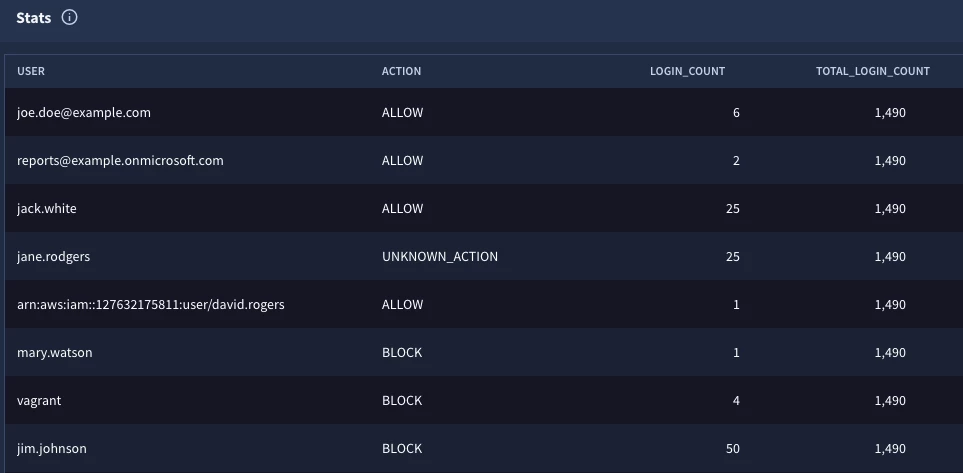
Notice that the fourth column has the same value in every row, that’s the grand total of values in the population, but now we have that value available to each row to perform additional calculations which is what we are going to do next to arrive at the frequency analysis.
stage login_user_action {
  metadata.event_type = "USER_LOGIN"
  target.user.userid != ""
  target.user.userid != /\$$/
  $user = target.user.userid
  $action = security_result[0].action
  match:
    $user, $action
  outcome:
    $login_count = count(metadata.id)
}

stage login_user_total {
  metadata.event_type = "USER_LOGIN"
  target.user.userid != ""
  target.user.userid != /\$$/
  outcome:
    $total_count = count(metadata.id)
  limit:
    1
}

cross join $login_user_action, $login_user_total

$user = $login_user_action.user
$action = $login_user_action.action
$login_count = $login_user_action.login_count
$total_login_count = $login_user_total.total_count

match:
  $user, $action, $login_count

outcome:
  $frequency_percent = max(math.round(($login_count / $total_login_count) * 100, 2))

order:
  $frequency_percent desc
The four fields in the outcome section of the previous search will become the filtering statement in the root stage. Remember that the match section needs to use placeholder variables in a multi-stage search, so defining them here allows us to use them in the root.
The match section will allow us to aggregate by the user, action and the login count because I want those values in the results. The one field that I need to calculate is the frequency and to calculate it, I need the login count and the grand total (total_login_count). In the outcome section, we are creating an outcome variable named $frequency_percent and using the max and math.round functions to calculate a percent value for this result. Finally, we are going to sort the output by this percentage in descending order.
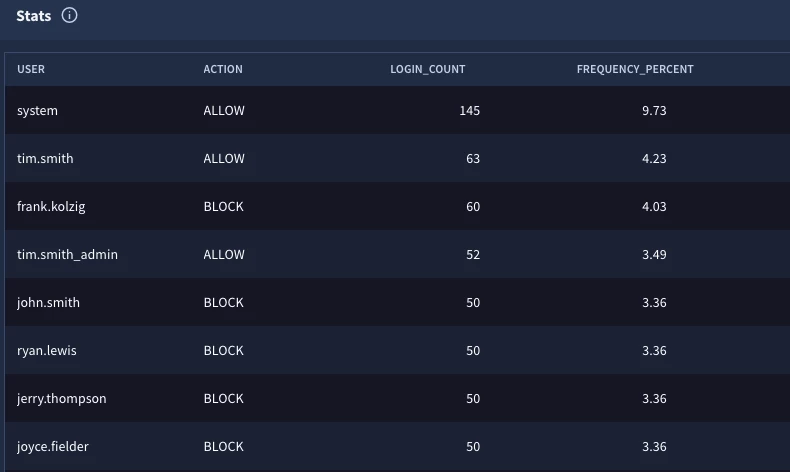
The results provide us with insight that the system user with an action of allow resulted in nearly ten percent of the user login events for the time range searched.
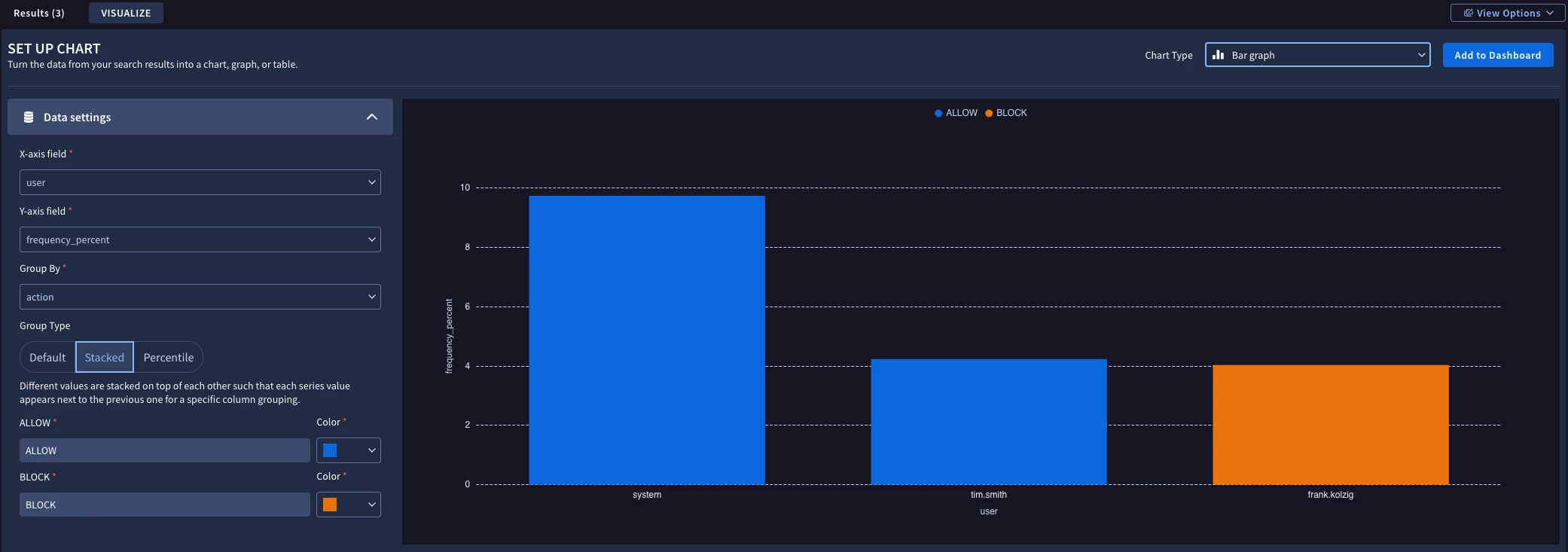
Perhaps we want to take this type of frequency analysis and output it to a dashboard. We could add a condition section before the order section to the previous search.
condition:
  $frequency_percent > 4
Clicking on the Visualize sub-tab, we can generate a chart that contains the userids that exceeded the threshold and add it to a dashboard.
I realize there are a lot of moving parts when it comes to multi-stage searches, but the cross join provides an additional capability that you can use to get a value for a population and utilize it in your search.
Here are a few things to keep in mind:
- The cross join command expects the names of the stages separated by a comma
- One of these stages must only have a single row output or you will get an error
- It is always a best practice to build each named stage as its own query first to visualize the output which makes it simpler to bring the stages together
- The filtering logic in both named stages should be the same otherwise the comparison between the details in the first named stage will not align with the population calculations in the second named stage
- The output of the multi-stage search will be the variables in the match and outcome sections of the root stage, so plan accordingly
The cross join is another nice tool to have in your search building toolkit. Try it out and see how you can generate values that then can be used for more advanced searches in Google SecOps!


